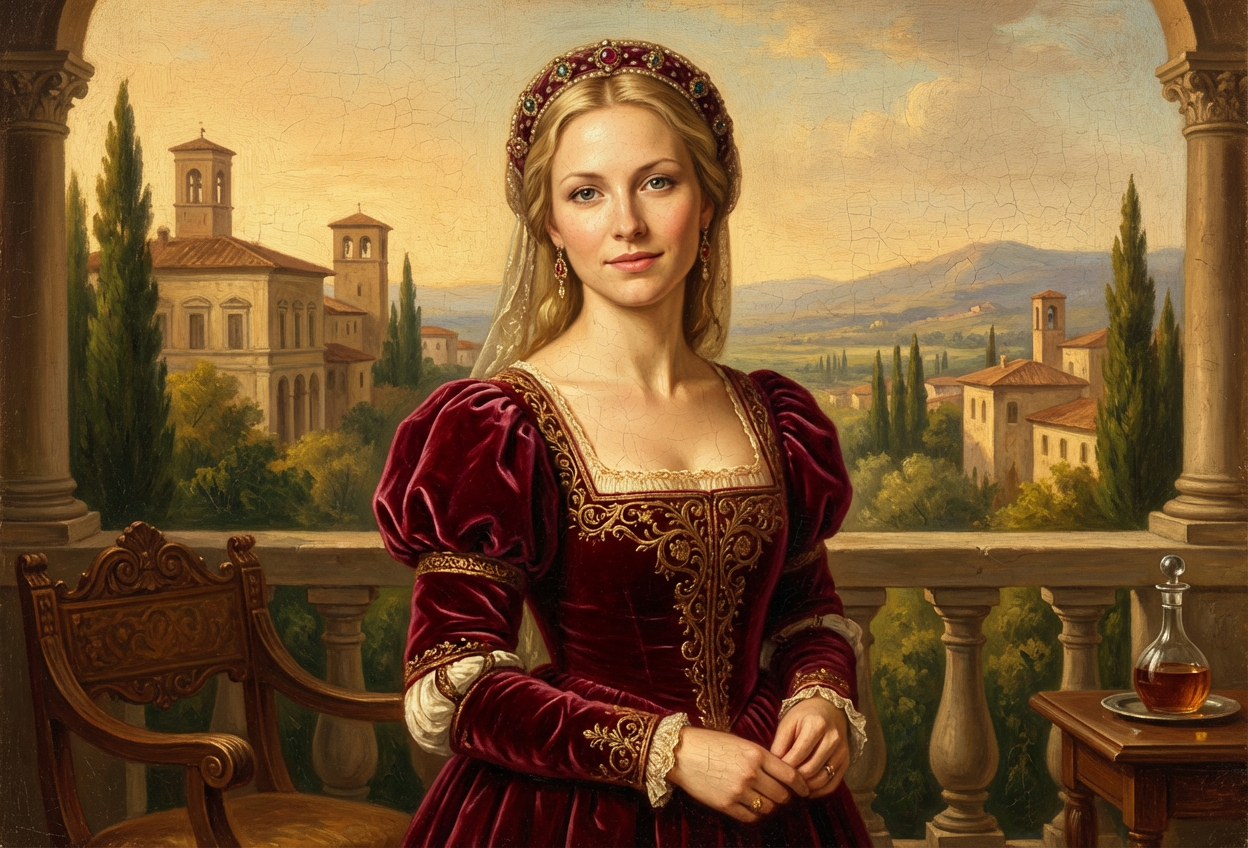
Compare the source image with each finished result.
Source image
Result
What Magica will ask for
The agent gathers these inputs and preferences in the conversation before it starts.
Upload Portrait Photo
attach a photo to apply the Renaissance filter
Why Choose Our AI 1400s Renaissance Filter?
Step back in time and transform your photos into authentic Italian Renaissance portraits. Experience the elegance and artistry of the 15th century with just one click!
Authentic Renaissance-era clothing and styling
Classical Italian portrait aesthetics
Warm oil painting tones and textures
Period-accurate hairstyles and accessories
Maintains facial features and expressions
High-quality artistic transformation
Perfect for art lovers and history enthusiasts
How Our 1400s Renaissance Filter Works
Transform into Renaissance nobility with these simple steps:
01
Attach Your Photo
Select a clear portrait photo where your face is clearly visible. Well-lit, front-facing photos work best for Renaissance transformations!
02
Apply the Filter
ask Magica to generate the result and watch as our AI transforms you into a 15th-century Italian Renaissance portrait with period clothing and styling.
03
Download & Share
Preview your Renaissance masterpiece and download your transformed portrait to share with friends or use as a unique profile picture.
Key Features of the AI 1400s Renaissance Filter
Authentic Oil Painting Aesthetic
Recreates the warm tones, soft lighting, and artistic style characteristic of 15th-century Italian Renaissance paintings.
Period-Accurate Clothing
Adds authentic Renaissance-era garments, including elaborate dresses, doublets, and accessories from the 1400s Italian nobility.
Classical Italian Styling
Incorporates Renaissance hairstyles, jewelry, and refined facial features inspired by master artists of the era.
Smart Feature Preservation
Maintains your natural likeness and expression while seamlessly applying Renaissance aesthetic transformations.
High-Resolution Output
Generates museum-quality images perfect for printing, framing, or sharing on social media.
Artistic Masterpiece Quality
Creates results worthy of the great Renaissance masters, with attention to historical detail and artistic composition.
Who Can Benefit from the 1400s Renaissance Filter?
Our AI 1400s Renaissance Filter is perfect for anyone fascinated by classical European art and history who wants to see themselves in the style of the great masters.
History Enthusiasts
Visualize yourself as Renaissance nobility and experience the elegance of 15th-century Italian culture.
Art Lovers
Experience the aesthetic of Renaissance masters and see yourself transformed into classical portrait art.
Social Media Creators
Create unique, eye-catching profile pictures and posts with classical artistic flair that stands out.
Cosplayers & Historical Reenactors
Preview Renaissance costume ideas or create stunning promotional images for historical events.
Content Creators
Generate unique Renaissance-themed content for YouTube, Instagram, TikTok, or educational channels.
Educators & Students
Bring history lessons to life or create engaging presentations about Renaissance culture and art.
Tips for the Best Renaissance Transformation
Tip 1
Use Clear, Well-Lit Photos
Ensure your photo has good natural lighting and sharp focus for the best Renaissance portrait transformation. Soft, even lighting works particularly well.
Tip 2
Front-Facing Portraits Are Ideal
Photos where you're facing the camera directly or at a slight angle work best, as this matches traditional Renaissance portrait compositions.
Tip 3
Neutral or Serene Expressions
Renaissance portraits typically feature calm, dignified expressions. A neutral or gentle expression will create the most authentic historical look.
Tip 4
High-Resolution Images Produce Better Results
Use high-quality photos to ensure fine details like clothing textures, jewelry, and oil painting effects are rendered beautifully.
Tip 5
Simple Backgrounds Work Best
Photos with uncluttered backgrounds allow the AI to focus on the Renaissance transformation, creating a more authentic portrait aesthetic.
Frequently Asked Questions About Our 1400s Renaissance Filter
How historically accurate is the Renaissance transformation?
Our AI is trained on authentic 15th-century Italian Renaissance art and creates transformations that reflect period-accurate clothing, styling, and artistic techniques. The filter incorporates elements from works by Renaissance masters, including characteristic warm oil painting tones, classical Italian fashion, and period-appropriate accessories.
What types of photos work best with this filter?
The filter works best on clear, well-lit portrait photos where the face is clearly visible. Front-facing or slightly angled portraits produce the most authentic Renaissance results. While the filter can work on various photo types, we recommend individual portraits with simple backgrounds for optimal historical accuracy.
Will I be recognizable in the Renaissance portrait?
Yes! Our AI maintains your key facial features and expression while applying Renaissance-era styling, clothing, and artistic effects. The result is a balanced transformation where you're clearly recognizable but styled as if painted by a 15th-century Italian master.
Can it transform both male and female subjects?
Absolutely! The AI adapts the Renaissance styling based on the subject, creating historically appropriate transformations for all genders with period-accurate clothing, hairstyles, and accessories typical of 1400s Italian nobility.
What makes the 1400s Renaissance period unique in this filter?
The 1400s (15th century) represents the Early Renaissance period in Italy, characterized by refined artistic techniques, warm oil painting tones, elaborate yet elegant clothing, and a focus on classical beauty and humanism. This filter captures these specific aesthetic qualities that distinguish Renaissance art from other historical periods.
Is my photo safe and private when I upload it?
We prioritize user privacy and security. Your photos are used solely for the Renaissance transformation process and are not stored long-term or used for any other purposes. The generated portrait is returned in the conversation for you to save.
Can I use the Renaissance portrait for social media or printing?
Yes! The high-resolution output is perfect for social media profile pictures, posts, printing, framing, or any personal use. Many users love displaying their Renaissance portraits as unique art pieces or conversation starters.
How long does the transformation take?
The AI transformation typically takes just a few seconds to process. Once you attach your photo and ask Magica to generate the result, you'll see your Renaissance portrait almost instantly.