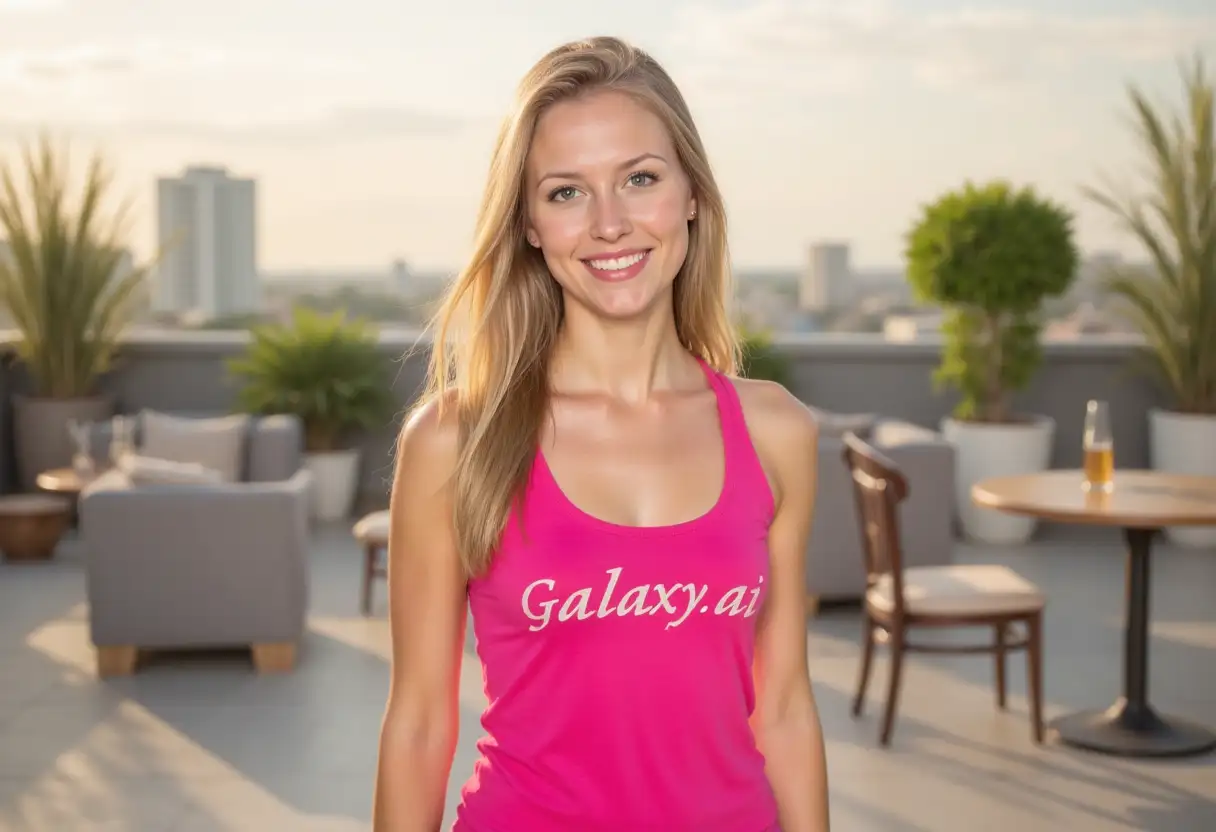
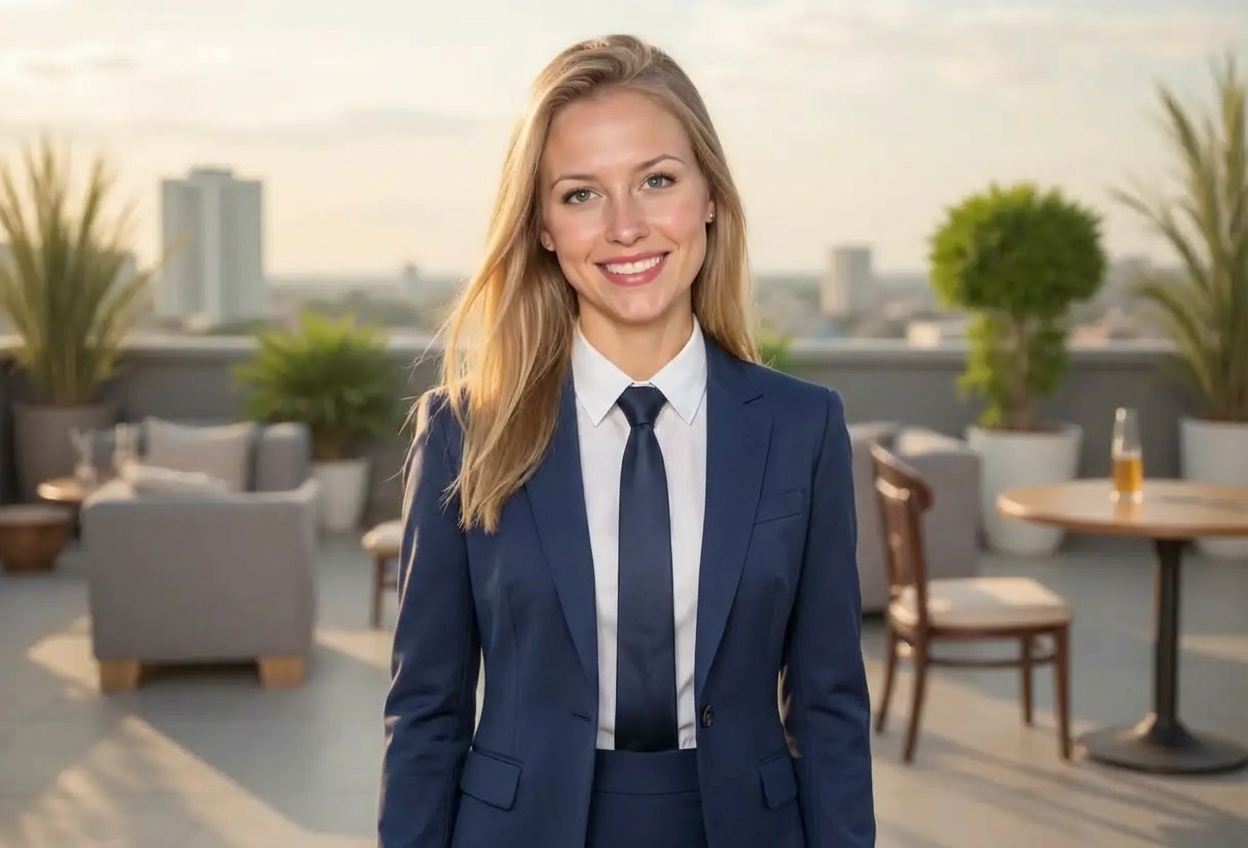
Compare the source image with each finished result.
Source image
Result
What Magica will ask for
The agent gathers these inputs and preferences in the conversation before it starts.
Description
Describe what you want to create...
Suit Style
Choose the style of suit
Choices: Classic Business Suit, Modern Slim Fit, Traditional Formal, Three-Piece Suit, Tuxedo, Casual Blazer, Double-Breasted
Suit Color
Choose the color of the suit
Choices: Any Color, Black, Charcoal Gray, Light Gray, Dark Blue, Brown, Beige/Tan
Formality Level
Control how formal the outfit appears
Choices: Any Formality, Business Professional, Ultra Formal (Black Tie), Business Casual, Smart Casual
Why Choose Our Add Suit to Photo Tool?
Transform casual photos into professional portraits with AI-powered suit generation that looks natural and realistic.
AI-powered realistic suit generation
Multiple suit styles (classic, modern, tuxedo)
Customizable suit colors and formality levels
Perfect fit to body shape and pose
Natural-looking results
Instant professional transformation
No photoshoot or wardrobe needed
Works with any photo
Maintains original background and setting
High-quality professional output
How Our Add Suit to Photo Tool Works
Transform photos into professional portraits in three steps:
01
Attach Your Photo
Upload any photo of a person. Works best with clear, front-facing or angled portraits.
02
Choose Suit Preferences
Select your preferred suit style, color, and formality level. Options from business casual to ultra formal.
03
Generate & Download
Get your professionally dressed photo instantly. Perfect for LinkedIn, resumes, and business profiles.
Key Features of Add Suit to Photo
Multiple Suit Styles
Choose from classic business, modern slim fit, traditional formal, three-piece, tuxedo, and more.
Natural Fitting
AI perfectly fits the suit to the person's body shape, pose, and perspective for realistic results.
Color Customization
Select from navy, black, charcoal, light gray, brown, beige, and more professional suit colors.
Formality Control
Adjust formality from smart casual to ultra formal black tie for different professional contexts.
Instant Transformation
Get professional business photos in seconds without expensive photoshoots or formal wear.
Professional Quality
High-resolution output suitable for LinkedIn, resumes, business cards, and corporate profiles.
Who Can Benefit from Our Add Suit to Photo Tool?
This tool is perfect for anyone needing professional business photos:
Job Seekers
Create professional headshots for resumes, LinkedIn profiles, and job applications quickly.
Entrepreneurs
Get professional business photos for websites, marketing materials, and networking without photoshoots.
Remote Workers
Create professional profile pictures for virtual meetings and professional platforms from home.
Small Business Owners
Produce professional team photos and business portraits without hiring photographers.
Students & Graduates
Prepare professional photos for internships, career fairs, and first job applications.
Real Estate Agents
Create consistent, professional profile photos for listings and marketing materials.
Tips for Better Suited Photo Results
Tip 1
Use Clear, Front-Facing Photos
Best results come from clear photos with the person facing forward or at a slight angle, with visible upper body.
Tip 2
Choose Appropriate Suit Style
Classic business suits for corporate roles, modern slim fit for tech/creative, tuxedo for formal events.
Tip 3
Match Formality to Purpose
Use business professional for most corporate settings, ultra formal for executive/formal events, business casual for startups.
Tip 4
Consider Industry Standards
Conservative colors (navy, charcoal) for finance/law, lighter colors okay for creative/tech industries.
Tip 5
Ensure Good Photo Quality
Use high-resolution photos with good lighting for best suit generation quality and realism.
Tip 6
Keep Natural Poses
Photos with natural standing or sitting poses work best - avoid extreme angles or awkward positions.
Tip 7
Test Different Styles
Try various suit styles and colors to find what looks most professional for your specific needs.
Frequently Asked Questions About Add Suit to Photo
What suit styles can I add to photos?
You can add classic business suits, modern slim fit, traditional formal, three-piece suits, tuxedos, casual blazers, and double-breasted suits.
Can I choose the suit color?
Yes! Select from navy blue, black, charcoal gray, light gray, dark blue, brown, or beige/tan to match your preference or professional context.
Will the suit fit the person naturally?
Absolutely! The AI analyzes body shape, pose, and perspective to create a naturally fitting suit that looks realistic and professional.
What types of photos work best?
Clear photos with the person facing forward or at a slight angle work best. Upper body should be visible with good lighting and reasonable resolution.
Can I use this for professional LinkedIn photos?
Perfect for that! This tool is ideal for creating professional LinkedIn profile pictures, resume photos, and business profiles.
What's the difference between formality levels?
Ultra formal (black tie) is for formal events, business professional for most corporate settings, business casual for less formal offices, and smart casual for creative environments.
Will the background stay the same?
Yes! The tool only changes the clothing to a suit while maintaining the original background, setting, and everything else in the photo.
Can I add a tuxedo for formal events?
Yes! Select the tuxedo style for formal occasions, black tie events, or ultra-formal professional requirements.
Do I need professional photography?
No! The tool works with regular photos. Just ensure reasonable quality and clarity for best results.
Can I use this for team photos?
Yes! Process individual team member photos to create consistent, professional-looking team portraits with matching formal wear.
How realistic will the suit look?
Very realistic! The AI creates natural-looking suits with proper fabric texture, fit, shadows, and integration with the original photo.
How fast is the processing?
Very fast! You'll get your professionally suited photo in just a few seconds, ready to use immediately.