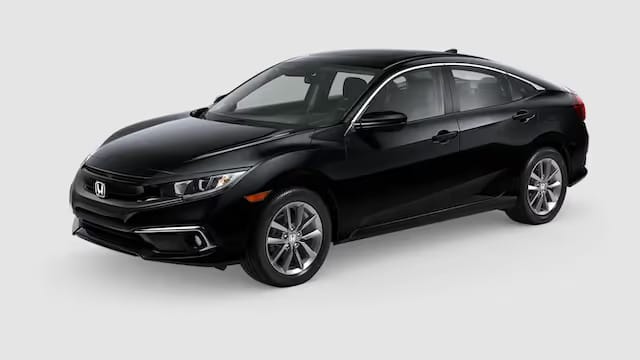
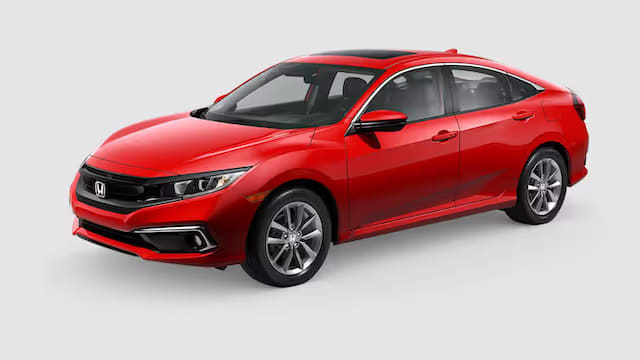
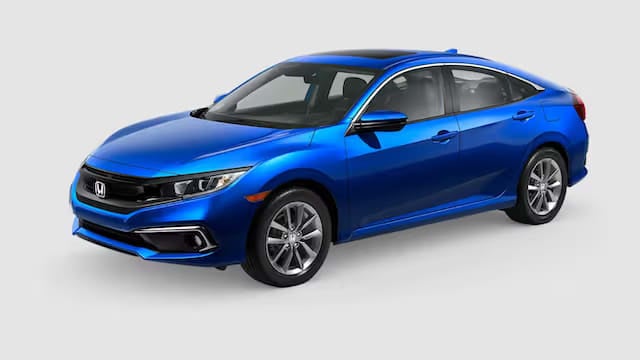
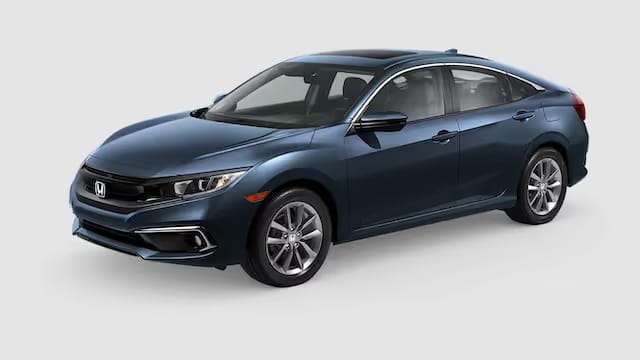
Compare the source image with each finished result.
Source image
Results
Result 1
Result 2
Result 3
What Magica will ask for
The agent gathers these inputs and preferences in the conversation before it starts.
Car Color Description
Why Choose Our AI Car Color Changer?
Transform car colors naturally and realistically using advanced AI technology that preserves the vehicle's details, reflections, and maintains photographic quality.
Instant car color transformation
Natural-looking results
Preserves car details and reflections
High-quality output resolution
Multiple color variations
Realistic metallic and pearl effects
Maintains surface textures
Professional-grade output
How Our AI Car Color Changer Works
Transform your car's color in just a few simple steps
01
Upload Car Photo
attach a clear photo of the car in good lighting conditions
02
Describe Desired Color
Specify the car color you want using detailed descriptions
03
AI Processing
Our AI analyzes and transforms the car color while preserving natural features
04
Download Result
Get your transformed image with naturally changed car color in high resolution
Key Features of Our AI Car Color Changer
Smart Color Mapping
Intelligently maps new car colors while preserving reflections and surface details
Realistic Results
Creates natural-looking transformations with proper metallic and pearl effects
Detail Preservation
Maintains vehicle contours, shadows, and unique characteristics
High Resolution
Generates professional-quality images perfect for various applications
Who Can Benefit from Our AI Car Color Changer?
This Magica workflow is designed for automotive professionals and enthusiasts who want to explore different car color variations while maintaining natural aesthetics.
Car Photographers
Create stunning automotive photography with different color variations.
Car Dealerships
Showcase vehicles in different colors without physical repainting.
Automotive Designers
Visualize different color schemes for vehicle designs quickly.
Auto Body Shops
Help clients visualize different paint options before committing.
Car Enthusiasts
Experiment with different color options for their vehicles.
Digital Marketers
Create engaging automotive content with color variations.
Tips for Best Results with AI Car Color Changer
Tip 1
Use High-Quality Photos
Upload clear, well-lit photos of the car for best results. Natural daylight works best.
Tip 2
Show Full Vehicle
Ensure the entire car is visible in the photo for complete color transformation.
Tip 3
Be Specific with Colors
Use detailed color descriptions like 'metallic midnight blue' or 'pearl white' for better results.
Tip 4
Consider Lighting
Photos taken in even lighting without harsh shadows produce more natural transformations.
Tip 5
Clean Car Surface
Cars with clean surfaces in the original photo yield better color change results.
Frequently Asked Questions About AI Car Color Changer
What is an AI Car Color Changer?
An AI Car Color Changer is a sophisticated tool that uses artificial intelligence to naturally modify vehicle colors in photographs while preserving the car's details, reflections, and overall authenticity. It allows you to visualize different car colors without the need for physical repainting or manual photo editing.
How realistic are the results?
Our AI produces highly realistic results by maintaining natural car characteristics such as metallic flakes, pearl effects, and surface reflections. The tool understands the complex nature of automotive paint and applies changes while preserving authenticity, making the transformations look natural rather than artificial.
What types of photos work best?
For optimal results, use clear, well-lit photos where the entire vehicle is visible. Photos taken in natural daylight work best, though the AI can handle various lighting conditions. The original car color should be clearly visible, and the image should be of good quality without excessive blur or noise.
Can I specify custom car colors?
Yes! You can describe any car color you want, from standard factory colors to unique custom finishes. The AI understands detailed color descriptions like 'metallic midnight blue with silver flakes' or 'pearl white with color-shifting effects'.
How does the AI preserve car details?
Our AI uses advanced computer vision to analyze and maintain key vehicle features including body lines, chrome trim, windows, and natural reflections. It applies the new color while respecting these elements, ensuring the result looks authentic.
Can I use this for commercial projects?
Yes, our AI Car Color Changer can be used for commercial purposes including automotive photography, dealership marketing, custom shop presentations, and digital automotive content. The tool produces high-resolution output suitable for professional use.
How long does the transformation process take?
Most car color transformations are completed within 10-30 seconds. Processing time may vary slightly based on image resolution and complexity, but our AI is optimized for quick, efficient results.
Will the AI work with all car types?
Yes, our AI is trained on a diverse dataset and can handle various vehicle types including cars, trucks, SUVs, and motorcycles. It works effectively with different body styles and paint finishes while maintaining natural-looking results.
Is my data secure?
Yes, we prioritize data security. All uploaded images are processed through encrypted connections, and we use enterprise-grade security measures to protect your content. We comply with global data protection regulations, and you retain full ownership of your images.