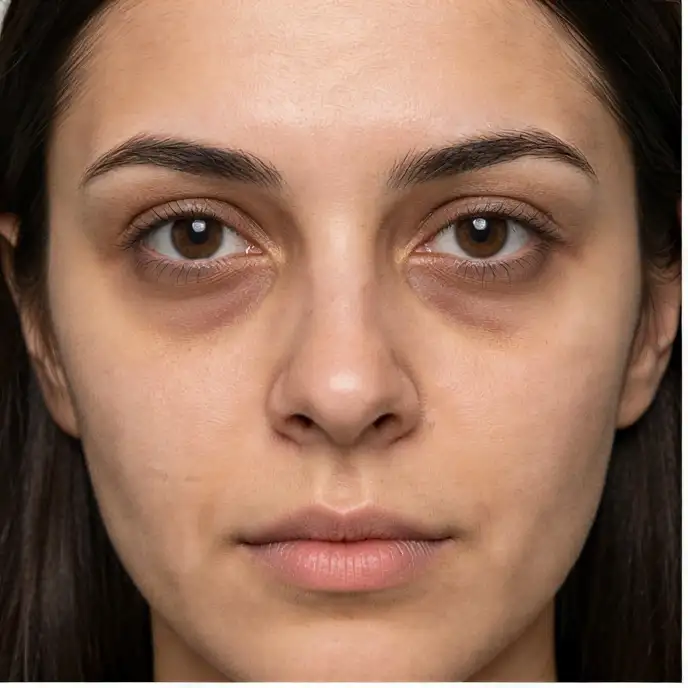
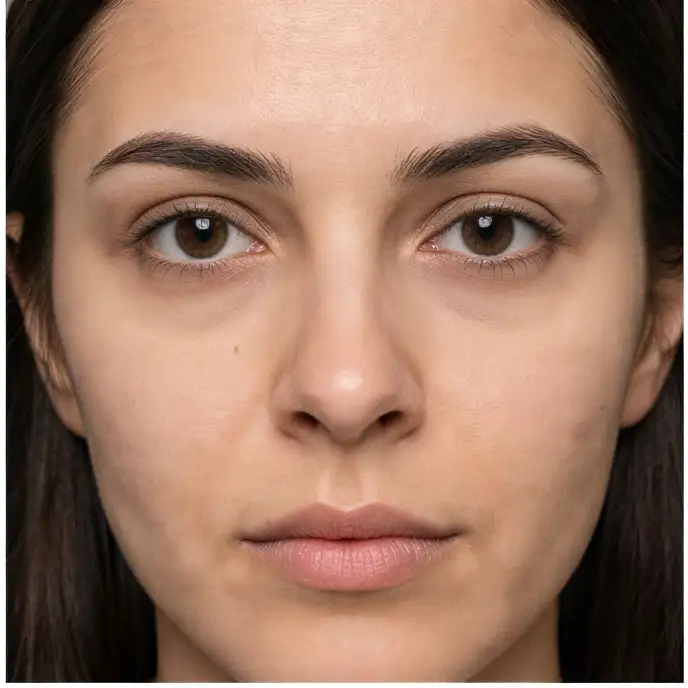
Compare the source image with each finished result.
Source image
Result
Why Choose Our AI Dark Circle Remover?
Experience the power of advanced AI technology that seamlessly removes dark circles and under-eye bags while preserving natural facial features and skin texture with professional-grade results.
State-of-the-art AI detection for precise dark circle identification
Preserves natural eye appearance and facial contours
Maintains authentic skin texture and tone
Works on all skin types and tones
Handles various severities of dark circles
Professional-quality results in seconds
No manual editing skills required
High-resolution output quality
Batch processing capabilities
Handled within your Magica workflow
How Our AI Dark Circle Remover Works
Our AI analyzes your photo to detect and naturally eliminate dark circles while maintaining facial authenticity
01
Attach Your Photo
Select a clear photo showing the face with dark circles you want to remove
02
AI Analysis
Our AI detects dark circles and analyzes skin tone for natural correction
03
Smart Removal
Advanced algorithms remove dark circles while preserving natural eye features
04
Download Result
Get your enhanced photo with refreshed, rejuvenated eyes instantly
Key Features of Our AI Dark Circle Remover
Intelligent Detection
Precisely identifies dark circles and under-eye bags without affecting other facial features
Natural Results
Maintains skin texture and natural eye appearance for authentic-looking results
Lightning Fast
Get professional results in 10-30 seconds with our optimized AI processing
Professional Quality
Studio-grade enhancement that rivals expensive photo editing software
Smart Preservation
Keeps natural eye color, shape, and expression perfectly intact
All Skin Types
Works effectively on all skin tones and types with customized processing
Who Can Benefit from Our AI Dark Circle Remover?
Our AI dark circle remover is perfect for anyone looking to enhance their photos with refreshed, well-rested eyes
Professional Photographers
Quickly enhance portrait photos without time-consuming manual retouching
Social Media Users
Look your best in profile pictures and posts with refreshed, vibrant eyes
Business Professionals
Create polished headshots for LinkedIn, resumes, and corporate profiles
Content Creators
Enhance thumbnails and promotional photos for a more engaging appearance
Dating App Users
Put your best face forward with naturally enhanced, well-rested photos
Anyone with Photos
Perfect for family photos, special occasions, or everyday snapshots
Tips for Best Results with AI Dark Circle Remover
Tip 1
Use Clear Photos
Upload high-quality images with good lighting and clear visibility of the face
Tip 2
Front-Facing Angles
Best results come from photos taken straight-on or at slight angles
Tip 3
Good Resolution
Higher resolution photos yield better results with more detail preservation
Tip 4
Natural Lighting
Photos taken in natural light produce the most realistic enhancements
Tip 5
Eyes Open
Ensure eyes are open and clearly visible for optimal processing
Tip 6
Multiple Attempts
Try different photos if the first result isn't perfect - lighting matters
Frequently Asked Questions About AI Dark Circle Remover
What exactly does the AI Remove Dark Circles tool do?
Our AI tool automatically detects and removes dark circles, under-eye bags, and shadows beneath the eyes. It uses advanced algorithms to analyze your photo and naturally lighten the under-eye area while preserving skin texture and facial features. The result is a refreshed, well-rested appearance that looks completely natural.
How long does it take to remove dark circles from a photo?
The process typically takes between 10-30 seconds, depending on image size and complexity. Our AI processes your photo quickly while ensuring high-quality results. You'll see the transformation happen in real-time, and your enhanced photo will be ready to download immediately after processing.
Will the results look natural or edited?
Our AI is specifically trained to produce natural-looking results that preserve your authentic appearance. It carefully maintains skin texture, natural shadows, and facial contours while removing dark circles. The enhancement is subtle yet effective, making you look well-rested rather than artificially edited. Most people won't be able to tell the photo has been enhanced.
What types of dark circles can the tool remove?
This Magica workflow effectively handles various types of dark circles including genetic dark circles, those caused by fatigue or aging, under-eye bags, and shadows. It works on all severities from mild discoloration to pronounced dark circles. The AI adapts its approach based on the specific characteristics of each photo for optimal results.
Is my photo data safe and private?
Absolutely. We take privacy seriously and process all photos securely. Your images are temporarily processed to remove dark circles and are automatically deleted from our servers shortly after. We don't store, share, or use your photos for any other purpose. The entire process is automated with no human review of your images.
What image formats and sizes are supported?
We support all common image formats including JPG, JPEG, PNG, and WebP. The tool works best with images between 500x500 pixels and 4096x4096 pixels. For optimal results, we recommend using high-resolution photos where the face is clearly visible. The output maintains the same format and quality as your input image.
Can I use the enhanced photos for commercial purposes?
Yes, you retain full rights to your enhanced photos and can use them for any purpose, including commercial use. This includes professional headshots, business profiles, marketing materials, or any other commercial application. There are no restrictions or additional licensing requirements for using your processed images.
Does the tool work on group photos or multiple faces?
Yes, our AI can detect and remove dark circles from multiple faces in a single photo. It processes each face individually to ensure optimal results for everyone in the image. This makes it perfect for family photos, team pictures, or any group shots where multiple people need enhancement.
What if I'm not satisfied with the results?
While our AI produces excellent results in most cases, photo quality and lighting can affect outcomes. If you're not satisfied, try uploading a different photo with better lighting or a clearer view of the face. You can process unlimited photos, so feel free to experiment with different images until you get the perfect result.
Can the tool also remove wrinkles or other facial imperfections?
This specific tool is optimized for removing dark circles and under-eye bags. While it may slightly smooth the under-eye area, it's not designed to remove wrinkles or other facial features. We have other specialized tools for different enhancements like wrinkle removal, blemish removal, and skin smoothing if you need those specific edits.