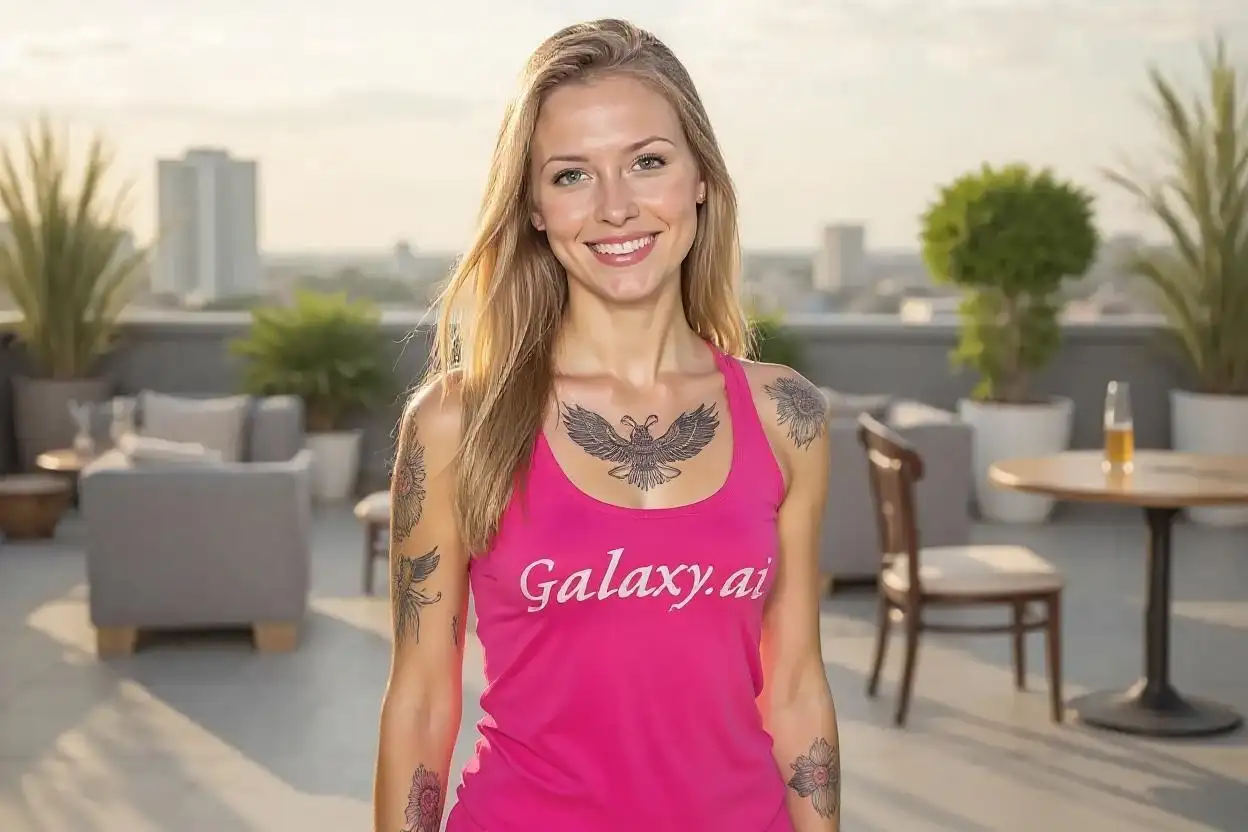
Compare the source image with each finished result.
Source image
Result
Why Choose Our AI Remove Tattoo From Photo?
Experience the power of advanced AI technology that seamlessly removes tattoos from photos while preserving natural skin texture, tone, and surrounding details with professional-grade results.
State-of-the-art AI tattoo detection and removal
Preserves natural skin texture and tone
Handles complex tattoo designs and colors
Works with tattoos on any body part
Maintains surrounding skin and background integrity
Professional-quality results in seconds
No manual editing skills required
High-resolution output quality
How Our AI Remove Tattoo From Photo Works
Our advanced AI analyzes your photo, detects tattoos automatically, and removes them while reconstructing the natural skin appearance underneath.
01
Attach Your Photo
Select and attach a photo containing the tattoo you want to remove. Our AI supports all common image formats.
02
AI Detection
Our AI automatically detects and analyzes the tattoo, understanding its boundaries, colors, and the underlying skin structure.
03
Tattoo Removal
Advanced algorithms remove the tattoo while reconstructing natural skin texture, tone, and details based on surrounding areas.
04
Download Result
Get your transformed photo with the tattoo seamlessly removed, ready to use wherever you need it.
Key Features of Our AI Remove Tattoo From Photo
Intelligent Tattoo Detection
Automatically identifies tattoos of all sizes, colors, and complexities without manual selection.
Natural Skin Reconstruction
Recreates realistic skin texture and tone based on surrounding areas for seamless results.
Fast Processing
Get professional results in seconds, not hours of manual editing.
High-Quality Output
Maintains original image resolution and quality throughout the removal process.
Detail Preservation
Keeps surrounding skin, clothing, and background elements perfectly intact.
Batch Processing Ready
Process multiple photos efficiently for consistent tattoo removal across image sets.
Who Can Benefit from Our AI Remove Tattoo From Photo?
Our tattoo removal tool serves various personal and professional needs, helping anyone who needs clean, tattoo-free photos.
Job Seekers
Create professional headshots and application photos for conservative industries or positions.
Photographers
Offer tattoo removal services to clients or prepare photos for specific editorial requirements.
Social Media Users
Create alternative versions of photos for different audiences or professional networking sites.
Models & Actors
Prepare portfolio photos for roles or campaigns that require a tattoo-free appearance.
Parents & Families
Create family photos or portraits without tattoos for traditional family albums or gifts.
Anyone Curious
See how you'd look without tattoos or preview tattoo removal before committing to laser treatment.
Tips for Best Results with AI Remove Tattoo From Photo
Tip 1
Use High-Quality Photos
Upload clear, well-lit photos where the tattoo is fully visible for optimal removal results.
Tip 2
Good Lighting Matters
Photos with even lighting and minimal shadows produce the most natural-looking results.
Tip 3
Avoid Extreme Angles
Straight-on photos of the tattoo area work better than photos taken at sharp angles.
Tip 4
Higher Resolution is Better
Use the highest resolution available for more detailed and accurate tattoo removal.
Tip 5
Simple Backgrounds Help
Photos with simple backgrounds allow the AI to focus better on the tattoo removal process.
Tip 6
Check Multiple Results
For complex tattoos, try processing the photo multiple times to get the best result.
Frequently Asked Questions About AI Remove Tattoo From Photo
How does the AI tattoo removal tool work?
Our AI uses advanced machine learning algorithms to detect tattoos in your photos automatically. It then analyzes the surrounding skin texture, tone, and patterns to intelligently reconstruct what the skin would look like without the tattoo. The process involves sophisticated image inpainting techniques that ensure natural-looking results.
Can it remove all types of tattoos?
Yes, our AI can remove various types of tattoos including black and gray tattoos, colorful designs, tribal patterns, text tattoos, and both small and large pieces. The tool works on tattoos located on any part of the body. However, results may vary depending on the tattoo's complexity, the photo quality, and the surrounding skin area.
How long does the tattoo removal process take?
The AI processing typically takes between 10-30 seconds per image, depending on the photo resolution and tattoo complexity. This is significantly faster than manual photo editing, which could take hours to achieve similar results. The actual time may vary slightly based on server load and image size.
Will the removed area look natural?
Yes, our AI is specifically trained to create natural-looking results by analyzing the surrounding skin and recreating appropriate texture, tone, and details. The algorithm considers factors like skin pores, natural variations in color, and lighting to ensure the edited area blends seamlessly with the rest of the image.
Is my photo kept private and secure?
Absolutely. We take privacy seriously and implement industry-standard security measures. Your uploaded photos are processed securely and are not stored permanently on our servers. We do not share, sell, or use your images for any purpose other than providing you with the tattoo removal service. All uploads and downloads are encrypted for your protection.
Can I use the edited photos commercially?
Yes, you retain full rights to your edited photos and can use them for any purpose, including commercial use. Whether you need them for professional headshots, modeling portfolios, business profiles, or any other commercial application, you're free to use the tattoo-removed versions without any restrictions from our side.
What image formats are supported?
This Magica workflow supports all common image formats including JPEG, PNG, WebP, and BMP. We recommend using high-quality JPEG or PNG files for the best results. The maximum file size supported is typically 10MB, which accommodates most high-resolution photos while ensuring fast processing times.
Can it remove multiple tattoos from one photo?
Yes, our AI can detect and remove multiple tattoos from a single photo. Whether you have tattoos on both arms, multiple small tattoos, or a combination of different designs, the tool will identify and remove all visible tattoos in one processing session. This makes it efficient for full-body shots or photos with multiple tattooed areas.
What if I'm not satisfied with the result?
If the first result doesn't meet your expectations, you can try processing the image again as results can vary slightly each time. For best results, ensure your photo is well-lit and high-quality. You can also try uploading a different photo of the same tattoo taken from a slightly different angle or in better lighting conditions.
Does it work on old or faded tattoos?
Yes, the tool works effectively on both new and old tattoos, including faded or partially removed tattoos. In fact, faded tattoos are often easier for the AI to remove as they have less contrast with the surrounding skin. The tool can also help visualize what complete tattoo removal might look like if you're considering laser removal treatments.