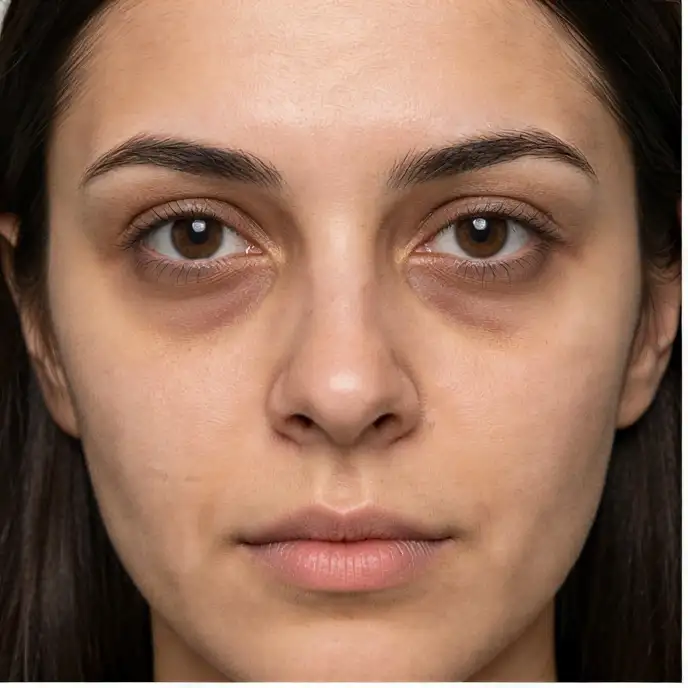
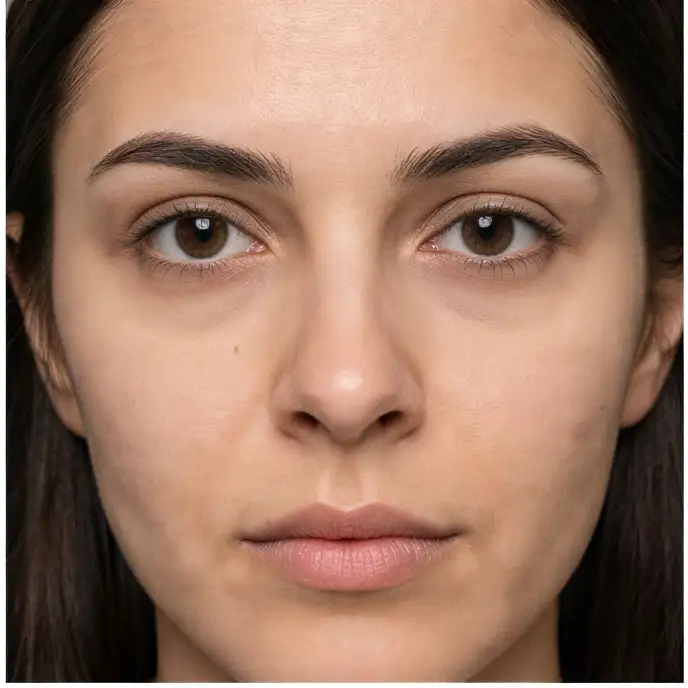
Compare the source image with each finished result.
Source image
Result
What Magica will ask for
The agent gathers these inputs and preferences in the conversation before it starts.
Makeup Style Description
Why Choose Our AI Virtual Makeup Try-On?
Experience professional makeup looks instantly with our advanced AI technology that creates natural, personalized results tailored to your facial features.
AI-powered realistic makeup application
Natural-looking results that complement your features
Wide variety of makeup styles and looks
Preserves your natural facial structure
Professional-quality virtual makeovers
No makeup skills required
Instant transformation in seconds
High-resolution output quality
How Our Virtual Makeup Try-On Works
Get a professional makeup look in just a few simple steps:
01
Attach Your Photo
attach a clear, front-facing photo for best results
02
Describe Your Look
Tell us what makeup style you want to try
03
AI Application
Our AI applies makeup naturally to your features
04
Download Result
Get your virtually made-up photo instantly
Key Features of Our AI Virtual Makeup Try-On
Intelligent Facial Analysis
Advanced AI recognizes your unique facial features and applies makeup that enhances your natural beauty
Professional Techniques
Mimics real makeup artist techniques including contouring, highlighting, and color matching for authentic results
Customizable Styles
From natural everyday looks to bold glamorous styles, create any makeup look you can imagine
Instant Results
Get professional-quality virtual makeup application in seconds with our optimized AI processing
Who Can Benefit from Our AI Virtual Makeup Try-On?
This Magica workflow is perfect for anyone wanting to experiment with makeup looks, from beauty enthusiasts to professionals in the industry.
Beauty Enthusiasts
Try new makeup looks without buying products or spending time applying makeup. Perfect for experimenting with different styles.
Makeup Artists
Show clients different makeup options instantly. Create portfolios and demonstrate various looks without physical application.
Content Creators
Create makeup transformation content, tutorials, and before/after comparisons for social media and blogs.
Beauty Brands
Showcase products virtually, create marketing materials, and help customers visualize different makeup looks.
Special Event Planning
Preview wedding, prom, or special event makeup looks before the big day to ensure perfect results.
Online Shoppers
Try makeup looks virtually before purchasing products online, reducing returns and ensuring satisfaction.
Tips for Best Results with AI Virtual Makeup Try-On
Tip 1
Use Front-Facing Photos
Upload photos where you're facing the camera directly with good lighting for most realistic makeup application.
Tip 2
Clear Skin Visibility
Ensure your face is clearly visible without obstructions like hair covering parts of your face or heavy shadows.
Tip 3
Be Specific with Descriptions
The more detailed your makeup description, the better the AI can create your desired look.
Tip 4
High-Quality Images
Use high-resolution photos (at least 1080p) for the best and most detailed makeup application results.
Frequently Asked Questions About Our AI Virtual Makeup Try-On
What is an AI Virtual Makeup Try-On?
An AI Virtual Makeup Try-On is an advanced technology that uses artificial intelligence to apply makeup digitally to your photos. It analyzes your facial features, skin tone, and structure to create realistic makeup looks that appear natural and professionally applied. The AI understands makeup techniques like contouring, highlighting, and color theory to ensure the virtual makeup enhances your features just like real makeup would.
How realistic do the makeup results look?
Our AI creates extremely realistic results that are often indistinguishable from actual makeup application. The technology considers factors like skin texture, lighting, facial contours, and natural shadows to apply makeup that looks authentic. It preserves your skin's natural texture while adding makeup effects, avoiding the artificial or filtered appearance common with basic photo editors.
What types of makeup looks can I try?
You can try virtually any makeup style imaginable! From natural no-makeup makeup looks to bold editorial styles, the AI can create it all. Popular options include everyday natural makeup, glamorous evening looks, smokey eyes, bold lip colors, contouring and highlighting, bridal makeup, editorial and artistic styles, and seasonal or themed makeup looks. Simply describe what you want, and the AI will create it.
Will it work with my skin tone?
Yes! Our AI is trained on diverse facial images and understands how makeup interacts with different skin tones. It automatically adjusts colors and techniques to complement your unique skin tone, ensuring that the makeup looks natural and flattering. Whether you have fair, medium, or deep skin tones, the AI will select appropriate shades and application techniques.
Can I specify particular makeup products or brands?
While you can't specify exact product brands, you can describe specific colors, finishes, and styles. For example, you can request 'matte red lips,' 'shimmery gold eyeshadow,' or 'dewy foundation finish.' The AI will interpret these descriptions and apply makeup that matches your specifications while ensuring it looks natural on your features.
How long does the virtual makeup application take?
The process typically takes 10-30 seconds, depending on the complexity of the makeup look requested and server load. Simple, natural looks process faster, while elaborate styles with multiple elements may take slightly longer. The AI works quickly to analyze your face and apply the makeup digitally with professional-quality results.
Can I use the photos commercially?
Yes, you retain full rights to all photos processed through this Magica workflow. You can use them for personal or commercial purposes, including social media, portfolios, marketing materials, or any other use. There are no watermarks or restrictions on how you use your virtually made-up photos.
Does it work with glasses or facial hair?
The AI works best with unobstructed faces, but it can handle glasses and facial hair to some extent. For optimal results with glasses, choose clear frames or remove them if possible. The AI will work around facial hair, applying makeup to visible skin areas while preserving the natural appearance of beards or mustaches.
Can I try multiple looks on the same photo?
Absolutely! You can process the same photo multiple times with different makeup descriptions to try various looks. This is perfect for comparing different styles or finding the perfect makeup for a special occasion. Each transformation is processed independently, so you can experiment as much as you like.
Is my photo data secure?
Yes, we prioritize your privacy and security. All photos are encrypted during upload and processing. Your images are automatically deleted from our servers immediately after processing, and we never store, share, or use your photos for any purpose beyond the makeup application you requested. We comply with all major privacy regulations including GDPR and CCPA.