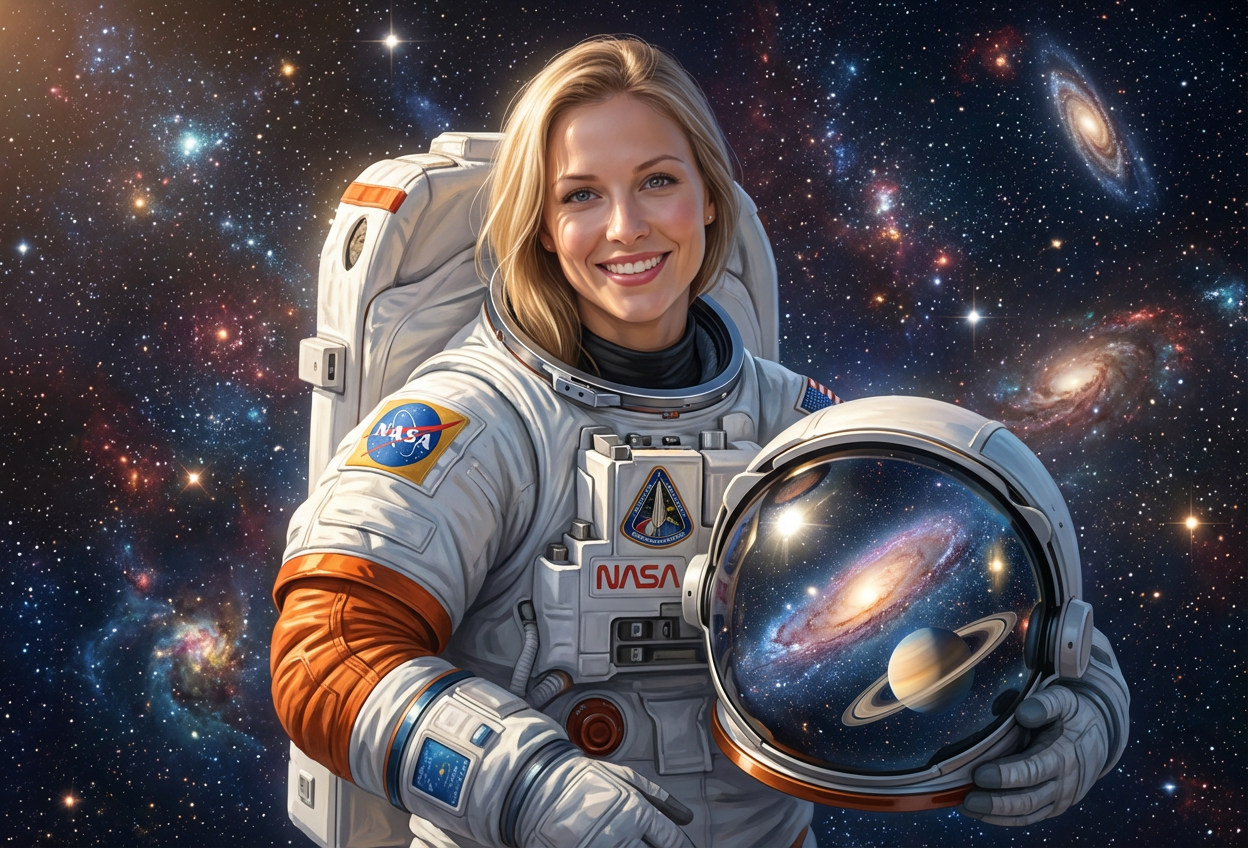
Compare the source image with each finished result.
Source image
Result
What Magica will ask for
The agent gathers these inputs and preferences in the conversation before it starts.
Attach Your Photo
attach a photo to apply the astronaut filter
Why Choose Our AI Astronaut Filter?
Transform your photos into epic space exploration portraits with our advanced AI. Fulfill your childhood dreams of becoming an astronaut with just one click!
Authentic astronaut space suit design
Realistic helmet with cosmic reflections
Professional NASA-style appearance
Maintains original photo quality
Stunning space backgrounds with stars and planets
Instant transformation powered by AI
No editing skills required
How Our Astronaut Filter Works
Transform into a space explorer with these simple steps:
01
Attach Your Photo
Select a clear portrait photo where your face is clearly visible. Front-facing shots with good lighting work best!
02
Apply the Filter
ask Magica to generate the result and watch as our AI transforms you into an astronaut with full space suit and cosmic helmet reflections.
03
Download & Share
Preview your astronaut transformation and download your space exploration portrait.
Key Features of the AI Astronaut Filter
Authentic Space Suit Design
Creates realistic astronaut suits with accurate details including NASA-style patches, equipment, and professional space gear.
Cosmic Helmet Reflections
Advanced AI generates stunning galaxy and planet reflections in your helmet visor for an authentic space exploration look.
Space Background Generation
Automatically places you in a realistic space environment with stars, nebulae, and celestial elements.
High-Resolution Output
Delivers professional-quality images perfect for social media, profiles, and creative projects.
Smart Feature Recognition
Accurately identifies and preserves your facial features while seamlessly integrating the astronaut transformation.
Instant Processing
Get your astronaut transformation in seconds with our powerful AI technology.
Who Can Benefit from the Astronaut Filter?
Our AI Astronaut Filter is perfect for anyone wanting to explore their space dreams or create unique cosmic-themed content.
Social Media Enthusiasts
Create unique astronaut-themed profile pictures that stand out and capture attention.
Space Enthusiasts
Visualize yourself as an astronaut and share your love for space exploration.
Content Creators
Generate eye-catching space-themed content for YouTube, TikTok, Instagram, and other platforms.
Sci-Fi Fans
Live out your science fiction dreams and create amazing astronaut portraits for your collection.
Gamers & Streamers
Create unique space-themed avatars and profile images for gaming platforms and streams.
Educators & Students
Make learning about space exploration more engaging with personalized astronaut imagery for projects and presentations.
Tips for the Best Astronaut Transformation
Tip 1
Use Clear, Well-Lit Photos
Ensure your face is clearly visible with good lighting for the most realistic astronaut transformation.
Tip 2
Front-Facing Portraits Work Best
Photos where you're looking directly at the camera provide the most accurate results and best helmet reflections.
Tip 3
Higher Resolution is Better
Use high-quality photos to ensure the space suit details and cosmic reflections are crisp and detailed.
Tip 4
Try Different Expressions
Both serious and smiling expressions work great - serious for professional astronaut looks, smiling for fun space explorer vibes!
Tip 5
Solid Background Photos
Photos with simple backgrounds allow the AI to better focus on your transformation and create more dramatic space environments.
Frequently Asked Questions About Our Astronaut Filter
How realistic is the astronaut transformation?
Our AI creates highly realistic astronaut transformations with authentic space suit details, NASA-style equipment, and stunning cosmic helmet reflections. The result looks professional and captures the essence of real space exploration imagery.
Will my face be visible in the helmet?
Yes! Our AI maintains visibility of your key facial features through the helmet visor while adding realistic reflections of galaxies and planets on the helmet surface, creating the perfect balance between recognition and cosmic atmosphere.
Can I use this for professional purposes?
Absolutely! Many users create astronaut portraits for LinkedIn profiles, creative portfolios, educational materials, and professional presentations. The high-quality output is suitable for both personal and professional use.
What types of photos work best?
The filter works best on clear, front-facing portrait photos with good lighting. While it can work on various photo types, we recommend individual portraits with simple backgrounds for the most impressive astronaut transformations.
Does it work for all ages?
Yes! Our AI Astronaut Filter works wonderfully for people of all ages, from children dreaming of space exploration to adults reliving their cosmic aspirations. Everyone can become an astronaut!
What happens to my uploaded photos?
We prioritize user privacy. Your photos are used only for the transformation process and are not stored long-term or used for other purposes. The generated astronaut portrait is returned in the conversation for you to save.
Can I customize the space suit or background?
The filter automatically generates the best space suit design and cosmic background for your photo. While customization isn't currently available, our AI intelligently adapts the astronaut style to complement your image.
Is this filter free to use?
The astronaut filter requires a small amount of credits (0.05M) per transformation. New users receive free credits to get started, and you can access basic features without requiring a login!