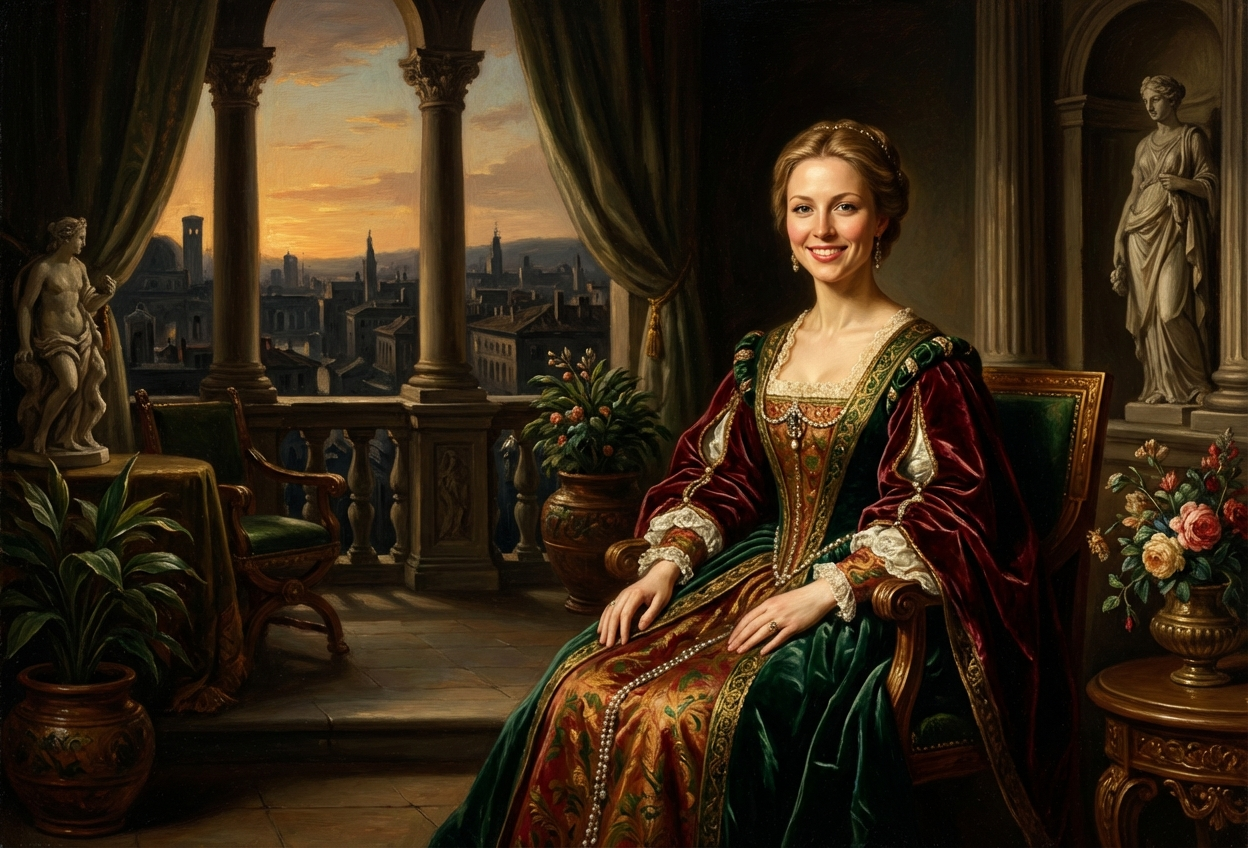
Compare the source image with each finished result.
Source image
Result
What Magica will ask for
The agent gathers these inputs and preferences in the conversation before it starts.
Upload Photos
attach a photo to apply the filter
Why Choose Our AI Baroque Painting Filter?
Transform your photos into timeless Baroque masterpieces with our advanced AI. Experience the grandeur of Renaissance art with rich colors, dramatic lighting, and classical elegance in just one click!
Authentic Baroque and Renaissance painting aesthetics
Rich jewel-tone color palette with period accuracy
Dramatic chiaroscuro lighting effects
Classical composition and period clothing details
Museum-quality artistic transformation
Maintains facial features while adding artistic style
No art history knowledge or editing skills required
How Our Baroque Painting Filter Works
Transform your photos into classical masterpieces with these simple steps:
01
Attach Your Photo
Select a clear portrait photo with good lighting. Photos with neutral backgrounds work best for classical painting transformation.
02
Apply the Filter
ask Magica to generate the result and watch as our AI transforms your photo into a Renaissance-era Baroque painting with rich colors and dramatic lighting.
03
Download & Share
Preview your classical masterpiece and download your museum-worthy Baroque painting.
Key Features of the AI Baroque Painting Filter
Rich Renaissance Color Palette
Applies authentic jewel tones and rich colors characteristic of Baroque and Renaissance master paintings.
Dramatic Chiaroscuro Lighting
Creates striking contrast between light and shadow using classical painting techniques popularized by masters like Caravaggio and Rembrandt.
Oil Painting Texture
Simulates the distinctive brushwork and texture of traditional oil paintings on canvas.
Period Costume Details
Adds authentic Renaissance-era clothing elements and classical styling to enhance the historical aesthetic.
Classical Composition
Applies Renaissance compositional principles for balanced, museum-quality results.
High-Resolution Output
Generates high-quality images perfect for printing, framing, or sharing on social media.
Who Can Benefit from the Baroque Painting Filter?
Our AI Baroque Painting Filter is perfect for art enthusiasts, history lovers, and anyone who wants to see themselves immortalized in classical painting style.
Art History Enthusiasts
Experience the grandeur of Renaissance art by transforming yourself into a classical painting subject.
Social Media Users
Create sophisticated, museum-worthy profile pictures and posts that stand out with classical elegance.
Content Creators
Generate unique Renaissance-themed content for educational channels, art blogs, or cultural social media accounts.
Theater & Period Drama Fans
Visualize yourself in historical costume for period productions or Renaissance fair promotions.
Artists & Art Students
Study Baroque painting techniques and explore classical aesthetics through AI transformation.
Gift Givers
Create unique, personalized gifts by transforming photos of loved ones into classical portraits worthy of framing.
Tips for the Best Baroque Painting Results
Tip 1
Use Well-Lit Portrait Photos
Clear lighting helps the AI create more dramatic chiaroscuro effects. Natural light or studio lighting works best.
Tip 2
Choose Photos with Neutral Backgrounds
Simple backgrounds allow the AI to focus on creating classical painting atmosphere and period details without distraction.
Tip 3
Front-Facing or Three-Quarter Poses
Traditional portrait poses common in Renaissance paintings work best for authentic classical transformation.
Tip 4
Higher Resolution for Better Details
Use high-quality photos to capture fine brushwork textures and rich color details characteristic of Baroque paintings.
Tip 5
Elegant or Neutral Expressions
Composed, dignified expressions typical of classical portraits enhance the Renaissance painting aesthetic.
Frequently Asked Questions About Our Baroque Painting Filter
What is Baroque painting style?
Baroque painting is an artistic style that flourished from the late 16th to 18th century, characterized by dramatic lighting (chiaroscuro), rich colors, emotional intensity, and grandeur. Our AI filter captures these elements to transform modern photos into classical Renaissance-era masterpieces.
Will my photo look like a real oil painting?
Yes! Our AI is trained on classical Baroque and Renaissance masterpieces to replicate authentic oil painting textures, brushwork, rich jewel tones, and dramatic lighting effects. The result looks like a museum-quality classical portrait.
What types of photos work best?
The filter works best on clear portrait photos with good lighting and neutral backgrounds. Front-facing or three-quarter profile shots similar to classical portrait poses produce the most authentic Baroque painting results.
Can I use this for professional purposes?
Absolutely! The high-resolution output is perfect for printing, framing, portfolio pieces, art projects, theater promotions, educational materials, or sophisticated social media content. Many users create gallery-worthy prints from their transformed photos.
How accurate is the historical style?
Our AI is trained on authentic Baroque and Renaissance paintings from masters like Caravaggio, Rembrandt, and Vermeer. It accurately replicates period-appropriate color palettes, lighting techniques, and compositional styles for historically authentic results.
Does it change my appearance completely?
No, the filter maintains your recognizable facial features while applying Baroque painting aesthetics, period clothing elements, and classical styling. You'll still be identifiable, but transformed into a Renaissance-era portrait subject.
Is my uploaded photo kept private?
Yes, we prioritize your privacy. Your photos are used only for the transformation process and are not stored long-term or used for any other purposes. Your classical painting is returned in the conversation for you to save.
Can I frame the result like a real painting?
Definitely! Many users print and frame their Baroque painting transformations. The high-resolution output looks stunning when printed on canvas or fine art paper, making it perfect for home decor or gifts.