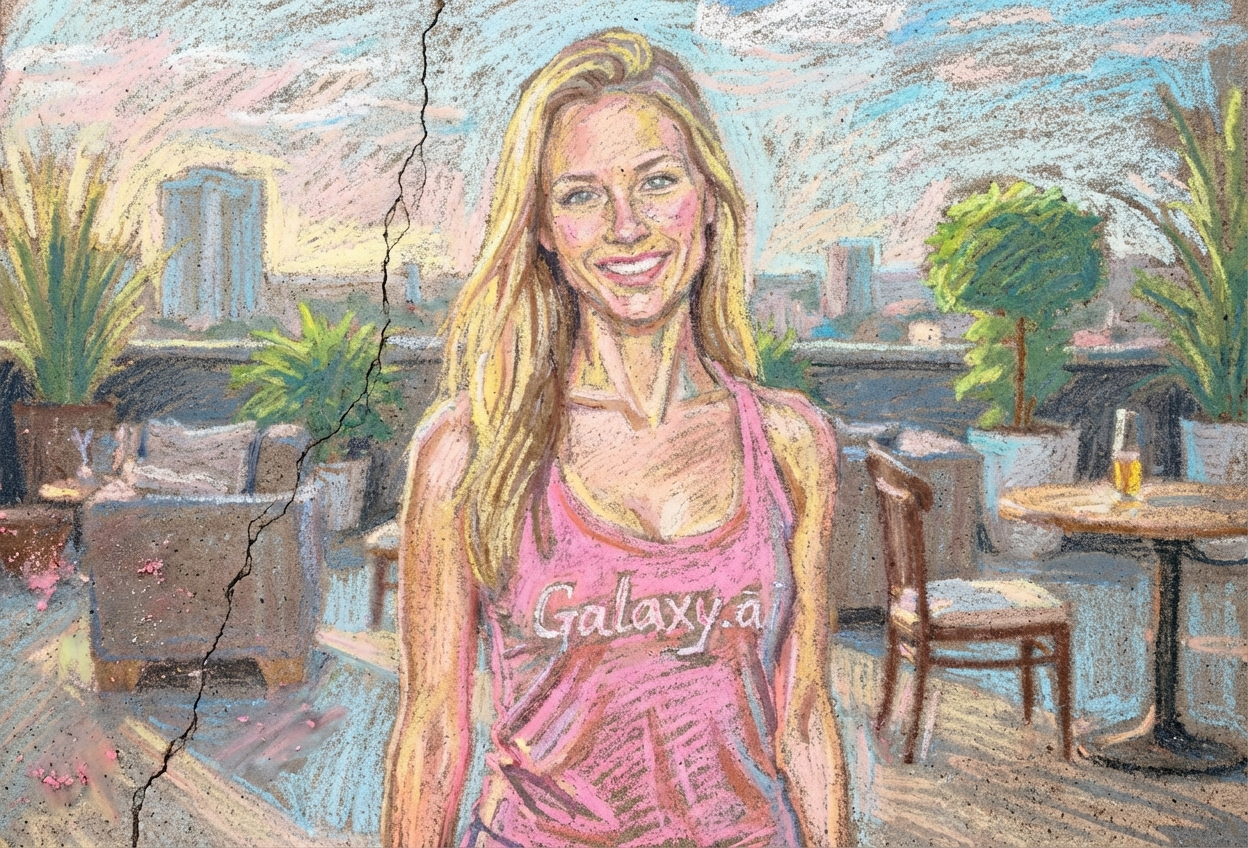
Compare the source image with each finished result.
Source image
Result
What Magica will ask for
The agent gathers these inputs and preferences in the conversation before it starts.
Upload Photos
attach a photo to apply the filter
Why Choose Our AI Chalk Drawing Filter?
Transform your photos into whimsical sidewalk chalk art with our advanced AI. Experience the playful charm and nostalgic beauty of hand-drawn chalk with just one click!
Authentic chalk texture and appearance
Vibrant dusty pastel color palette
Realistic pavement background texture
Hand-drawn artistic strokes
Maintains photo quality and clarity
Instant transformation powered by AI
Perfect for creative social media posts
How Our Chalk Drawing Filter Works
Create delightful chalk art from your photos with these simple steps:
01
Attach Your Photo
Select a clear photo with good contrast. Portraits, landscapes, and objects all work beautifully as chalk art!
02
Apply the Filter
ask Magica to generate the result and watch as our AI transforms your photo into vibrant sidewalk chalk art with authentic texture.
03
Download & Share
Preview your chalk drawing transformation and download your creative artwork to share.
Key Features of the AI Chalk Drawing Filter
Authentic Chalk Texture
Creates realistic chalk dust and grainy texture that captures the essence of sidewalk chalk art.
Hand-Drawn Aesthetic
Applies visible artistic strokes and rough edges that mimic hand-drawn chalk artwork.
Smart Feature Recognition
Advanced AI preserves key details while transforming your photo into charming chalk art.
High-Resolution Output
Generates crisp, high-quality chalk drawings perfect for printing and social media sharing.
Pavement Background
Adds authentic concrete or pavement texture as the background for realistic street art effect.
Nostalgic Appeal
Evokes childhood memories and playful creativity with warm, inviting chalk art style.
Who Can Benefit from the Chalk Drawing Filter?
Our AI Chalk Drawing Filter is perfect for anyone wanting to add playful, nostalgic charm to their photos and create unique artistic content.
Social Media Enthusiasts
Create eye-catching, unique profile pictures and posts with charming chalk art style.
Content Creators
Generate whimsical chalk art content for Instagram, TikTok, and YouTube thumbnails.
Teachers & Educators
Transform educational content into playful chalk-style illustrations for presentations and materials.
Parents & Families
Create adorable chalk art versions of family photos and children's pictures.
Event Planners
Design creative invitations and promotional materials with nostalgic chalk art aesthetic.
Artists & Designers
Generate unique chalk-style artwork for projects, portfolios, and creative inspiration.
Tips for the Best Chalk Drawing Effect
Tip 1
Use Photos with Good Contrast
Images with clear contrast between subjects and backgrounds create more striking chalk art effects.
Tip 2
Bright, Colorful Photos Work Best
Vibrant source images translate beautifully into the dusty pastel palette of chalk art.
Tip 3
Clear Subject Focus
Photos with a clear main subject produce chalk drawings with better definition and impact.
Tip 4
Try Different Photo Types
Experiment with portraits, pets, landscapes, and objects - chalk style works wonderfully on various subjects.
Tip 5
High-Quality Input for Best Results
Use high-resolution photos to ensure fine chalk texture details are visible and crisp.
Frequently Asked Questions About Our Chalk Drawing Filter
How realistic is the chalk texture?
Our AI creates highly authentic chalk texture by analyzing real sidewalk chalk art. The result includes visible chalk dust, grainy texture, and rough pavement backgrounds that capture the genuine look of street chalk drawings.
What types of photos work best?
The filter works beautifully on portraits, pets, landscapes, and objects. Photos with good contrast and clear subjects produce the most striking results, though the filter can handle various types of images.
Can I use this for commercial projects?
Yes! The chalk drawings you create can be used for personal and commercial projects, including social media posts, marketing materials, invitations, and educational content.
Will my photo still be recognizable?
Absolutely! Our AI maintains the key features and recognizable elements of your original photo while transforming it into artistic chalk drawing style. The result is a perfect balance of artistic effect and photo clarity.
Does it look hand-drawn?
Yes! The filter applies authentic hand-drawn stroke patterns, rough edges, and natural chalk irregularities that make the result look genuinely hand-drawn rather than digitally filtered.
Is my photo safe to upload?
We prioritize user privacy. Your photos are used only for the transformation process and are not stored long-term or used for other purposes. The generated chalk drawing is returned in the conversation for you to save.
Can I print the chalk drawings?
Yes! Our filter generates high-resolution chalk drawings that are perfect for printing. They make wonderful decorative prints, greeting cards, and creative wall art.
What makes this different from other art filters?
Our Chalk Drawing Filter specifically recreates the unique texture and aesthetic of sidewalk chalk art, including the dusty pastel colors, visible chalk grain, pavement background, and playful hand-drawn quality that other filters don't capture.