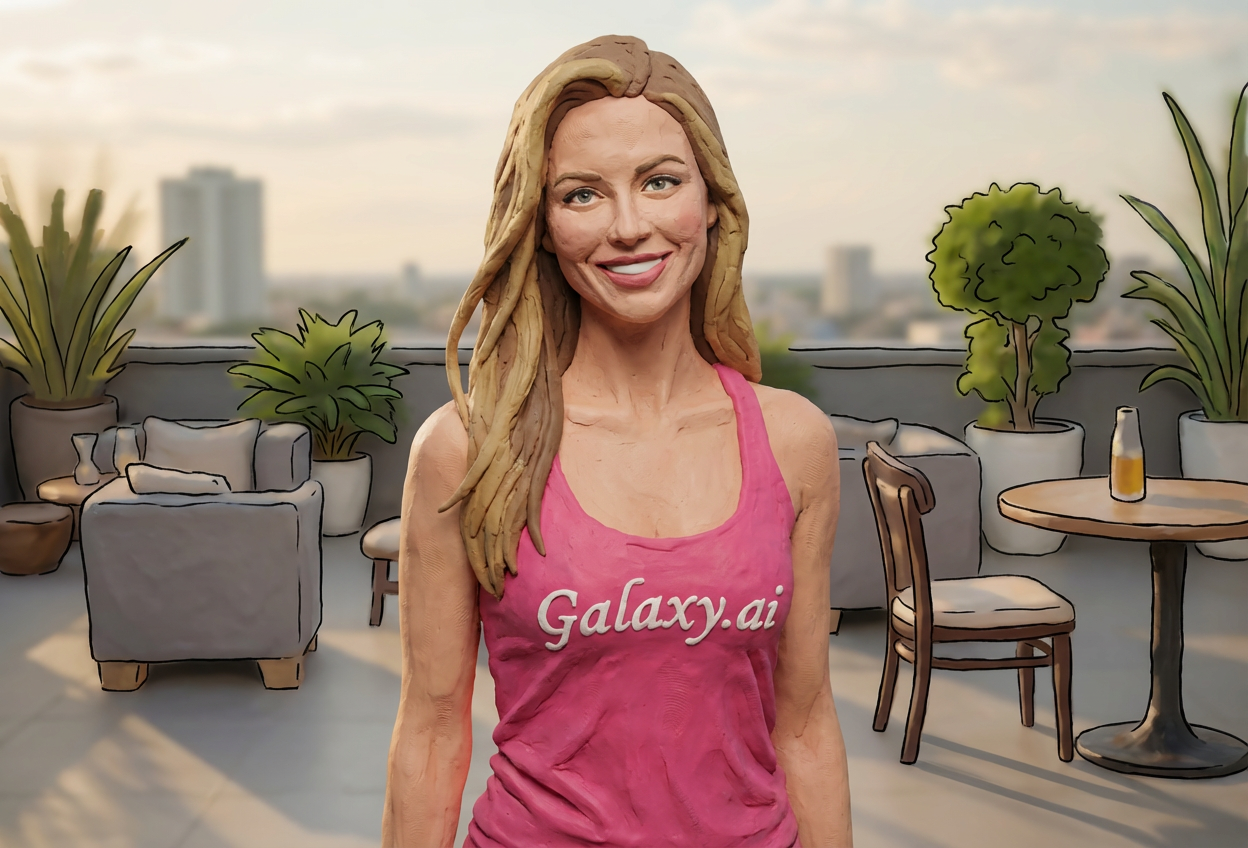
Compare the source image with each finished result.
Source image
Result
What Magica will ask for
The agent gathers these inputs and preferences in the conversation before it starts.
Attach Your Photo
attach a photo to apply the filter
Why Choose Our AI Claymation Filter?
Transform your photos into charming claymation characters with our advanced AI. Experience the nostalgic magic of stop-motion clay animation with just one click!
Authentic claymation character transformation
Textured clay surface with fingerprint details
Matte finish for realistic clay appearance
Maintains facial features and expressions
Instant stop-motion animation style
No sculpting skills required
Perfect for creative social media content
How Our Claymation Filter Works
Transform into a charming clay character with these simple steps:
01
Attach Your Photo
Select a clear portrait photo where your face is clearly visible. Front-facing shots with good lighting work best!
02
Apply the Filter
ask Magica to generate the result and watch as our AI transforms you into a handcrafted claymation character.
03
Download & Share
Preview your clay transformation and download your whimsical claymation portrait.
Key Features of the AI Claymation Filter
Authentic Clay Texture
Creates realistic clay sculpture appearance with visible fingerprints, sculpting marks, and matte finish that captures the handcrafted essence of stop-motion animation.
Smart Feature Detection
Advanced AI accurately identifies and transforms facial features while maintaining natural proportions and your unique characteristics in clay form.
Stop-Motion Aesthetic
Achieves the iconic look of beloved claymation films with that tactile, handmade quality that brings nostalgic charm to your photos.
High-Quality Output
Delivers high-resolution claymation transformations perfect for social media, profile pictures, and creative projects.
Instant Results
Get your claymation character transformation in seconds, no manual sculpting or animation skills required.
Who Can Benefit from the Claymation Filter?
Our AI Claymation Filter is perfect for anyone wanting to add a whimsical, handcrafted touch to their photos or create unique nostalgic content.
Social Media Enthusiasts
Create unique claymation-style profile pictures and posts that stand out with charming, nostalgic appeal.
Content Creators
Generate eye-catching claymation content for YouTube thumbnails, Instagram posts, and TikTok videos.
Animation Fans
Celebrate your love for stop-motion animation by transforming yourself into a clay character like those from beloved claymation films.
Artists & Designers
Create reference images for clay animation projects or explore character design concepts with instant visualization.
Gaming Communities
Design unique claymation-style avatars for gaming profiles and community platforms.
Creative Hobbyists
Experiment with artistic transformations and create fun, nostalgic content for personal projects and gifts.
Tips for the Best Claymation Effect
Tip 1
Use Clear, Well-Lit Photos
Ensure your photo has even lighting and clear details so the AI can accurately capture your features in clay form.
Tip 2
Front-Facing Portraits Work Best
Photos where you're looking directly at the camera provide the most recognizable and appealing claymation transformations.
Tip 3
Simple Backgrounds Enhance the Effect
Photos with clean, uncluttered backgrounds help emphasize the clay character transformation and create a more professional look.
Tip 4
Expressive Faces Add Character
Smiles, friendly expressions, or distinctive poses translate wonderfully into the whimsical claymation style.
Tip 5
Higher Resolution Images Work Best
Use high-quality photos to ensure the clay texture details and sculpting marks are crisp and visible.
Frequently Asked Questions About Our Claymation Filter
What is claymation style?
Claymation is a stop-motion animation technique using clay figures. Our filter replicates this beloved aesthetic by giving your photos a handcrafted clay sculpture appearance with visible textures, fingerprints, and that characteristic matte finish seen in classic films like Wallace & Gromit and Chicken Run.
How realistic is the clay texture?
Our AI creates highly authentic clay textures with visible sculpting details, fingerprint marks, and matte surfaces that capture the handmade quality of real claymation. The result maintains your facial features while giving you that charming, tactile clay character look.
Does it work on all types of photos?
The filter works best on clear, front-facing portrait photos with good lighting. While it can transform various photo types, individual portraits with simple backgrounds produce the most striking claymation results.
Will I still be recognizable?
Yes! Our AI maintains your key facial features, expressions, and unique characteristics while applying the claymation aesthetic. You'll look like a clay version of yourself, just like characters in stop-motion films.
Can I use this for commercial projects?
The claymation filter is perfect for social media content, profile pictures, creative projects, and personal use. For commercial applications, please review our terms of service for specific usage guidelines.
What happens to my uploaded photos?
We prioritize user privacy. Your photos are used only for the transformation process and are not stored long-term or used for other purposes. The generated claymation image is returned in the conversation for you to save.
How long does the transformation take?
The claymation transformation typically takes just a few seconds. Simply attach your photo, ask Magica to generate the result, and watch as our AI instantly creates your clay character.
Can I adjust the clay effect intensity?
The filter applies a carefully calibrated claymation effect designed to achieve the most authentic stop-motion clay appearance. This standardized approach ensures consistent, high-quality results that capture that classic handcrafted look.