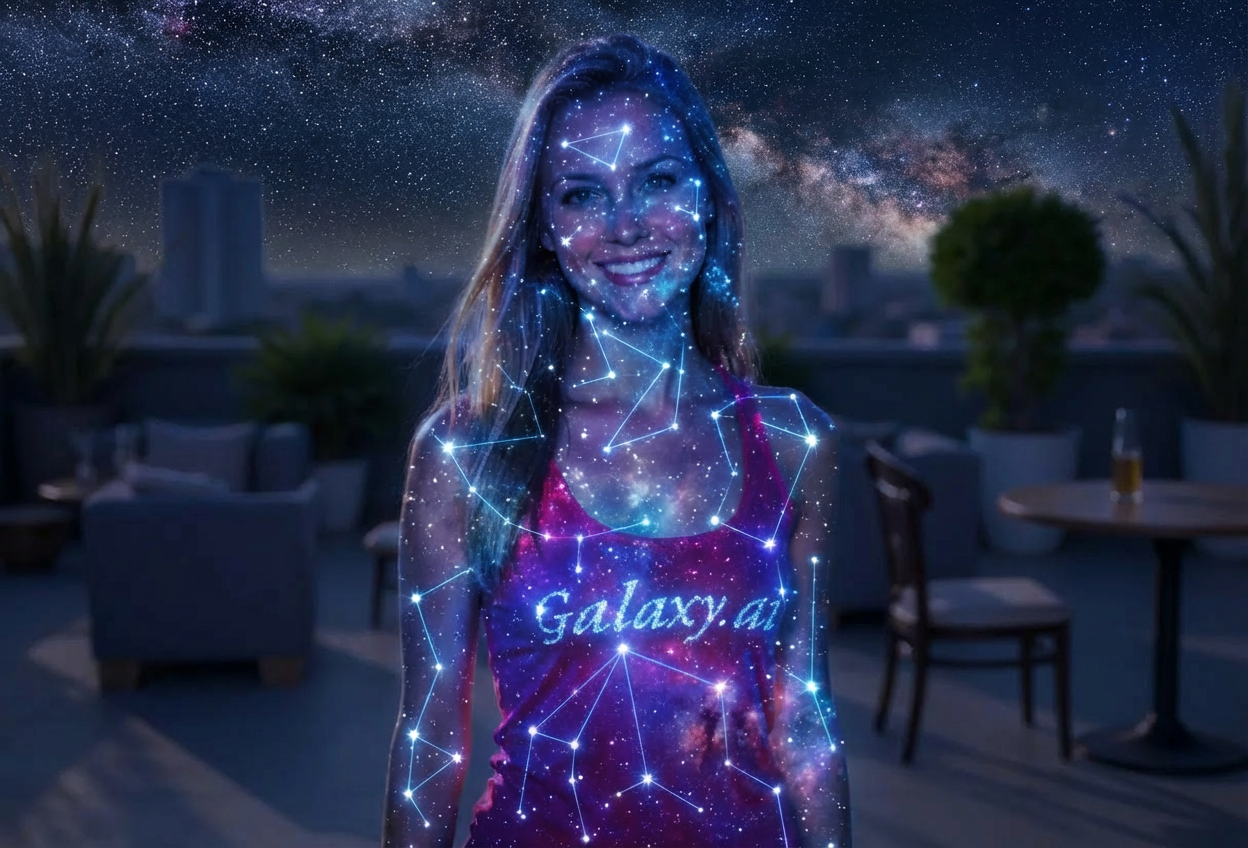
Compare the source image with each finished result.
Source image
Result
What Magica will ask for
The agent gathers these inputs and preferences in the conversation before it starts.
Upload Portrait Photo
attach a photo to apply the constellation filter
Why Choose Our AI Constellation Filter?
Transform your photos into mystical celestial art with our advanced AI. Experience the cosmic beauty of star maps with just one click!
Authentic constellation mapping with connected star points
Ethereal cosmic glow effects
Night sky aesthetic overlay
Maintains photo composition and structure
Instant celestial transformation powered by AI
No design skills required
Perfect for unique profile pictures and cosmic-themed content
How Our AI Constellation Filter Works
Transform into a celestial star map with these simple steps:
01
Attach Your Photo
Select a clear portrait photo where your face is visible. Front-facing shots and upper body portraits work best!
02
Apply the Filter
ask Magica to generate the result and watch as our AI transforms you into a cosmic constellation artwork.
03
Download & Share
Preview your celestial transformation and download your cosmic star map portrait.
Key Features of the AI Constellation Filter
Celestial Star Mapping
Creates authentic constellation patterns with connected star points traced across your portrait, mimicking night sky star charts.
Cosmic Glow Effects
Applies ethereal luminous effects that give your portrait a mystical, otherworldly appearance with celestial radiance.
Smart Feature Detection
Advanced AI accurately maps constellation points along facial contours and body outlines for a natural celestial overlay.
High-Resolution Output
Generates high-quality cosmic portraits perfect for social media, profile pictures, and artistic displays.
Night Sky Aesthetic
Applies deep space color grading with cosmic hues that evoke the beauty of the night sky and distant galaxies.
Instant Processing
Fast AI transformation delivers your celestial portrait in seconds without compromising quality.
Who Can Benefit from the Constellation Filter?
Our AI Constellation Filter is perfect for anyone wanting to create unique, mystical cosmic-themed portraits with celestial aesthetics.
Social Media Enthusiasts
Create stunning cosmic profile pictures and posts that stand out with ethereal celestial aesthetics.
Astrology & Spirituality Fans
Perfect for those interested in celestial themes, astrology, and cosmic spirituality to express their connection to the stars.
Content Creators
Generate unique cosmic-themed content for YouTube, Instagram, TikTok, or other platforms with mystical appeal.
Artists & Designers
Create celestial art references or incorporate constellation aesthetics into creative projects and designs.
Fantasy & Sci-Fi Enthusiasts
Perfect for fans of cosmic themes, space fantasy, and science fiction who want otherworldly portraits.
Gaming Community
Create unique cosmic-themed avatars and profile pictures for gaming profiles with celestial flair.
Tips for the Best Constellation Effect
Tip 1
Use Clear, Well-Lit Photos
Ensure your photo has good lighting and clear visibility for the AI to accurately map constellation points along your features.
Tip 2
Front-Facing Portraits Work Best
Photos where you're facing the camera directly provide the most striking constellation mapping with symmetrical star patterns.
Tip 3
Choose Photos with Defined Outlines
Images with clear body and facial contours allow the AI to create more precise and beautiful constellation line connections.
Tip 4
Higher Resolution Images Yield Better Results
High-quality photos ensure the cosmic glow effects and star points are crisp, detailed, and visually stunning.
Tip 5
Neutral or Mystical Expressions Enhance the Effect
Calm, contemplative, or ethereal expressions complement the celestial aesthetic for a more cohesive cosmic portrait.
Frequently Asked Questions About Our Constellation Filter
How does the constellation mapping work?
Our AI analyzes your portrait and intelligently places star points along key facial features and body contours, then connects them with glowing lines to create an authentic celestial star map overlay that resembles night sky constellations.
What types of photos work best with this filter?
The filter works best on clear portrait photos with good lighting and visible facial features. Front-facing portraits and upper body shots provide the most striking results, though full-body photos can also create beautiful celestial effects.
Will the cosmic effect look natural or artistic?
The constellation filter creates an artistic, mystical effect rather than a realistic look. It's designed to transform your portrait into celestial art with ethereal glow and star map aesthetics, perfect for creative and spiritual expression.
Can I use this for social media profile pictures?
Absolutely! The constellation filter is perfect for creating unique, eye-catching profile pictures for Instagram, Twitter, Facebook, TikTok, and other platforms. The cosmic aesthetic stands out and makes a memorable impression.
Is my photo safe and private when I upload it?
Yes, we prioritize user privacy. Your photos are used only for the constellation transformation process and are not stored long-term or used for other purposes. Your celestial portrait is returned in the conversation for you to save.
What makes this different from other artistic filters?
Unlike generic artistic filters, our constellation filter specifically creates celestial star map patterns with connected points and cosmic glow effects. It's inspired by astronomy and astrology, making it perfect for those who love mystical and celestial themes.
Can I customize the constellation pattern?
The AI automatically generates the optimal constellation pattern based on your portrait's features. While customization isn't available, the AI ensures each transformation is unique and tailored to your specific photo's composition.
Does it work on group photos or just individual portraits?
While the filter works best on individual portraits where facial features are clearly visible, it can also be applied to group photos. However, for the most detailed and striking constellation effects, we recommend individual portraits.