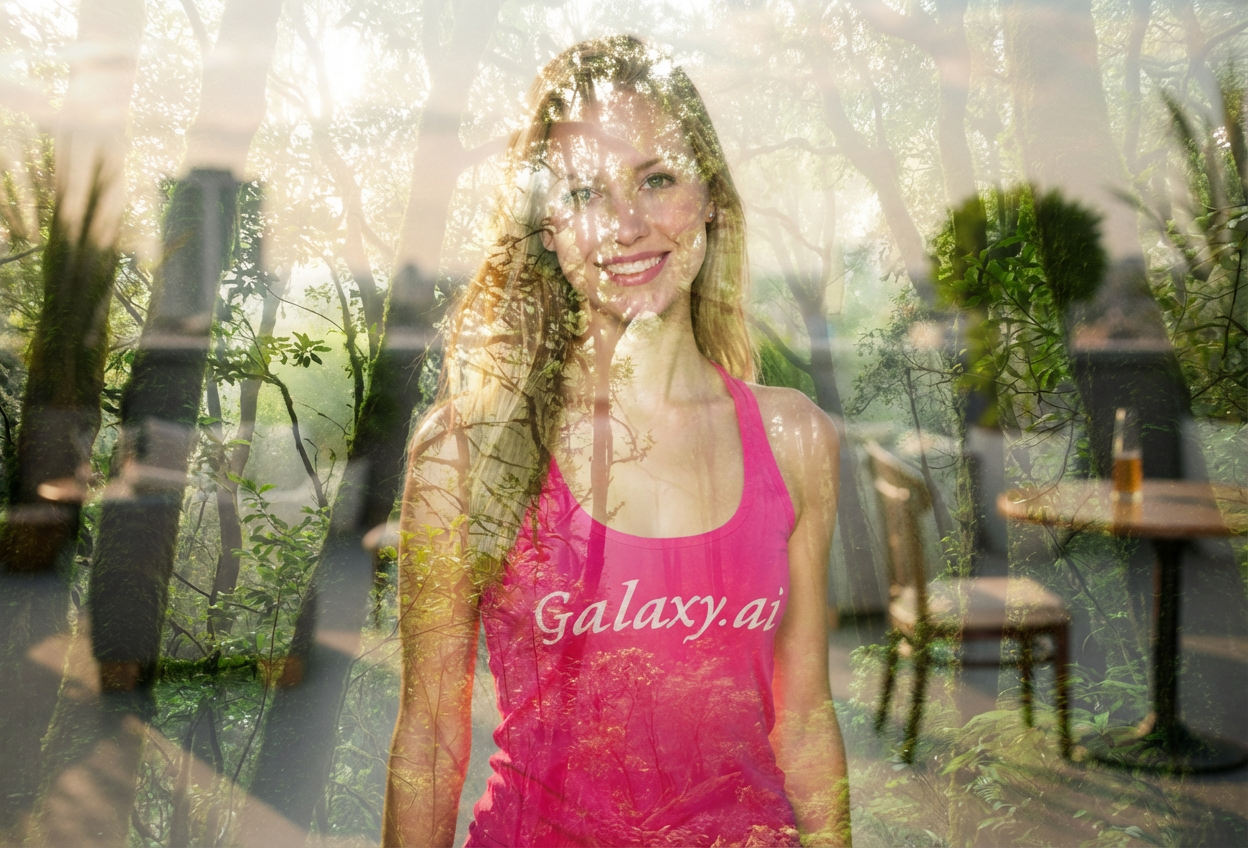
Compare the source image with each finished result.
Source image
Result
What Magica will ask for
The agent gathers these inputs and preferences in the conversation before it starts.
Upload Portrait Photo
attach a photo to apply the filter
Why Choose Our AI Double Exposure Filter?
Create stunning artistic double exposure effects that blend portraits with nature or cityscapes. Transform your photos into captivating visual art with just one click!
Authentic double exposure artistic effect
Seamless blending of portrait and landscape
Professional-quality transparent overlays
Dreamy atmospheric mood creation
Perfect for creative photography
No complex editing skills required
Instant artistic transformation
How Our Double Exposure Filter Works
Create breathtaking double exposure art with these simple steps:
01
Attach Your Photo
Select a clear portrait photo where your face or silhouette is well-defined. High-contrast photos work best!
02
Apply the Filter
ask Magica to generate the result and watch as our AI blends your portrait with beautiful nature or cityscape imagery.
03
Download & Share
Preview your artistic double exposure creation and download your unique artwork.
Key Features of the AI Double Exposure Filter
Seamless Blending
Advanced AI creates natural-looking overlays that perfectly merge portrait and landscape elements.
Artistic Atmosphere
Generates dreamy, ethereal moods that capture the essence of double exposure photography.
Smart Composition
Intelligently positions nature elements to create balanced, visually striking compositions.
Detail Preservation
Maintains portrait clarity while seamlessly integrating landscape imagery for professional results.
Who Can Benefit from the Double Exposure Filter?
Our AI Double Exposure Filter is perfect for anyone seeking creative photography effects popular on social media and artistic portfolios.
Social Media Influencers
Create eye-catching profile pictures and posts that stand out with artistic double exposure effects.
Photographers
Add creative double exposure effects to your portfolio without complex manual editing.
Artists & Designers
Generate unique artistic compositions for creative projects, album covers, or design inspiration.
Content Creators
Produce visually stunning content for YouTube thumbnails, Instagram posts, or blog headers.
Nature Enthusiasts
Blend your portrait with beautiful natural landscapes for unique environmental storytelling.
Marketing Professionals
Create compelling visual content for campaigns, presentations, or brand materials.
Tips for the Best Double Exposure Effect
Tip 1
Use High-Contrast Photos
Photos with clear silhouettes and defined edges create the most striking double exposure effects.
Tip 2
Portrait Clarity is Key
Ensure your face or profile is well-lit and clearly visible for the best blending results.
Tip 3
Simple Backgrounds Work Best
Photos with clean backgrounds allow the AI to create more dramatic and focused double exposure effects.
Tip 4
Profile Shots Create Drama
Side profile or silhouette photos often produce the most artistic and visually stunning results.
Tip 5
Higher Resolution Equals Better Quality
Use high-quality images to ensure both the portrait and landscape elements are crisp and detailed.
Frequently Asked Questions About Our Double Exposure Filter
What is double exposure photography?
Double exposure is an artistic technique where two images are blended together, traditionally done in-camera or darkroom. Our AI recreates this effect by seamlessly merging your portrait with nature or cityscape imagery, creating dreamy, ethereal compositions.
What types of photos work best?
The filter works best on clear portrait photos with good contrast and defined edges. Profile shots, silhouettes, and photos with simple backgrounds produce the most dramatic results. High-resolution images ensure the best quality in the final artwork.
Can I choose what landscape is blended with my portrait?
Currently, the AI automatically selects complementary nature or cityscape elements that create the most aesthetically pleasing composition. The algorithm is trained to produce professional-looking double exposure effects.
Will my photo look natural?
Double exposure is intentionally artistic and surreal rather than realistic. The AI creates a dreamy, ethereal aesthetic where your portrait seamlessly merges with landscape imagery, maintaining a professional artistic quality.
Is this suitable for professional use?
Absolutely! Double exposure effects are popular in professional photography portfolios, album covers, magazine editorials, and creative marketing materials. Our high-quality output is suitable for both personal and commercial projects.
How is my photo data handled?
We prioritize user privacy. Your photos are used only for the transformation process and are not stored long-term or used for other purposes. Your generated artwork is returned in the conversation for you to save.