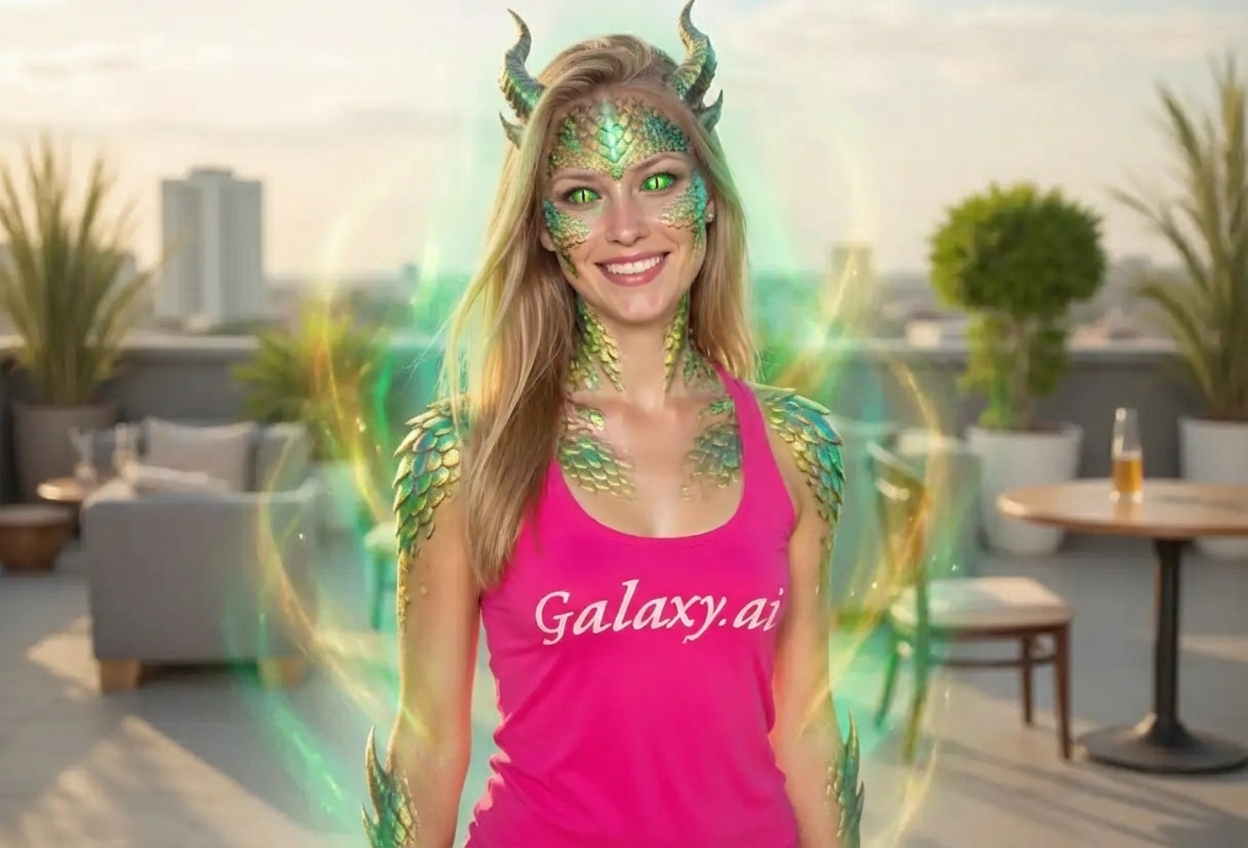
Compare the source image with each finished result.
Source image
Result
What Magica will ask for
The agent gathers these inputs and preferences in the conversation before it starts.
Upload Photos
attach a photo to apply the filter
Why Choose Our AI Dragon Filter?
Transform your photos into mythical dragon portraits with our advanced AI. Experience the power and mystique of legendary dragons with just one click!
Authentic dragon scales and texture
Mystical reptilian eyes with slitted pupils
Natural-looking horns and dragon features
Maintains original photo quality
Instant fantasy transformation powered by AI
No editing skills required
Perfect for fantasy enthusiasts and roleplay
How Our Dragon Filter Works
Transform into a mythical dragon hybrid with these simple steps:
01
Attach Your Photo
Select a clear portrait photo where your face is clearly visible. Front-facing shots with good lighting work best!
02
Apply the Filter
ask Magica to generate the result and watch as our AI transforms you into a mythical dragon creature with scales, horns, and mystical eyes.
03
Download & Share
Preview your dragon transformation and download your fantasy portrait for social media or creative projects.
Key Features of the AI Dragon Filter
Authentic Dragon Scales
Adds realistic dragon scales with natural texture and shimmering effects across the skin.
Mystical Reptilian Eyes
Transforms eyes into striking reptilian features with slitted pupils and captivating colors.
Dragon Horns & Features
Seamlessly adds small horns and other draconic elements while maintaining facial recognition.
Mystical Aura Effect
Creates an enchanting fantasy atmosphere with subtle magical effects and lighting.
Quick Processing
Fast AI transformation delivers high-quality results in seconds.
High-Resolution Output
Generates high-quality images perfect for social media, gaming profiles, and creative projects.
Who Can Benefit from the Dragon Filter?
Our AI Dragon Filter is perfect for anyone who loves fantasy, dragons, and mythical creature transformations.
Fantasy Enthusiasts
Create unique dragon-themed profile pictures and artwork that showcase your love for mythical creatures.
Cosplayers & Roleplayers
Enhance your dragon character photos or preview dragon-themed costume looks for conventions and events.
Content Creators
Generate eye-catching dragon content for YouTube, Twitch, TikTok, and other social platforms.
Gamers
Create epic gaming avatars and profile pictures with dragon features for RPGs and fantasy games.
Artists & Designers
Generate reference images for dragon-human hybrid characters and fantasy artwork.
Social Media Users
Stand out with unique dragon-themed photos that capture attention and express your mythical side.
Tips for the Best Dragon Transformation
Tip 1
Use Clear, Well-Lit Photos
Ensure your face is clearly visible with good lighting for the best dragon feature application and scale details.
Tip 2
Front-Facing Portraits Work Best
Photos where you're looking directly at the camera allow the AI to accurately place dragon scales, eyes, and horns.
Tip 3
Higher Resolution Yields Better Details
Use high-quality photos to ensure dragon scales and mystical eyes are crisp, detailed, and realistic.
Tip 4
Experiment with Different Expressions
Try both neutral and slightly fierce expressions to see which creates the most striking dragon-like appearance.
Tip 5
Solid Backgrounds Work Well
Simple or solid color backgrounds help the dragon features stand out and create a more professional result.
Frequently Asked Questions About Our Dragon Filter
How realistic are the dragon features?
Our AI creates highly realistic dragon transformations by adding authentic scales, reptilian eyes, and horns while maintaining your natural facial structure. The result is a convincing fantasy creature that blends human and dragon characteristics beautifully.
What types of photos work best?
The filter works best on clear, front-facing portrait photos with good lighting. While it can work on various photo types, we recommend individual portraits for the most impressive dragon transformations.
Will I still be recognizable after the transformation?
Yes! The AI is designed to add dragon features while preserving your key facial characteristics, so you'll still be recognizable as yourself with mythical enhancements.
Can I customize the dragon features?
The current filter applies a balanced set of dragon features including scales, reptilian eyes, and horns. The AI automatically adjusts these elements to complement your facial structure for the best results.
Is the dragon filter suitable for all ages?
Yes! The dragon transformation is family-friendly and creates fantasy-themed portraits perfect for all ages. It's a fun way to explore mythical aesthetics for creative projects, social media, or entertainment.
How long does the transformation take?
The dragon transformation typically takes just a few seconds. Our AI processes your photo quickly to deliver high-quality results without long wait times.
Is my photo safe to upload?
We prioritize user privacy. Your photos are used only for the transformation process and are not stored long-term or used for other purposes. The generated dragon portrait is returned in the conversation for you to save.
Can I use the dragon filter for commercial projects?
For commercial usage rights and licensing information, please refer to our terms of service. The filter is perfect for personal use, social media, and creative projects.