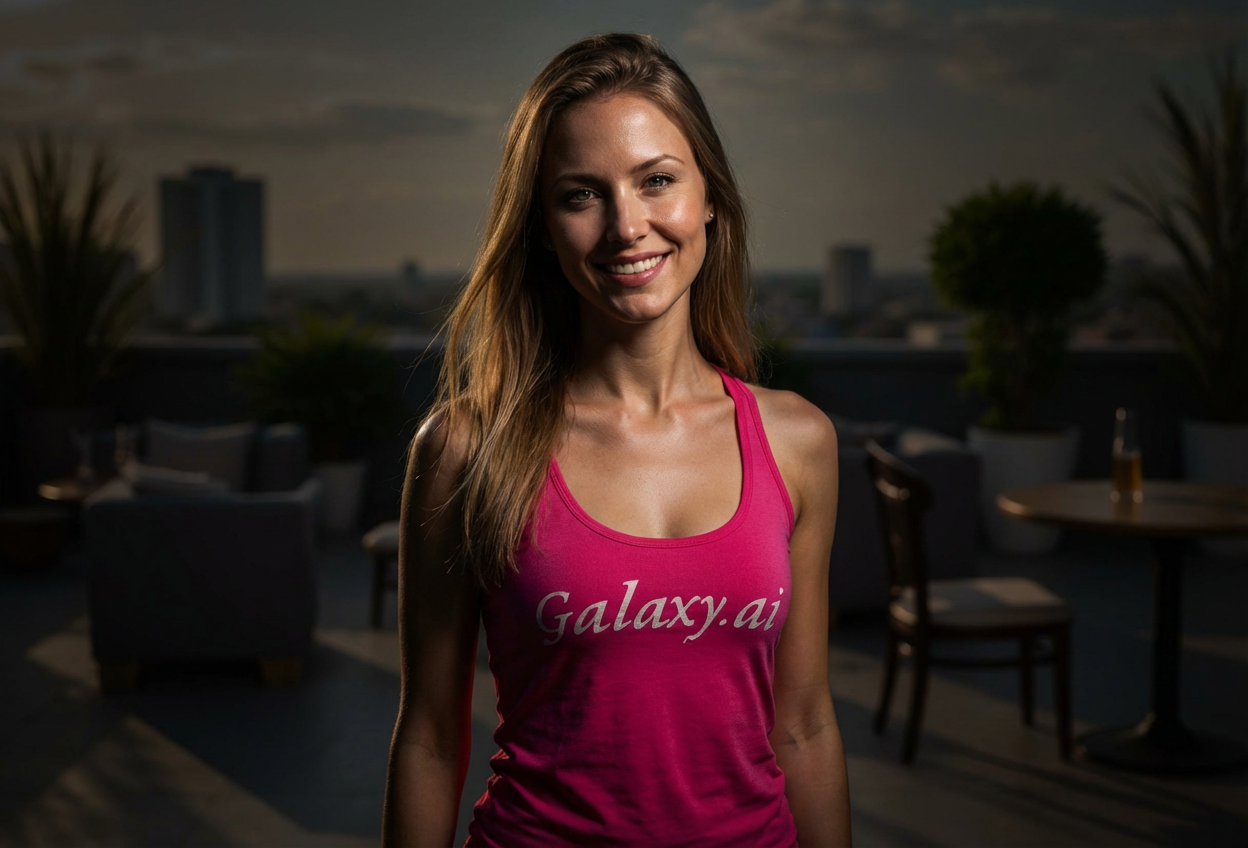
Compare the source image with each finished result.
Source image
Result
What Magica will ask for
The agent gathers these inputs and preferences in the conversation before it starts.
Upload Photos
attach a photo to apply the filter
Why Choose Our AI Dramatic Lighting Filter?
Transform ordinary photos into cinematic masterpieces with professional dramatic lighting. Experience studio-quality chiaroscuro effects without expensive equipment!
Professional cinematic lighting transformation
Strong directional light with deep shadows
Chiaroscuro effect for artistic depth
Moody atmospheric enhancement
Maintains original image quality
No photography equipment needed
Instant results with AI processing
How Our Dramatic Lighting Filter Works
Create professional cinematic lighting in three simple steps:
01
Attach Your Photo
Select any portrait or photo where you want to add dramatic lighting. Photos with clear subjects work best!
02
Apply the Filter
ask Magica to generate the result and watch as our AI transforms your photo with professional dramatic lighting, deep shadows, and cinematic contrast.
03
Download & Share
Preview your dramatically lit photo and download your cinematic masterpiece.
Key Features of the AI Dramatic Lighting Filter
Cinematic Chiaroscuro Lighting
Creates professional dramatic lighting with strong directional light and deep shadows for a cinematic effect.
Smart Subject Recognition
Advanced AI accurately identifies subjects and applies optimal dramatic lighting while preserving important details.
High-Contrast Enhancement
Enhances contrast to create moody, atmospheric photos with professional studio quality.
High-Resolution Output
Delivers high-quality images with dramatic lighting perfect for professional use and social media.
Who Can Benefit from the Dramatic Lighting Filter?
Our AI Dramatic Lighting Filter is perfect for anyone wanting to add professional cinematic quality to their photos without studio equipment.
Photographers
Add cinematic lighting effects to portraits and enhance your photography portfolio with dramatic studio-quality results.
Social Media Enthusiasts
Create eye-catching profile pictures and posts with professional dramatic lighting that stands out.
Content Creators
Generate cinematic content with dramatic lighting for YouTube thumbnails, Instagram posts, and TikTok videos.
Artists & Designers
Enhance artistic projects with dramatic lighting effects and create moody, atmospheric visual content.
Business Professionals
Create professional headshots and portfolio images with cinematic lighting that makes an impression.
Actors & Models
Enhance portfolio photos with dramatic lighting for headshots and professional modeling photos.
Tips for the Best Dramatic Lighting Effect
Tip 1
Use Clear, High-Quality Photos
Start with well-focused photos to ensure the dramatic lighting enhances details rather than obscuring them.
Tip 2
Portrait Photos Work Best
Photos with clear subjects, especially portraits, allow the dramatic lighting to create the most striking chiaroscuro effects.
Tip 3
Consider Your Subject's Position
Photos where the subject is well-positioned allow the AI to apply more effective directional lighting and shadow placement.
Tip 4
Higher Resolution is Better
Use high-quality images to ensure the dramatic lighting effects are crisp and the contrast is well-defined.
Tip 5
Experiment with Different Photos
Try the filter on various types of photos - portraits, product shots, and artistic photos all benefit from dramatic lighting in different ways.
Frequently Asked Questions About Our Dramatic Lighting Filter
How realistic is the dramatic lighting effect?
Our AI creates highly realistic dramatic lighting by analyzing your photo and applying professional studio-quality directional light, deep shadows, and cinematic contrast. The result mimics what you would achieve with expensive lighting equipment and professional photography skills.
What types of photos work best with dramatic lighting?
The filter works best on portraits, headshots, and photos with clear subjects. While it can enhance any photo, images with distinct subjects and good base lighting will produce the most dramatic and professional results.
Will the dramatic lighting look natural?
Yes! Our AI is trained to apply dramatic lighting in a way that looks natural and professional, similar to studio photography. The chiaroscuro effect creates artistic depth while maintaining the integrity of your original photo.
Can I use this for professional photography?
Absolutely! The dramatic lighting filter produces high-resolution, professional-quality results perfect for portfolios, headshots, social media, marketing materials, and any professional photography needs.
Is my photo safe to upload?
We prioritize user privacy. Your photos are used only for the transformation process and are not stored long-term or used for other purposes. The generated dramatically lit photo is returned in the conversation for you to save.
Do I need photography experience to use this filter?
Not at all! That's the beauty of this AI filter - it brings professional cinematic lighting to anyone, regardless of photography experience or access to studio equipment. Just attach your photo and let the AI do the work.
What is chiaroscuro lighting?
Chiaroscuro is an artistic technique using strong contrasts between light and dark to create dramatic, three-dimensional effects. Our filter applies this classic cinematic lighting style to your photos automatically.
Can I adjust the intensity of the dramatic lighting?
The filter applies optimal dramatic lighting based on your photo's content. For best results, the AI analyzes your image and applies the appropriate level of contrast and shadow depth to achieve a professional cinematic look.