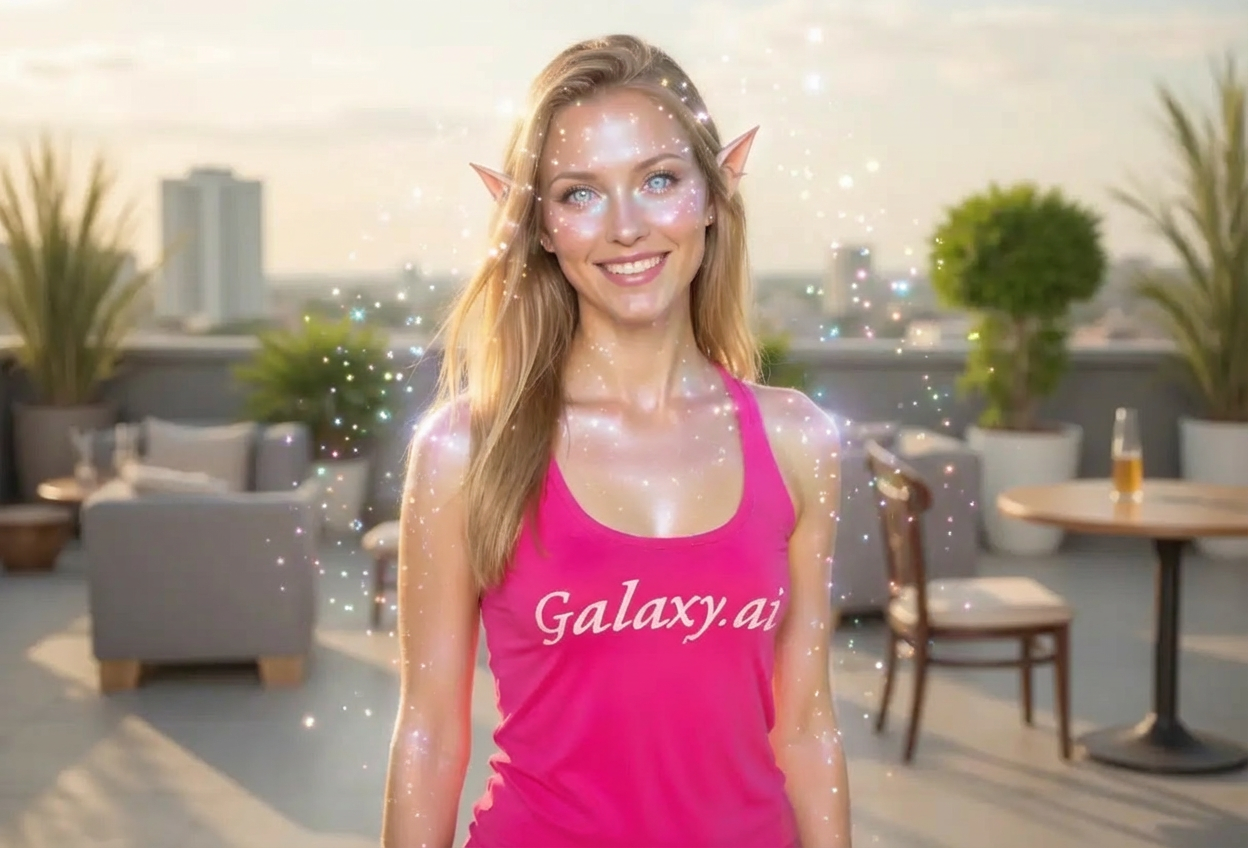
Compare the source image with each finished result.
Source image
Result
What Magica will ask for
The agent gathers these inputs and preferences in the conversation before it starts.
Upload Photos
attach a photo to apply the filter
Why Choose Our AI Faerie Filter?
Transform your photos into enchanting fairy portraits with our advanced AI. Experience the magic of the fae realm with delicate features and ethereal beauty!
Authentic fairy features including pointed ears
Luminous, otherworldly skin with subtle glow
Enchanting eye transformations with magical sparkle
Soft iridescent color tones and effects
Maintains original photo quality and composition
Instant magical transformation powered by AI
No editing skills or software required
Perfect for fantasy enthusiasts and creative projects
How Our AI Faerie Filter Works
Transform into a mystical fairy creature with these simple steps:
01
Attach Your Photo
Select a clear portrait photo where your face is well-lit and visible. Outdoor lighting works beautifully for fairy transformations!
02
Apply the Filter
ask Magica to generate the result and watch as our AI adds delicate fairy features, magical sparkles, and ethereal beauty to your image.
03
Download & Share
Preview your enchanting faerie transformation and download your magical portrait to share with the world.
Key Features of the AI Faerie Filter
Magical Fairy Features
Adds authentic fairy characteristics including pointed ears, luminous skin, and enchanting eyes with otherworldly beauty.
Ethereal Effects
Applies soft glowing effects, sparkles, and iridescent tones that create a truly magical and whimsical appearance.
Natural-Looking Transformation
Maintains your facial features while seamlessly blending fairy elements for a believable yet fantastical result.
High-Quality Output
Delivers stunning, high-resolution images perfect for social media, creative projects, or personal collections.
Who Can Benefit from the AI Faerie Filter?
Our AI Faerie Filter is perfect for anyone who loves fantasy, magic, and whimsical transformations.
Fantasy Enthusiasts
Create magical fairy portraits that bring your love of fantasy to life with authentic fae features.
Social Media Creators
Generate enchanting profile pictures and posts that capture attention with mystical, otherworldly beauty.
Cosplayers & Fantasy Fans
Visualize fairy costume ideas or enhance your fantasy character photos with magical effects.
Artists & Illustrators
Generate reference images for fairy-themed artwork, character designs, or fantasy illustrations.
Event & Party Planners
Create whimsical promotional materials for fairy-themed parties, fantasy events, or magical celebrations.
Dreamers & Romantics
Experience the magic of transformation and fulfill your fantasy of becoming a mystical fairy creature.
Tips for the Best Faerie Transformation
Tip 1
Use Soft, Natural Lighting
Photos with soft, natural lighting work best for fairy transformations, creating a more ethereal and magical appearance.
Tip 2
Choose Clear Portrait Photos
Front-facing portraits where your face is clearly visible produce the most detailed and enchanting fairy features.
Tip 3
Outdoor Photos Work Beautifully
Nature backgrounds complement the fairy aesthetic perfectly, though the filter works well with any background.
Tip 4
Soft Expressions Enhance the Magic
A gentle smile or serene expression helps create that delicate, mystical fairy look that's truly enchanting.
Tip 5
High-Resolution Images Yield Better Results
Better quality input photos ensure crisp, detailed fairy features including pointed ears and luminous skin effects.
Frequently Asked Questions About Our AI Faerie Filter
What fairy features does the filter add?
The AI adds authentic fairy characteristics including delicately pointed ears, luminous glowing skin, otherworldly sparkles in the eyes, and subtle iridescent tones. The transformation creates an ethereal, magical appearance while maintaining your recognizable features.
Will the transformation look natural or overly edited?
Our AI creates a balanced transformation that blends fairy features seamlessly with your natural appearance. The result is magical yet believable, with delicate enhancements rather than harsh or artificial-looking edits.
Can I use this filter for cosplay reference photos?
Absolutely! The Faerie Filter is perfect for visualizing fairy costumes, creating character references, or enhancing existing cosplay photos with magical effects and fairy features.
What types of photos work best with the Faerie Filter?
The filter works best on clear portrait photos with good lighting. Outdoor photos with natural lighting are particularly effective, though any well-lit portrait will produce beautiful results. Front-facing poses capture the most detail in fairy features.
Is this suitable for professional creative projects?
Yes! The high-resolution output is perfect for professional use in fantasy-themed projects, book covers, character designs, marketing materials, or any creative work requiring fairy or fantasy imagery.
How is my photo privacy protected?
We prioritize user privacy and security. Your uploaded photos are used solely for the transformation process and are not stored long-term or shared. The generated fairy portrait is yours to download and use as you wish.
Does it work on photos of all ages and genders?
Yes! The AI adapts the fairy features appropriately for any subject, creating age-appropriate and naturally fitting transformations that respect the original photo while adding enchanting fairy elements.
Can I use the transformed images on social media?
Absolutely! The transformed images are perfect for social media profiles, posts, and creative content. Many users love sharing their magical fairy transformations on Instagram, TikTok, and other platforms.