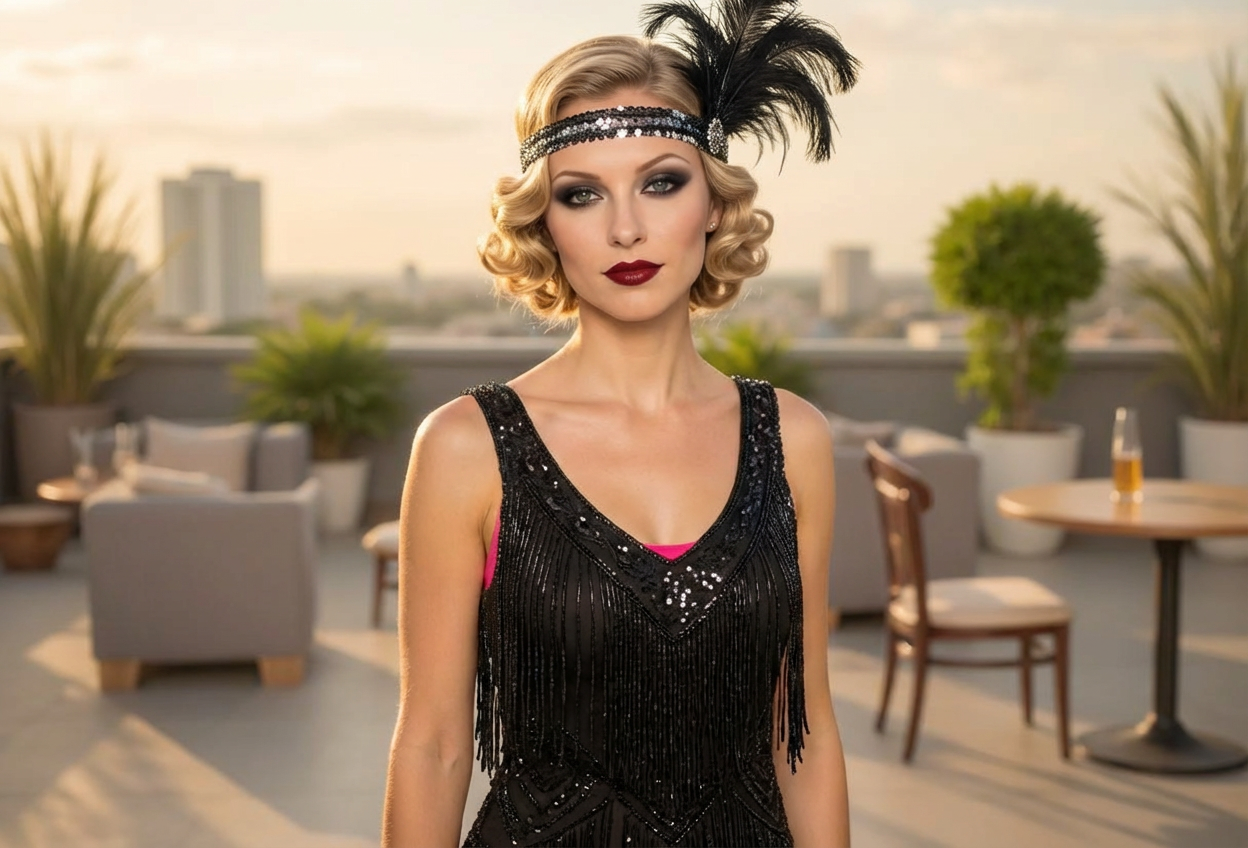
Compare the source image with each finished result.
Source image
Result
What Magica will ask for
The agent gathers these inputs and preferences in the conversation before it starts.
Upload Portrait Photo
attach a photo to apply the filter
Why Choose Our AI Flapper Filter?
Transform your photos into stunning 1920s flapper portraits with our advanced AI. Experience the glamour and sophistication of the Jazz Age with just one click!
Authentic 1920s flapper transformation
Signature finger wave hairstyles
Dramatic period-accurate makeup
Art deco headpieces and accessories
Maintains original photo quality
Instant transformation powered by AI
No editing skills required
Perfect for vintage-themed events and social media
How Our Flapper Filter Works
Step back into the Roaring Twenties with these simple steps:
01
Attach Your Photo
Select a clear portrait photo where your face is clearly visible. Front-facing shots with good lighting work best!
02
Apply the Filter
ask Magica to generate the result and watch as our AI transforms you into a glamorous 1920s flapper with finger waves, dramatic makeup, and art deco elegance.
03
Download & Share
Preview your flapper transformation and download your stunning Jazz Age portrait to share on social media.
Key Features of the AI Flapper Filter
Authentic Flapper Transformation
Creates genuine 1920s flapper style with characteristic finger waves, dramatic makeup, and period-accurate accessories.
Signature Finger Wave Hairstyle
Our AI accurately recreates the iconic S-shaped finger wave hairstyle that defined the flapper era.
Period-Accurate Makeup
Applies dramatic 1920s makeup including defined eyebrows, bold dark lips, and smoky eyes characteristic of the era.
Art Deco Accessories
Adds feather headpieces, decorative headbands, and art deco elements that complete the flapper look.
High-Resolution Output
Generates high-quality images perfect for social media, vintage events, and creative projects.
Jazz Age Elegance
Captures the sophisticated glamour and rebellious spirit of the Roaring Twenties.
Who Can Benefit from the Flapper Filter?
Our AI Flapper Filter is perfect for anyone wanting to experience the glamour of the 1920s or create unique vintage-themed content.
Vintage Fashion Enthusiasts
Create stunning 1920s-style profile pictures and explore the iconic flapper aesthetic.
Gatsby Party Attendees
Perfect your look for 1920s themed parties, Great Gatsby events, and vintage celebrations.
Social Media Content Creators
Generate eye-catching vintage content that stands out on Instagram, TikTok, and other platforms.
History & Culture Lovers
Visualize yourself in the Roaring Twenties and experience the glamorous Jazz Age aesthetic.
Performers & Entertainers
Create promotional materials for jazz performances, theater productions, and vintage-themed shows.
Event Planners
Generate promotional content for 1920s themed events, weddings, and vintage parties.
Tips for the Best Flapper Transformation
Tip 1
Use Clear, Well-Lit Photos
Ensure your face is clearly visible and well-lit for the best transformation. Natural lighting works beautifully for capturing the glamorous details.
Tip 2
Front-Facing Portraits Work Best
Photos where you're looking directly at the camera provide the most accurate flapper transformations and showcase the finger wave hairstyle effectively.
Tip 3
Higher Resolution is Better
Use high-quality photos to ensure the intricate details of the finger waves, makeup, and accessories are crisp and authentic.
Tip 4
Try Different Expressions
A slight smile or confident expression captures the bold, sophisticated spirit of 1920s flappers perfectly.
Tip 5
Consider Your Background
Simple or neutral backgrounds help the flapper transformation stand out and create a more polished vintage portrait.
Frequently Asked Questions About Our Flapper Filter
How authentic is the 1920s flapper transformation?
Our AI creates highly authentic flapper transformations by incorporating historically accurate elements including finger wave hairstyles, period-appropriate makeup with defined eyebrows and bold lips, and art deco accessories. The result is a genuine representation of the iconic Jazz Age aesthetic.
What types of photos work best with the flapper filter?
The filter works best on clear, front-facing portrait photos with good lighting. Photos where the face is fully visible and well-lit produce the most stunning transformations. While it can work on various photo types, we recommend individual portraits for the best flapper results.
Will the transformation include the signature finger wave hairstyle?
Yes! The filter automatically adds the iconic S-shaped finger wave hairstyle that was the defining characteristic of 1920s flappers, along with feather headpieces or decorative headbands to complete the look.
Can I use this for themed events and parties?
Absolutely! The flapper filter is perfect for Great Gatsby parties, 1920s themed weddings, vintage events, and any occasion where you want to capture the glamour of the Roaring Twenties. Many users create their transformed photos before events to see their vintage look.
Will the transformation look natural and elegant?
Yes, our AI is trained to maintain natural-looking features while applying the flapper aesthetic. The result is a sophisticated blend that captures the elegance and glamour of the 1920s while preserving your facial characteristics.
What happens to my uploaded photos?
We prioritize user privacy. Your photos are used only for the transformation process and are not stored long-term or used for other purposes. The generated flapper portrait is returned in the conversation for you to save.
Does the filter work for all ages and genders?
Yes! The AI adapts the flapper style appropriately, creating authentic Jazz Age transformations regardless of age or gender. The filter applies period-accurate styling while maintaining the natural essence of your photo.
Can I use the transformed images commercially?
The images you generate are yours to download and use. For specific commercial licensing questions, please refer to our terms of service or contact our support team for detailed information about usage rights.