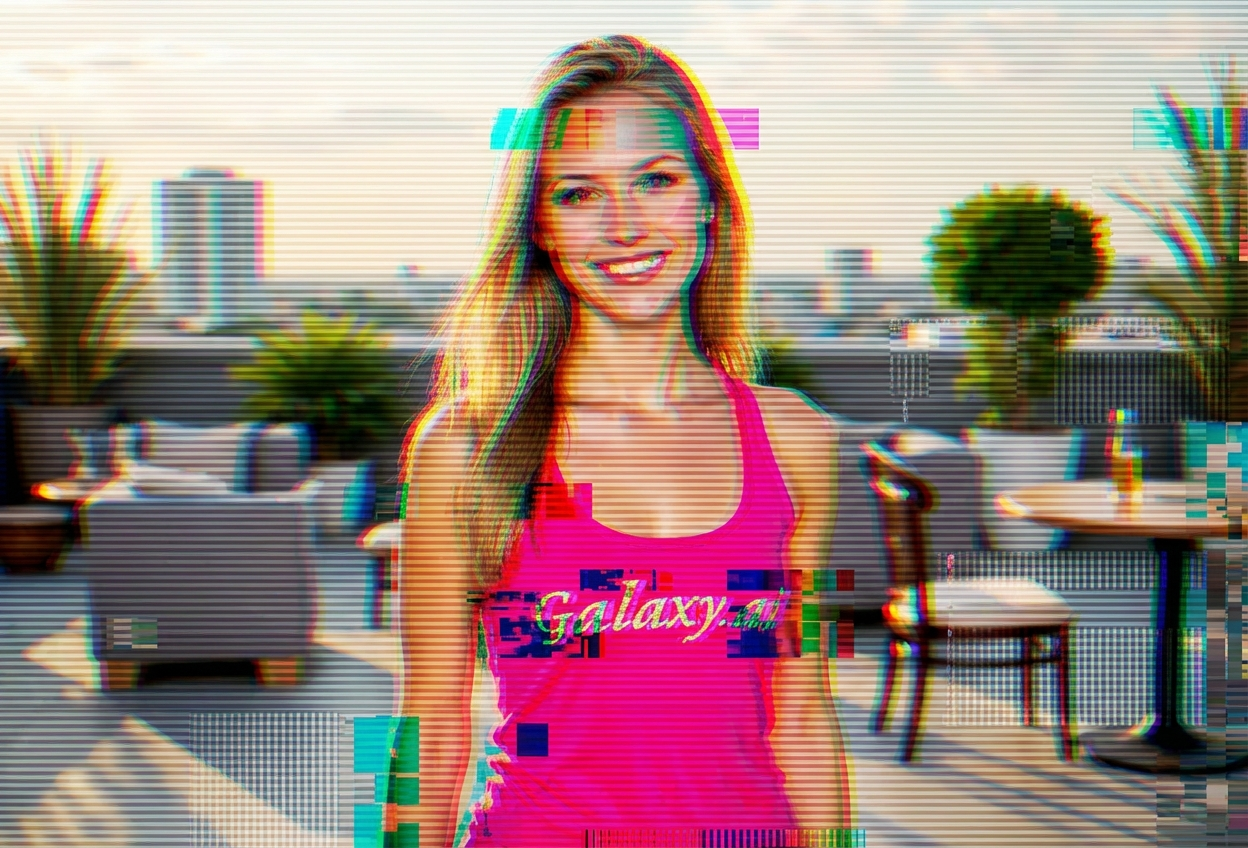
Compare the source image with each finished result.
Source image
Result
What Magica will ask for
The agent gathers these inputs and preferences in the conversation before it starts.
Upload Photos
attach a photo to apply the filter
Why Choose Our AI Glitch Art Filter?
Transform your photos into edgy digital art with our advanced AI. Experience the power of cyberpunk aesthetics and modern glitch effects with just one click!
Authentic digital glitch effects and distortions
RGB color shifts and chromatic aberration
Pixelation and scanline artifacts
Maintains original photo composition
Instant transformation powered by AI
No editing skills required
Perfect for cyberpunk and vaporwave aesthetics
How Our Glitch Art Filter Works
Transform your photos into glitched digital art with these simple steps:
01
Attach Your Photo
Select any photo you want to transform. Clear, high-contrast images work best for striking glitch effects!
02
Apply the Filter
ask Magica to generate the result and watch as our AI transforms your photo with digital glitches, color distortion, and cyberpunk aesthetics.
03
Download & Share
Preview your glitch art transformation and download your edgy digital masterpiece.
Key Features of the AI Glitch Art Filter
Authentic Digital Glitches
Creates genuine digital corruption effects including pixel distortion, scanlines, and data artifacts.
RGB Color Shift
Advanced chromatic aberration and color channel separation for that classic glitch aesthetic.
Smart Feature Preservation
AI intelligently applies glitch effects while maintaining recognizable composition and subject matter.
High-Resolution Output
Generates high-quality glitch art perfect for social media, album covers, and digital artwork.
Who Can Benefit from the Glitch Art Filter?
Our AI Glitch Art Filter is perfect for anyone wanting to create edgy, cyberpunk-inspired digital art or explore modern aesthetic trends.
Social Media Influencers
Create eye-catching glitch art profile pictures and posts that stand out in feeds.
Music Artists & DJs
Generate glitched visuals for album covers, promotional materials, and event posters.
Content Creators
Produce unique cyberpunk and vaporwave content for YouTube, TikTok, and streaming platforms.
Gaming Streamers
Create glitched overlays, thumbnails, and branding materials with a digital edge.
Digital Artists
Generate glitch art references and explore digital corruption as an artistic medium.
Video Editors
Create glitched stills for video projects, transitions, and cyberpunk-themed content.
Tips for the Best Glitch Art Effects
Tip 1
Use High-Contrast Photos
Images with strong contrasts between light and dark areas create more dramatic glitch effects.
Tip 2
Bold Colors Work Best
Photos with vibrant colors produce more striking RGB shift and chromatic aberration effects.
Tip 3
Try Different Compositions
Both portraits and landscapes can create unique glitch art - experiment to find your perfect aesthetic.
Tip 4
Higher Resolution is Better
Use high-quality photos to ensure glitch effects are crisp and detailed, especially for printing.
Tip 5
Embrace the Unexpected
Glitch art thrives on digital chaos - each transformation creates unique, unpredictable results.
Frequently Asked Questions About Our Glitch Art Filter
What is glitch art?
Glitch art is a digital art form that embraces technological errors and digital corruption. Our AI creates authentic glitch effects including RGB color shifts, pixelation, scanlines, and data artifacts that mimic digital malfunctions.
Does it work on all types of photos?
Yes! The filter works on any photo, but images with high contrast and vibrant colors produce the most striking results. Both portraits and landscapes can create stunning glitch art.
Can I control the intensity of the glitch effects?
Our AI applies carefully balanced glitch effects that maintain visual interest while keeping your subject recognizable. Each transformation creates a unique result with varied glitch patterns.
Is the glitch art style good for social media?
Absolutely! Glitch art is hugely popular on Instagram, TikTok, and Twitter. The edgy, cyberpunk aesthetic stands out in feeds and is perfect for music artists, gamers, and digital creators.
Will my photo still be recognizable?
Yes, our AI intelligently applies glitch effects while preserving the core composition and subject matter. The result is a perfect balance between digital corruption and visual clarity.
What happens to my uploaded photos?
We prioritize user privacy. Your photos are used only for the transformation process and are not stored long-term or used for other purposes. The generated glitch art is returned in the conversation for you to save.
Can I use this for commercial projects?
Yes! You can use your glitch art creations for album covers, promotional materials, social media content, and other commercial projects. The artwork you generate is yours to use.
How is this different from photo editing apps?
Our AI creates authentic, complex glitch effects that would take hours to achieve manually in traditional photo editors. It intelligently applies multiple distortion techniques simultaneously for professional results.