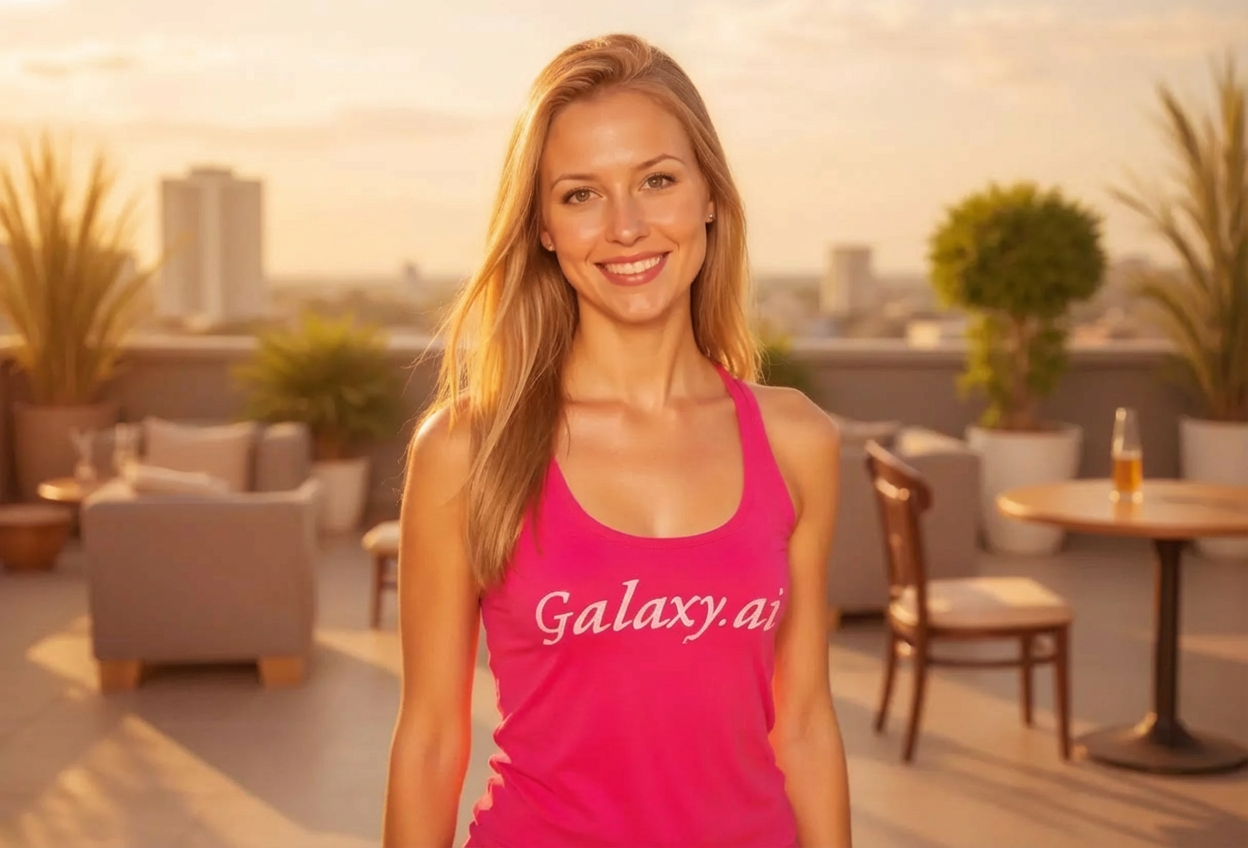
Compare the source image with each finished result.
Source image
Result
What Magica will ask for
The agent gathers these inputs and preferences in the conversation before it starts.
Upload Photos
attach a photo to apply the filter
Why Choose Our AI Golden Hour Filter?
Transform your photos with the most flattering natural lighting, available any time of day. Experience the warm, magical glow of golden hour with just one click!
Authentic golden hour warm lighting effect
Soft, flattering glow on skin tones
Enhanced warm color palette with sunset tones
Maintains original photo quality and details
Perfect for any time of day or weather
Instant transformation powered by AI
No photography skills or special equipment required
How Our Golden Hour Filter Works
Add magical golden hour lighting to your photos in three simple steps:
01
Attach Your Photo
Select any photo you want to enhance. Outdoor portraits, landscapes, and lifestyle shots work beautifully!
02
Apply the Filter
ask Magica to generate the result and watch as our AI transforms your photo with warm golden hour lighting and dreamy sunset ambiance.
03
Download & Share
Preview your golden hour transformation and download your beautifully lit photo ready for social media.
Key Features of the AI Golden Hour Filter
Authentic Golden Hour Lighting
Recreates the warm, flattering light of sunset's golden hour with realistic color temperature and soft shadows.
Magical Golden Glow
Adds a dreamy, ethereal quality to your photos with warm golden tones that enhance skin tones and create atmosphere.
Smart Lighting Enhancement
Advanced AI analyzes your photo and applies golden hour effects naturally, preserving important details and composition.
High-Resolution Output
Generates stunning high-quality images perfect for social media, prints, and professional portfolios.
Instant Results
Get professional-looking golden hour photos in seconds without waiting for the perfect time of day or weather conditions.
Who Can Benefit from the Golden Hour Filter?
Our AI Golden Hour Filter is perfect for anyone wanting to add the most flattering natural lighting to their photos without waiting for sunset.
Social Media Enthusiasts
Create stunning, eye-catching posts with warm golden hour lighting that boosts engagement and likes.
Photographers
Save photos taken at any time of day by adding the coveted golden hour look without reshoots.
Content Creators
Generate consistent, beautifully lit content for Instagram, TikTok, and YouTube regardless of shooting conditions.
Wedding & Event Photographers
Enhance portraits and event photos with romantic golden hour lighting, even for indoor or midday shots.
Travel Bloggers
Make your travel photos stand out with warm, inviting golden hour tones that capture the magic of each destination.
Portrait Enthusiasts
Achieve flattering, soft lighting on portraits that makes skin glow and creates a dreamy atmosphere.
Tips for the Best Golden Hour Effect
Tip 1
Outdoor Photos Work Best
Photos taken outdoors benefit most from golden hour transformation, as the filter enhances natural lighting and sky colors.
Tip 2
Choose Well-Exposed Photos
Start with photos that aren't too dark or overexposed for the best golden hour transformation results.
Tip 3
Portraits Benefit from Front or Side Lighting
Photos where the subject faces toward the light source create the most flattering golden hour glow effect.
Tip 4
Include Some Sky When Possible
Photos with visible sky or background allow the filter to create more dramatic sunset color transformations.
Tip 5
Use High-Quality Images
Higher resolution photos allow the AI to add more detailed golden hour lighting effects and preserve texture quality.
Frequently Asked Questions About Our Golden Hour Filter
What is golden hour lighting?
Golden hour is the period shortly after sunrise or before sunset when the sun is low on the horizon, creating warm, soft, diffused light that's universally flattering. Our AI recreates this coveted lighting effect on any photo taken at any time of day.
Will the filter work on indoor photos?
Yes! While the filter works best on outdoor photos, it can add warm, golden tones to indoor photos as well. The effect will be most noticeable on photos with natural light sources like windows.
Can I use this on photos taken at noon or on cloudy days?
Absolutely! That's the beauty of this filter - it transforms harsh midday lighting or flat overcast conditions into beautiful golden hour warmth. It's perfect for 'saving' photos taken in less-than-ideal lighting.
Will it look natural or artificial?
Our AI is trained to apply golden hour effects naturally, maintaining realistic color gradients and lighting. The result looks like your photo was genuinely taken during golden hour, not obviously filtered.
Does it work on landscapes and not just portraits?
Yes! The golden hour filter works beautifully on all types of photos - portraits, landscapes, cityscapes, still life, and more. Any scene benefits from the warm, magical lighting of golden hour.
Will it change my photo's composition or crop it?
No, the filter only enhances the lighting and color tones. Your original composition, framing, and subject remain unchanged - we only add that magical golden hour glow.
Is my uploaded photo safe and private?
Yes, we prioritize user privacy. Your photos are used only for the transformation process and are not stored long-term or used for other purposes. Your golden hour photos are returned in the conversation for you to save.
Can I use the transformed photos commercially?
If you own the rights to the original photo, you retain all rights to the golden hour filtered version. Perfect for professional portfolios, client work, and commercial social media content.