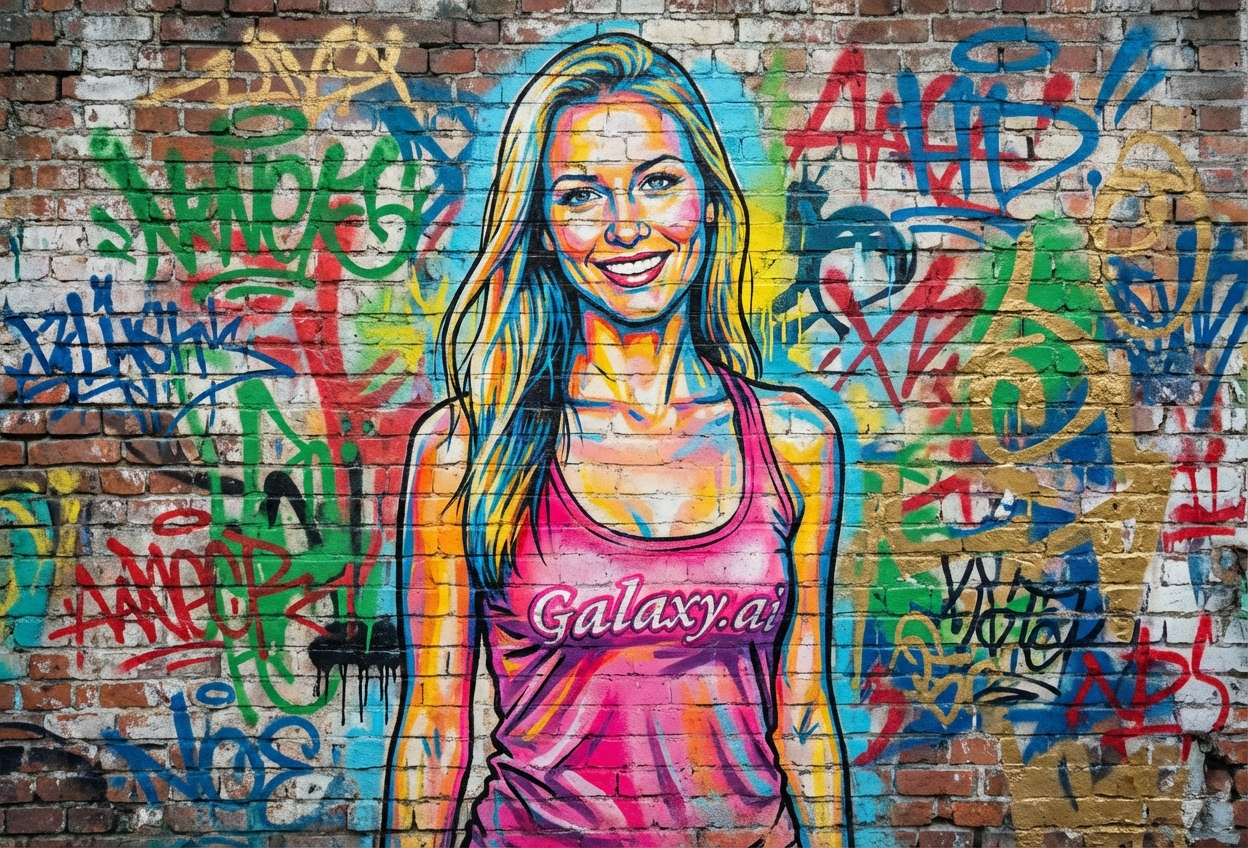
Compare the source image with each finished result.
Source image
Result
What Magica will ask for
The agent gathers these inputs and preferences in the conversation before it starts.
Upload Portrait Photo
attach a photo to apply the graffiti art filter
Why Choose Our AI Graffiti Art Filter?
Transform your photos into stunning street art graffiti with our advanced AI. Experience the vibrant energy of urban art culture with just one click!
Authentic street art graffiti transformation
Vibrant colors and spray paint texture effects
Realistic brick wall background integration
Bold outlines and urban aesthetic
Maintains portrait recognition while adding artistic style
Instant results powered by AI
No artistic skills required
Perfect for social media and creative projects
How Our Graffiti Art Filter Works
Transform into vibrant street art with these simple steps:
01
Attach Your Photo
Select a clear portrait photo where your face is clearly visible. Front-facing shots with good lighting work best!
02
Apply the Filter
ask Magica to generate the result and watch as our AI transforms your portrait into colorful graffiti art on a brick wall.
03
Download & Share
Preview your street art transformation and download your unique graffiti-style portrait.
Key Features of the AI Graffiti Art Filter
Vibrant Urban Colors
Applies authentic spray paint colors and street art aesthetics with bold, eye-catching hues.
Smart Portrait Recognition
Advanced AI accurately identifies facial features and transforms them into graffiti art while maintaining recognition.
Authentic Spray Paint Texture
Recreates realistic spray paint effects including drips, texture, and layered paint characteristic of street art.
High-Quality Output
Generates high-resolution graffiti art perfect for printing, social media, and creative projects.
Brick Wall Integration
Seamlessly places your graffiti portrait on an authentic urban brick wall background.
Instant Transformation
Quick AI processing delivers your graffiti art portrait in seconds, no manual editing required.
Who Can Benefit from the Graffiti Art Filter?
Our AI Graffiti Art Filter is perfect for anyone wanting to embrace urban street art culture and create unique, edgy visual content.
Social Media Influencers
Create bold, eye-catching profile pictures and posts that stand out in feeds and attract younger audiences.
Content Creators
Generate unique graffiti-style thumbnails, channel art, and creative content for YouTube, TikTok, and Instagram.
Artists & Designers
Experiment with street art styles or generate reference images for urban art projects and designs.
Hip-Hop & Urban Culture Fans
Express your connection to street culture and hip-hop aesthetics with graffiti-style portraits.
Brand Marketers
Create edgy, youth-oriented marketing materials and campaigns that resonate with urban demographics.
Event Promoters
Generate street art-style promotional materials for music festivals, art shows, and urban events.
Tips for the Best Graffiti Art Transformation
Tip 1
Use Clear, Contrasted Photos
Photos with good contrast and clear facial features translate better into bold graffiti art with defined outlines.
Tip 2
Front-Facing Portraits Work Best
Direct-facing portraits create the most impactful graffiti art, similar to classic street art murals.
Tip 3
Well-Lit Photos Enhance Color Vibrancy
Good lighting ensures your graffiti transformation has vibrant, eye-catching colors characteristic of street art.
Tip 4
Expressive Faces Create Dynamic Art
Strong expressions or confident poses result in more engaging and powerful graffiti portraits.
Tip 5
High-Resolution for Print Quality
Use high-quality photos if you plan to print your graffiti art for posters or physical displays.
Frequently Asked Questions About Our Graffiti Art Filter
How authentic is the graffiti art style?
Our AI creates highly authentic graffiti art by analyzing real street art characteristics including spray paint texture, bold outlines, vibrant colors, and brick wall integration. The result captures the essence of urban wall murals.
Can I customize the colors or style?
The filter automatically selects vibrant, street art-appropriate colors that complement your photo. The AI is trained on authentic graffiti art to ensure the color palette and style match real urban murals.
What types of photos work best?
The filter works best on clear portrait photos with good lighting and contrast. Front-facing portraits create the most impactful graffiti art, though side profiles can also produce interesting results.
Will my portrait still be recognizable?
Yes! Our AI maintains facial recognition while applying the graffiti art style. You'll be recognizable as yourself, just transformed into vibrant street art with spray paint aesthetics.
Can I use this for commercial projects?
Yes, the graffiti art you create is yours to use. It's perfect for social media, marketing materials, event promotions, album covers, and other creative projects.
Does it work on group photos?
While the filter can work on group photos, it's optimized for individual portraits where each person's features can be clearly transformed into distinct graffiti art elements.
Is my photo kept private?
We prioritize user privacy. Your photos are used only for the transformation process and are not stored long-term or used for other purposes. Your graffiti art is returned in the conversation for you to save.
What resolution is the output?
The filter generates high-resolution graffiti art suitable for social media, printing, and professional use. The output maintains quality for both digital and physical applications.