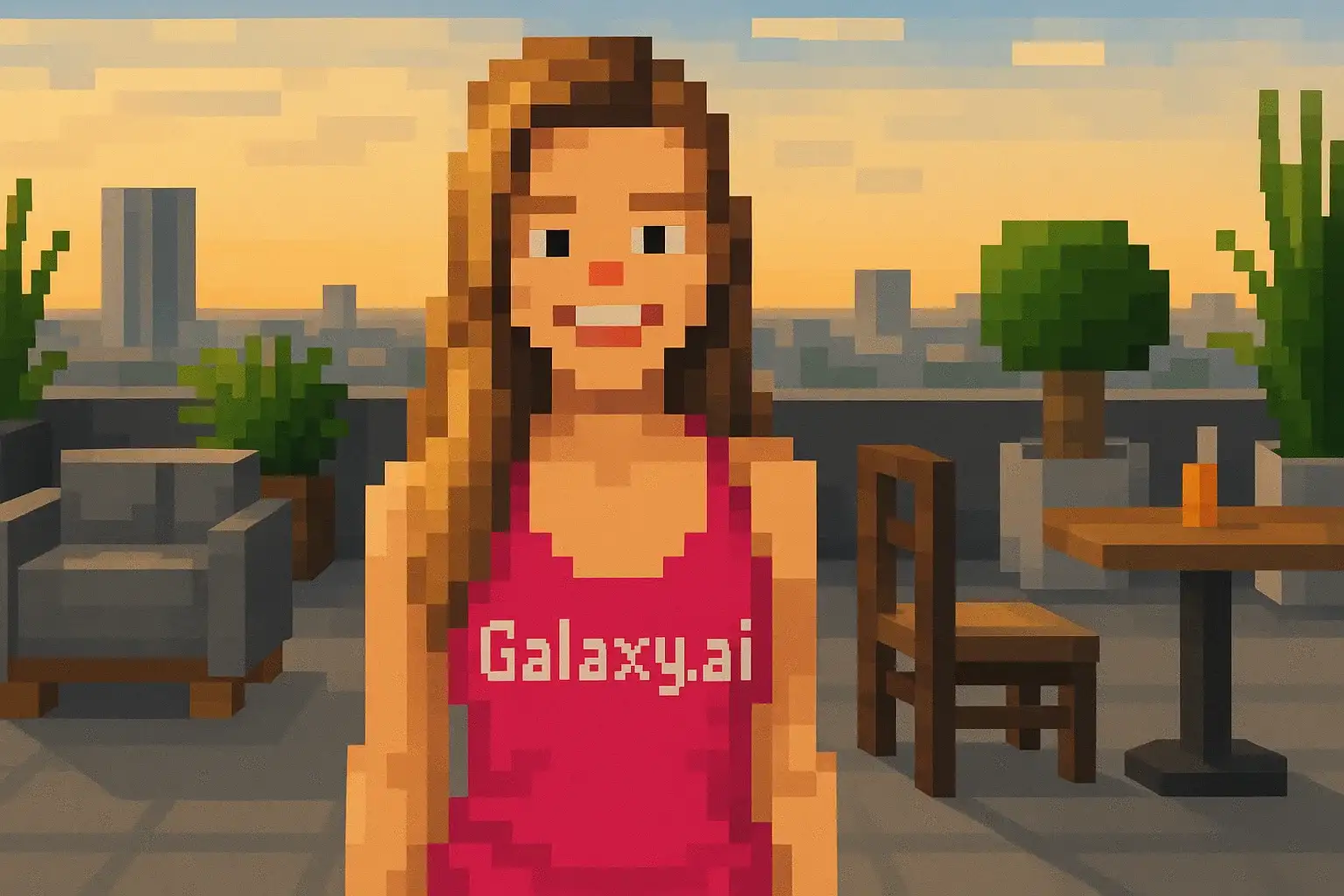
Compare the source image with each finished result.
Source image
Result
What Magica will ask for
The agent gathers these inputs and preferences in the conversation before it starts.
Upload Photos
attach a photo to apply the filter
Why Choose Our AI Minecraft Filter?
Transform your photos into authentic Minecraft blocky art with our advanced AI. Experience the iconic pixelated game style with just one click!
Authentic Minecraft blocky aesthetic
Characteristic cubic and voxel-based rendering
Pixelated low-resolution texture style
Maintains recognizable facial features
Instant transformation powered by AI
No editing skills required
Perfect for gaming profiles and fan content
How Our Minecraft Filter Works
Transform into a blocky Minecraft character with these simple steps:
01
Attach Your Photo
Select a clear portrait photo where your face is clearly visible. Front-facing shots work best for Minecraft transformation!
02
Apply the Filter
ask Magica to generate the result and watch as our AI transforms you into a pixelated Minecraft-style character.
03
Download & Share
Preview your blocky transformation and download your Minecraft-styled portrait.
Key Features of the AI Minecraft Filter
Authentic Blocky Style
Creates genuine Minecraft voxel-based aesthetic with characteristic cubic shapes and pixelated textures.
Smart Feature Recognition
Advanced AI accurately identifies facial features while applying the distinctive Minecraft block-based rendering.
Gaming Aesthetic
Perfectly captures the iconic Minecraft game graphics style loved by millions worldwide.
Instant Processing
Quick AI transformation delivers your Minecraft-style portrait in seconds.
Who Can Benefit from the Minecraft Filter?
Our AI Minecraft Filter is perfect for anyone who wants to celebrate their love for the world's most popular block-building game.
Minecraft Players
Create authentic Minecraft-style profile pictures that showcase your passion for the game.
Gaming Content Creators
Generate unique blocky thumbnails and profile images for YouTube, Twitch, or gaming channels.
Social Media Enthusiasts
Stand out with distinctive Minecraft-styled photos on Instagram, Twitter, or Discord.
Minecraft Streamers
Create cohesive branding with Minecraft-style portraits for your streaming setup.
Digital Artists
Experiment with voxel art style or use as inspiration for Minecraft-themed projects.
Gaming Community Members
Show your dedication to the Minecraft community with blocky avatar art.
Tips for the Best Minecraft Transformation
Tip 1
Use Clear, Well-Lit Photos
Ensure your face is clearly visible and well-lit for the best blocky transformation results.
Tip 2
Front-Facing Portraits Work Best
Photos where you're looking directly at the camera provide the most accurate Minecraft-style conversion.
Tip 3
Simple Backgrounds Are Ideal
Clean backgrounds help the AI focus on transforming your face into the characteristic Minecraft blocky style.
Tip 4
Try Different Expressions
Experiment with various facial expressions to see how they translate into Minecraft's iconic pixelated aesthetic.
Tip 5
High-Quality Input Photos
Better quality input photos result in more detailed and recognizable Minecraft-style portraits.
Frequently Asked Questions About Our Minecraft Filter
How accurate is the Minecraft blocky style?
Our AI creates authentic Minecraft-style transformations by applying the game's characteristic voxel-based, pixelated aesthetic while maintaining your recognizable facial features in blocky form.
Will I look like a Minecraft character?
Yes! The filter transforms your photo into the iconic Minecraft cubic, low-resolution texture style, making you look like you belong in the Minecraft world.
What types of photos work best?
The filter works best on clear, front-facing portrait photos with good lighting and simple backgrounds. While it can work on various photos, we recommend close-up portraits for the most recognizable Minecraft transformations.
Can I use this for my gaming profile?
Absolutely! The Minecraft filter is perfect for creating unique gaming profile pictures, YouTube thumbnails, Twitch avatars, or Discord profile images that showcase your love for Minecraft.
Is my photo safe to upload?
We prioritize user privacy. Your photos are used only for the Minecraft transformation process and are not stored long-term or used for other purposes. The generated blocky portrait is returned in the conversation for you to save.
How long does the transformation take?
The AI transformation is typically completed within seconds. Simply attach your photo, ask Magica to generate the result, and watch as your image is transformed into Minecraft's iconic blocky style.
Can I use the result commercially?
The transformed images are for personal use. For commercial usage, please ensure you have appropriate rights and consider Minecraft's trademark guidelines when using game-inspired artwork.