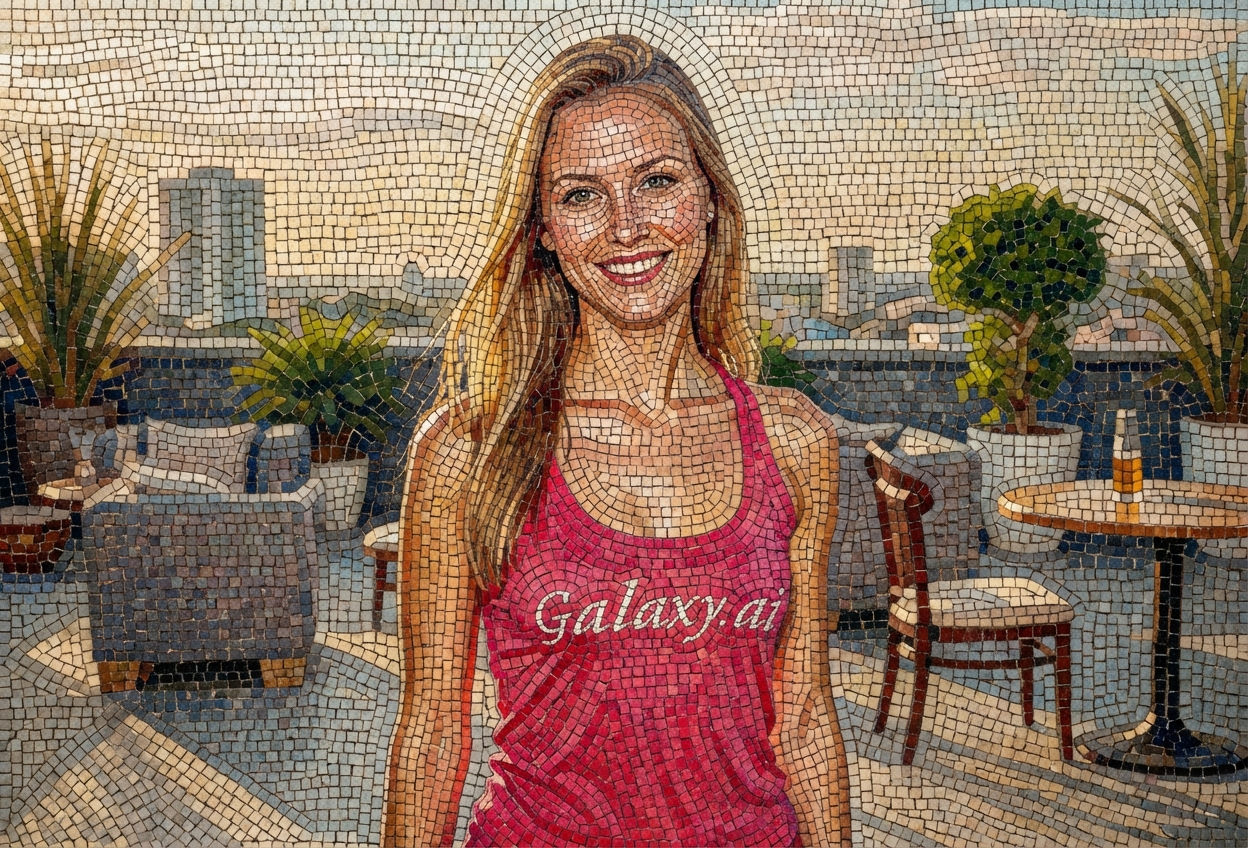
Compare the source image with each finished result.
Source image
Result
What Magica will ask for
The agent gathers these inputs and preferences in the conversation before it starts.
Attach Your Photo
attach a photo to transform into mosaic tile art
Why Choose Our AI Mosaic Tile Filter?
Transform your photos into stunning mosaic tile art with our advanced AI. Experience the timeless beauty of classical mosaic artistry with just one click!
Authentic mosaic tile patterns with visible grout lines
Classical ancient art style transformation
Maintains subject recognizability
High-quality artistic rendering
Realistic tile texture and depth
Perfect for artistic and decorative purposes
Instant transformation powered by AI
How Our Mosaic Tile Filter Works
Transform your photos into beautiful mosaic art with these simple steps:
01
Attach Your Photo
Select any photo you want to transform into mosaic tile art. Photos with clear subjects and good contrast work best!
02
Apply the Filter
ask Magica to generate the result and watch as our AI transforms your photo into an intricate mosaic made of colorful tiles with authentic grout lines.
03
Download & Share
Preview your mosaic tile artwork and download your transformed image in high resolution.
Key Features of the AI Mosaic Tile Filter
Authentic Mosaic Texture
Creates realistic tile patterns with visible grout lines, mimicking the look of ancient mosaic art with intricate detail.
Classical Art Style
Transforms images with the timeless aesthetic of ancient Roman and Byzantine mosaics while maintaining modern quality.
Smart Tile Placement
Advanced AI intelligently places tiles to preserve subject details while creating an authentic mosaic effect.
High-Resolution Output
Generates high-quality mosaic artwork perfect for prints, wall art, and professional projects.
Who Can Benefit from the Mosaic Tile Filter?
Our AI Mosaic Tile Filter is perfect for anyone who wants to create sophisticated artistic transformations reminiscent of classical art.
Social Media Enthusiasts
Create unique, artistic profile pictures and posts that stand out with classical mosaic aesthetics.
Artists & Designers
Generate mosaic-style artwork for inspiration, reference images, or incorporate into creative projects.
Content Creators
Produce eye-catching visual content with a timeless, artistic aesthetic for blogs, videos, and social media.
Interior Designers
Visualize custom mosaic art for client projects or create decorative wall art concepts.
Gift Makers
Transform personal photos into stunning mosaic art prints for unique, meaningful gifts.
Educators & History Enthusiasts
Create educational materials or visualize historical art styles for teaching and presentations.
Tips for the Best Mosaic Tile Results
Tip 1
Use Photos with Strong Contrast
Images with clear subject definition and good contrast between light and dark areas translate best into mosaic tile patterns.
Tip 2
Choose Photos with Clear Subjects
Photos with well-defined subjects work best, as the mosaic tile effect will maintain recognizability while adding artistic flair.
Tip 3
Consider Composition
Images with interesting compositions and colors will create more visually striking mosaic artwork.
Tip 4
Higher Resolution for Better Detail
Use high-quality photos to ensure the mosaic tiles are rendered with intricate detail and texture.
Tip 5
Experiment with Different Subjects
Try portraits, landscapes, and architectural photos - each creates a unique mosaic effect with different character.
Frequently Asked Questions About Our Mosaic Tile Filter
How realistic is the mosaic tile effect?
Our AI creates highly realistic mosaic transformations with authentic tile patterns, visible grout lines, and texture that mimics ancient mosaic artwork. The result captures the essence of classical mosaic art while maintaining the recognizability of your original image.
What types of photos work best?
The filter works best on photos with clear subjects and good contrast. Portraits, landscapes, architecture, and any image with well-defined elements will create stunning mosaic art. While any photo can be transformed, images with interesting compositions yield the most visually striking results.
Can I use this for professional projects?
Yes! The high-resolution output is perfect for professional use including prints, wall art, marketing materials, and design projects. The classical mosaic aesthetic adds sophistication to any project.
Will my original image still be recognizable?
Yes, our AI is designed to maintain the recognizability of your subject while applying the mosaic tile transformation. The balance between artistic effect and subject clarity creates authentic-looking mosaic art.
How long does the transformation take?
The AI processes your image in just seconds, delivering your mosaic tile artwork almost instantly. You can preview and download your transformed image immediately after generation.
Is my uploaded photo safe and private?
We prioritize user privacy. Your photos are used only for the transformation process and are not stored long-term or used for other purposes. Your generated mosaic artwork is returned in the conversation for you to save.
Can I adjust the mosaic tile size?
The AI automatically determines the optimal tile size and placement to create the most authentic and visually appealing mosaic effect based on your image. This ensures consistent, high-quality results every time.
What makes this different from other filters?
Our Mosaic Tile Filter uses advanced AI to create authentic tile patterns with realistic grout lines and texture, not just a simple pixelation effect. It captures the true essence of classical mosaic artistry with sophisticated tile placement and depth.