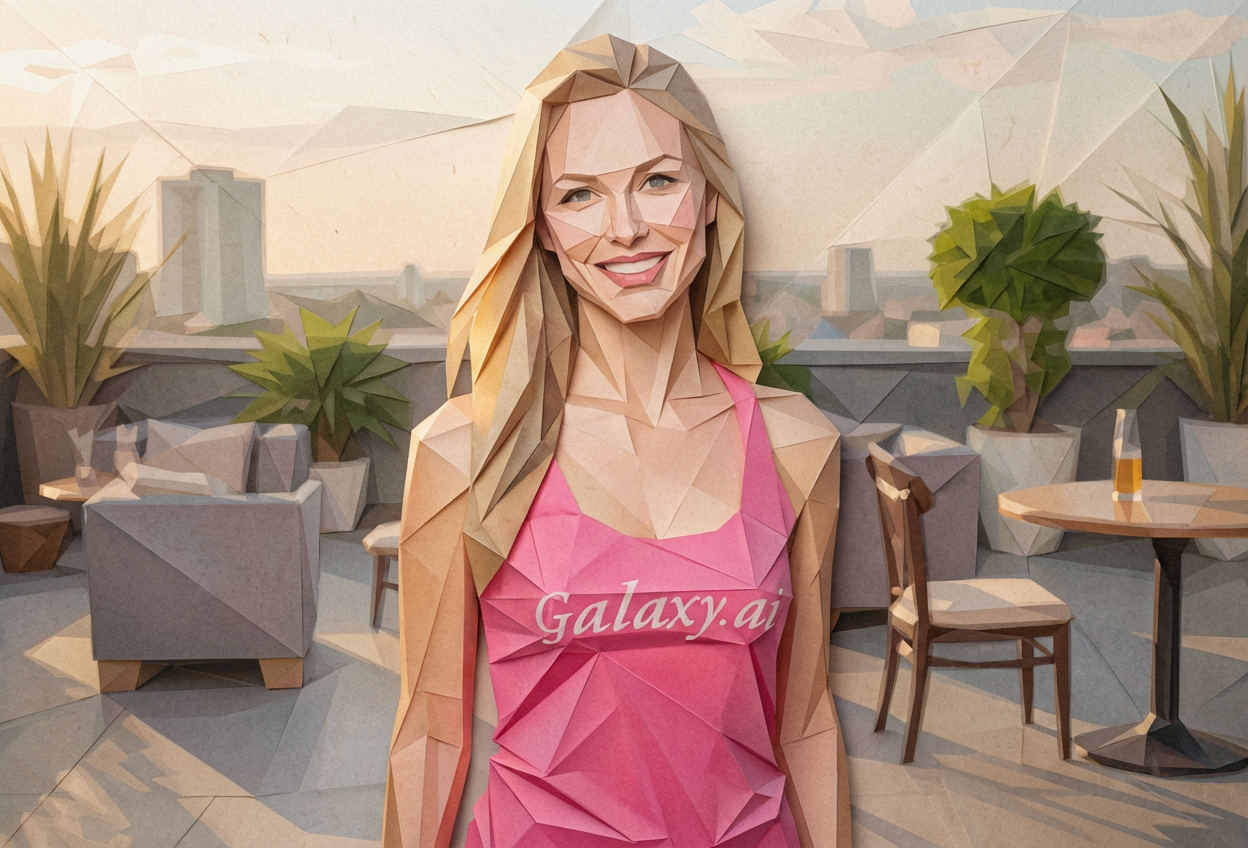
Compare the source image with each finished result.
Source image
Result
What Magica will ask for
The agent gathers these inputs and preferences in the conversation before it starts.
Upload Photos
attach a photo to apply the filter
Why Choose Our AI Origami Style Filter?
Transform your photos into stunning paper-folded origami art with our advanced AI. Experience the unique blend of traditional Japanese art and modern geometric aesthetics with just one click!
Authentic origami paper-folded appearance
Geometric angular shapes and clean lines
Visible paper creases and fold details
Layered paper texture effects
Maintains recognizable subject features
Perfect for creative portfolios
Instant artistic transformation
How Our Origami Style Filter Works
Transform your photos into paper-folded art with these simple steps:
01
Attach Your Photo
Select a clear photo where the subject is well-defined. Photos with good contrast and distinct features work best!
02
Apply the Filter
ask Magica to generate the result and watch as our AI transforms your photo into a beautiful origami-style paper art masterpiece.
03
Download & Share
Preview your origami transformation and download your unique paper-folded artwork.
Key Features of the AI Origami Style Filter
Authentic Paper-Folded Look
Creates genuine origami aesthetics with angular geometric shapes and paper-folding characteristics that capture the essence of traditional Japanese paper art.
Layered Paper Texture
Applies realistic layered paper textures with visible depth and dimensional qualities that make your image look like it's crafted from folded paper.
Visible Creases and Folds
Adds authentic paper crease lines and fold marks that bring the origami aesthetic to life with realistic paper-folding details.
Smart Feature Preservation
Maintains recognizable subject features while applying geometric paper-folding effects for a perfect balance of art and identity.
High-Quality Output
Generates high-resolution origami-style images perfect for creative projects, portfolios, and social media.
Who Can Benefit from the Origami Style Filter?
Our AI Origami Style Filter is perfect for anyone wanting to create unique geometric paper art or explore Japanese-inspired artistic styles.
Social Media Enthusiasts
Create unique origami-style profile pictures and posts that stand out with artistic geometric paper aesthetics.
Content Creators
Generate distinctive origami-style content for videos, thumbnails, and social media that captures attention.
Artists & Designers
Create reference images or unique origami-style artwork for projects, portfolios, and creative designs.
Creative Professionals
Produce eye-catching origami-style visuals for presentations, portfolios, and marketing materials.
Japanese Culture Enthusiasts
Explore traditional Japanese paper-folding art through modern AI technology and create culturally inspired artwork.
Gift & Card Creators
Design unique origami-style images for greeting cards, gifts, and personalized creative projects.
Tips for the Best Origami Style Results
Tip 1
Use Clear, High-Contrast Photos
Photos with clear subject definition and good contrast work best for origami transformation, as the geometric shapes need distinct features to work with.
Tip 2
Choose Photos with Distinct Features
Images where facial features or subject details are well-defined will produce more recognizable origami-style results.
Tip 3
Simple Backgrounds Work Best
Photos with clean or simple backgrounds allow the origami paper-folding effect to focus on the main subject without distraction.
Tip 4
Portrait Photos are Ideal
Close-up portraits or well-framed subjects translate beautifully into origami style with clear geometric paper-folding effects.
Tip 5
Experiment with Different Photos
Try various types of photos - portraits, objects, or scenes - to discover how different subjects transform into origami art.
Frequently Asked Questions About Our Origami Style Filter
What is origami style art?
Origami style art mimics the appearance of traditional Japanese paper folding, featuring angular geometric shapes, visible paper creases, layered textures, and the dimensional quality of folded paper. Our AI filter applies these characteristics to transform any photo into origami-inspired artwork.
How realistic is the origami paper effect?
Our AI creates highly realistic origami effects with authentic paper textures, visible fold lines, geometric angles, and layered depth. The result combines recognizable features with genuine paper-folding aesthetics for a beautiful artistic transformation.
What types of photos work best?
The filter works best on clear photos with good contrast and well-defined subjects. Portraits, close-up shots, and images with simple backgrounds produce the most striking origami transformations. However, you can experiment with various photo types!
Will my photo still be recognizable?
Yes! Our AI is designed to maintain the recognizable features of your subject while applying the origami paper-folding aesthetic. The result is a perfect balance between artistic transformation and subject identification.
Can I use this for commercial projects?
Yes, the origami-style images you create can be used for creative portfolios, social media, presentations, and commercial projects. The unique geometric paper art style is perfect for standing out in creative work.
Is my uploaded photo safe and private?
We prioritize user privacy. Your photos are used only for the transformation process and are not stored long-term or used for other purposes. The generated origami-style image is returned in the conversation for you to save.
How long does the transformation take?
The origami style transformation typically takes just a few seconds. Our AI quickly processes your image and applies the geometric paper-folding effects to create your unique origami-style artwork.
Can I adjust the origami effect intensity?
The filter applies a carefully balanced origami effect designed to create the most authentic paper-folded appearance while maintaining subject recognition. The transformation is optimized for the best artistic results.