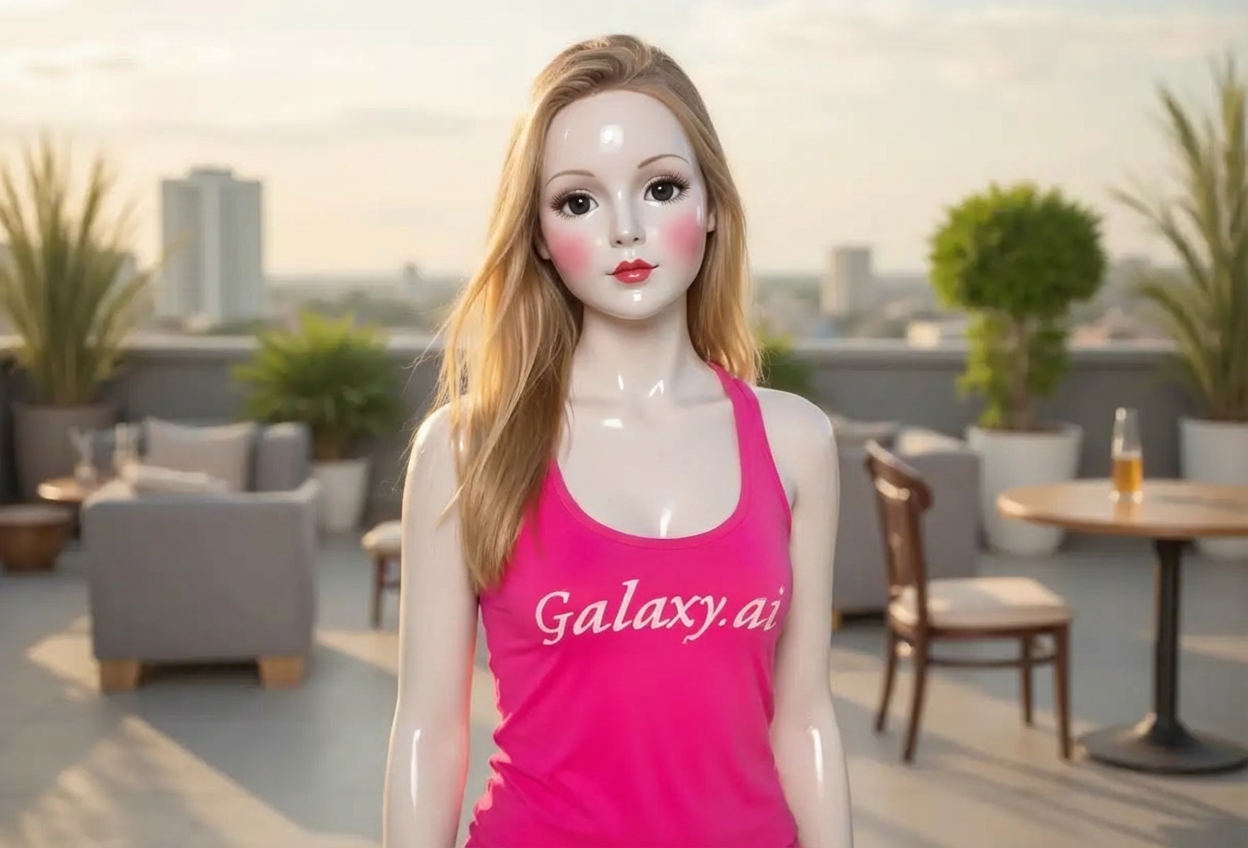
Compare the source image with each finished result.
Source image
Result
What Magica will ask for
The agent gathers these inputs and preferences in the conversation before it starts.
Upload Portrait Photo
attach a photo to apply the filter
Why Choose Our AI Porcelain Doll Filter?
Transform your photos into enchanting porcelain doll portraits with our advanced AI. Experience the delicate beauty and vintage charm of porcelain dolls with just one click!
Smooth, flawless porcelain skin texture
Delicate doll-like facial features
Rosy cheeks and vintage doll makeup
Glossy, refined finish
Maintains original photo quality
Perfect for aesthetic and beauty content
No editing skills required
How Our Porcelain Doll Filter Works
Transform into a delicate porcelain doll with these simple steps:
01
Attach Your Photo
Select a clear portrait photo where your face is clearly visible. Well-lit front-facing shots work best for the most enchanting transformation!
02
Apply the Filter
ask Magica to generate the result and watch as our AI transforms you into a beautiful porcelain doll with smooth skin and delicate features.
03
Download & Share
Preview your porcelain doll transformation and download your enchanting new portrait to share on social media.
Key Features of the AI Porcelain Doll Filter
Authentic Porcelain Texture
Creates genuine porcelain skin texture with characteristic smooth, glossy finish and delicate appearance.
Smart Feature Enhancement
Our AI accurately enhances facial features to achieve doll-like beauty while maintaining your natural appearance.
Vintage Doll Aesthetic
Applies rosy cheeks, delicate makeup, and classic doll beauty characteristic of vintage porcelain dolls.
High-Resolution Output
Generates high-quality images perfect for social media, profile pictures, and aesthetic content.
Who Can Benefit from the Porcelain Doll Filter?
Our AI Porcelain Doll Filter is perfect for anyone wanting to achieve delicate doll-like beauty or create enchanting aesthetic content.
Social Media Enthusiasts
Create unique porcelain doll profile pictures and posts that capture attention with their delicate beauty.
Beauty Content Creators
Generate stunning porcelain doll aesthetic content for Instagram, TikTok, and other platforms.
Fashion & Lifestyle Influencers
Create enchanting vintage-inspired content that stands out with delicate porcelain doll aesthetics.
Artists & Designers
Generate reference images for doll-inspired artwork, fashion designs, or creative projects.
Cosplayers & Performers
Preview doll-inspired makeup looks or enhance costume photos with porcelain doll aesthetics.
Photography Enthusiasts
Transform portrait photography into enchanting porcelain doll art for unique creative projects.
Tips for the Best Porcelain Doll Effect
Tip 1
Use Clear, Well-Lit Photos
Ensure your face is clearly visible with good lighting to achieve the smoothest porcelain skin effect.
Tip 2
Front-Facing Portraits Work Best
Photos where you're looking directly at the camera provide the most authentic porcelain doll transformation with delicate features.
Tip 3
Higher Resolution is Better
Use high-quality photos to ensure the porcelain texture and delicate details are crisp and beautiful.
Tip 4
Neutral or Gentle Expressions
A neutral or gentle expression helps achieve that authentic porcelain doll aesthetic with delicate charm.
Tip 5
Clean Background Recommended
Simple backgrounds help the porcelain doll transformation stand out and maintain focus on the delicate features.
Frequently Asked Questions About Our Porcelain Doll Filter
How realistic is the porcelain doll transformation?
Our AI creates highly realistic porcelain doll transformations by adding smooth porcelain skin texture, rosy cheeks, and delicate doll-like features while maintaining your natural facial structure. The result is an enchanting blend that captures the beauty of vintage porcelain dolls.
What types of photos work best with this filter?
The filter works best on clear, front-facing portrait photos with good lighting. Photos with neutral or gentle expressions and clean backgrounds provide the most authentic porcelain doll aesthetic. While it can work on various photos, we recommend well-lit portraits for the best results.
Will the transformation look natural?
Yes, our AI is trained to maintain natural-looking features while applying porcelain doll aesthetics. The result is a balanced blend that looks both enchanting and refined, perfect for aesthetic content without appearing overly artificial.
Is this filter popular in Asian beauty trends?
Yes! The porcelain doll aesthetic is particularly popular in Asian beauty trends, especially in Korea and Japan, where smooth, flawless skin and delicate doll-like features are highly valued. This filter captures that coveted aesthetic perfectly.
Can I use this filter for professional content?
Absolutely! The high-resolution output is perfect for social media content, beauty blogs, fashion portfolios, and aesthetic photography. Many content creators use this filter to create unique, eye-catching visuals.
Is my photo safe to upload?
We prioritize user privacy. Your photos are used only for the transformation process and are not stored long-term or used for other purposes. The generated porcelain doll portrait is returned in the conversation for you to save.
Does it work on all skin tones?
Yes! Our AI is designed to work beautifully on all skin tones, adapting the porcelain doll aesthetic to enhance your natural beauty while maintaining the delicate, smooth characteristics of porcelain.
Can I adjust the intensity of the effect?
The filter applies a carefully balanced porcelain doll transformation designed for optimal aesthetic results. The AI automatically adjusts the effect to work harmoniously with your facial features and photo quality.