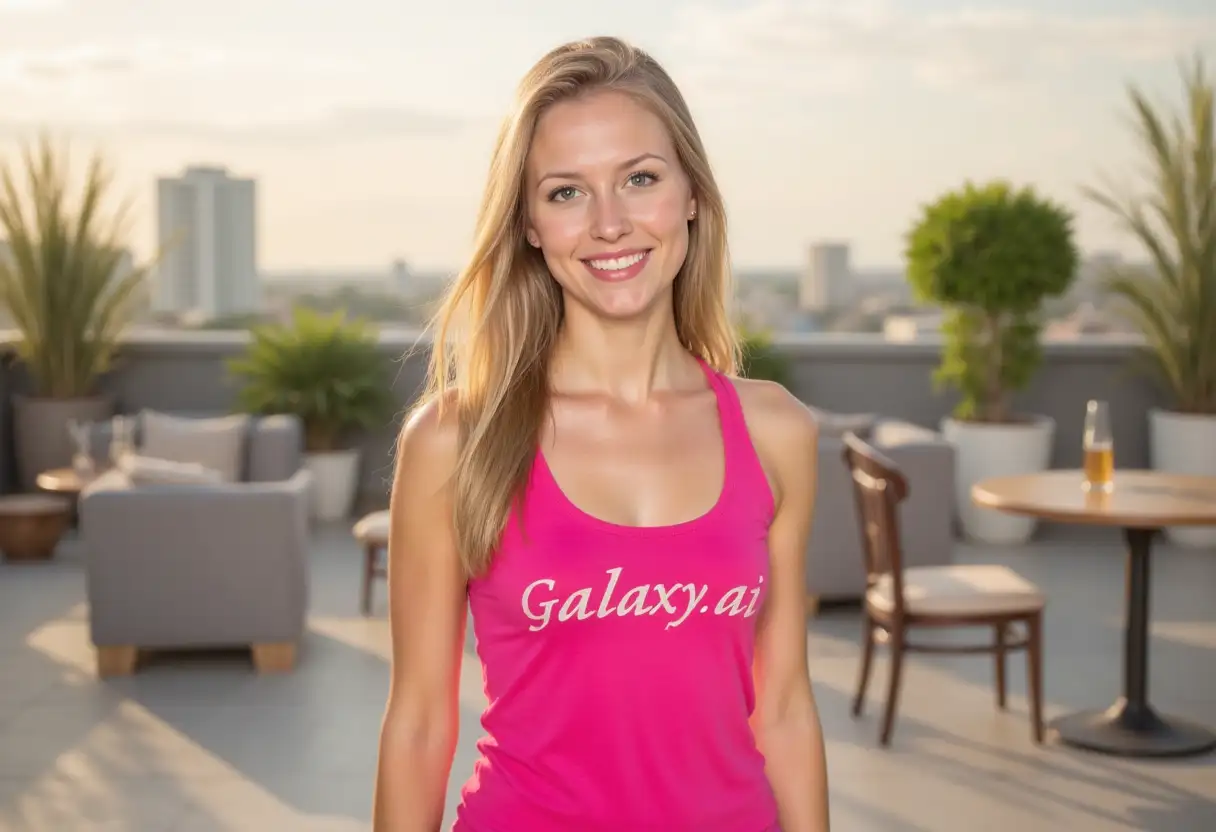
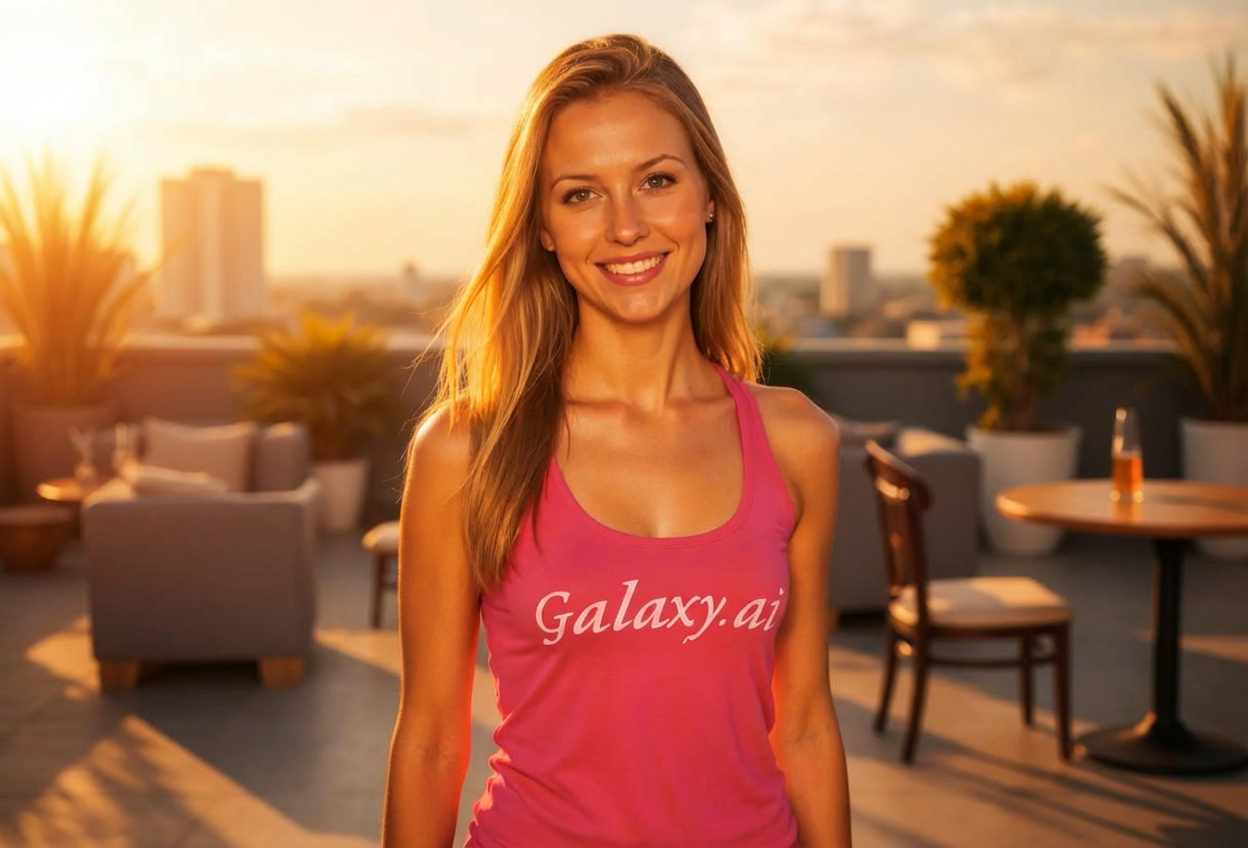
Compare the source image with each finished result.
Source image
Result
What Magica will ask for
The agent gathers these inputs and preferences in the conversation before it starts.
Description
Describe what you want to create...
Lighting Style
Choose the type of lighting
Choices: Natural Lighting, Studio Lighting, Golden Hour, Dramatic Lighting, Soft Diffused Light, Backlit, Rim Lighting, Cinematic Lighting
Light Direction
Choose where light comes from
Choices: Auto (Natural), Front Light, Front Top (45°), Top Light, Side Light (Right), Side Light (Left), Back Light, Bottom Light
Light Intensity
Control the brightness of lighting
Choices: Soft, Moderate, Bright
Why Choose Our Relight Photo Tool?
Transform your photos with AI-powered relighting that changes atmosphere and enhances subjects with professional lighting.
AI-powered intelligent relighting
Multiple lighting styles (studio, golden hour, dramatic)
Adjustable light direction from any angle
Customizable light intensity levels
Natural shadow and highlight generation
Perfect for portrait and product photography
Professional studio-quality results
No photography equipment needed
Instant lighting transformation
Works with any photo type
How Our Relight Photo Tool Works
Transform your photo's lighting in three simple steps:
01
Attach Your Photo
Upload any photo you want to relight. Works with portraits, products, landscapes, or any image.
02
Configure Lighting Settings
Choose your lighting style, direction, and intensity. Select from studio, golden hour, dramatic, and more.
03
Generate & Download
Get your professionally relit photo instantly. Download with enhanced lighting and atmosphere.
Key Features of Relight Photo
Multiple Lighting Styles
Choose from natural, studio, golden hour, dramatic, soft diffused, backlit, rim, and cinematic lighting.
Directional Control
Place light source from front, top, sides, back, or bottom for complete creative control.
Adjustable Intensity
Fine-tune lighting brightness from soft and gentle to bright and dramatic.
Natural Shadow Generation
AI creates realistic shadows and highlights that match the new lighting direction.
Professional Quality
Achieve studio-quality lighting without expensive equipment or photo shoots.
Instant Processing
Get professionally relit photos in seconds without complex editing software.
Who Can Benefit from Our Relight Photo Tool?
This tool is perfect for anyone looking to enhance or transform photo lighting:
Photographers
Fix lighting issues, experiment with different lighting setups, and enhance portrait photography.
E-commerce Sellers
Improve product photos with professional lighting for better online presentation.
Content Creators
Enhance photos for social media, videos, and creative content with cinematic lighting.
Marketing Teams
Create professional visuals with perfect lighting for campaigns and advertisements.
Portrait Photographers
Perfect portrait lighting after the shoot, experiment with dramatic or soft lighting effects.
Real Estate Agents
Enhance property photos with better lighting to showcase spaces attractively.
Tips for Better Relighting Results
Tip 1
Choose Lighting Style by Purpose
Use studio for portraits, golden hour for warmth, dramatic for impact, soft for flattering results.
Tip 2
Consider Original Lighting
Photos with flat lighting respond best to relighting. Already dramatic lighting may need subtle adjustments.
Tip 3
Match Light Direction to Subject
Front light flatters faces, side light adds dimension, backlight creates silhouettes and mood.
Tip 4
Start with Moderate Intensity
Begin with moderate lighting and adjust - too bright can wash out details, too soft may lack impact.
Tip 5
Use Golden Hour for Warmth
Golden hour lighting adds warm, flattering tones perfect for portraits and outdoor scenes.
Tip 6
Try Rim Lighting for Subjects
Rim lighting creates beautiful edge highlights that separate subjects from backgrounds dramatically.
Tip 7
Experiment with Back Lighting
Back lighting creates mood and atmosphere, perfect for silhouettes and artistic effects.
Frequently Asked Questions About Relight Photo
What lighting styles can I apply to my photos?
You can apply natural, studio, golden hour, dramatic, soft diffused, backlit, rim lighting, and cinematic lighting styles. Each creates different moods and effects.
Can I control where the light comes from?
Yes! Choose from front, front-top (45°), top, side (left/right), back, bottom, or let AI determine the best natural direction.
How does AI relighting work?
The AI analyzes your photo's geometry and surfaces, then simulates new lighting by adjusting highlights, shadows, and color temperature based on your chosen settings.
Will relighting fix poorly lit photos?
Yes! Relighting can significantly improve photos taken in poor lighting conditions by adding proper illumination and balancing exposure.
What's the difference between studio and natural lighting?
Studio lighting creates professional, controlled illumination typical of photo studios. Natural lighting simulates outdoor or ambient indoor light with softer transitions.
Can I use this for portrait photography?
Absolutely! This tool is excellent for portrait photography, allowing you to achieve flattering lighting and fix lighting issues after the shoot.
What is golden hour lighting?
Golden hour lighting simulates the warm, soft light that occurs shortly after sunrise or before sunset, creating flattering, warm-toned photos.
Will relighting look realistic?
Yes! The AI creates realistic lighting with natural shadow placement, proper highlights, and color temperature adjustments that look authentic.
Can I relight product photos?
Perfect for product photography! Studio lighting settings create professional results ideal for e-commerce and marketing materials.
What is rim lighting and when should I use it?
Rim lighting creates bright edges around subjects, separating them from backgrounds. Use it for dramatic portraits, product shots, and artistic photography.
Do I need photography knowledge?
No experience required! Simply choose your preferred lighting style and settings - the AI handles all technical aspects automatically.
How quickly can I relight my photos?
Relighting is instant! You'll get your professionally relit photo in just a few seconds, ready to download.