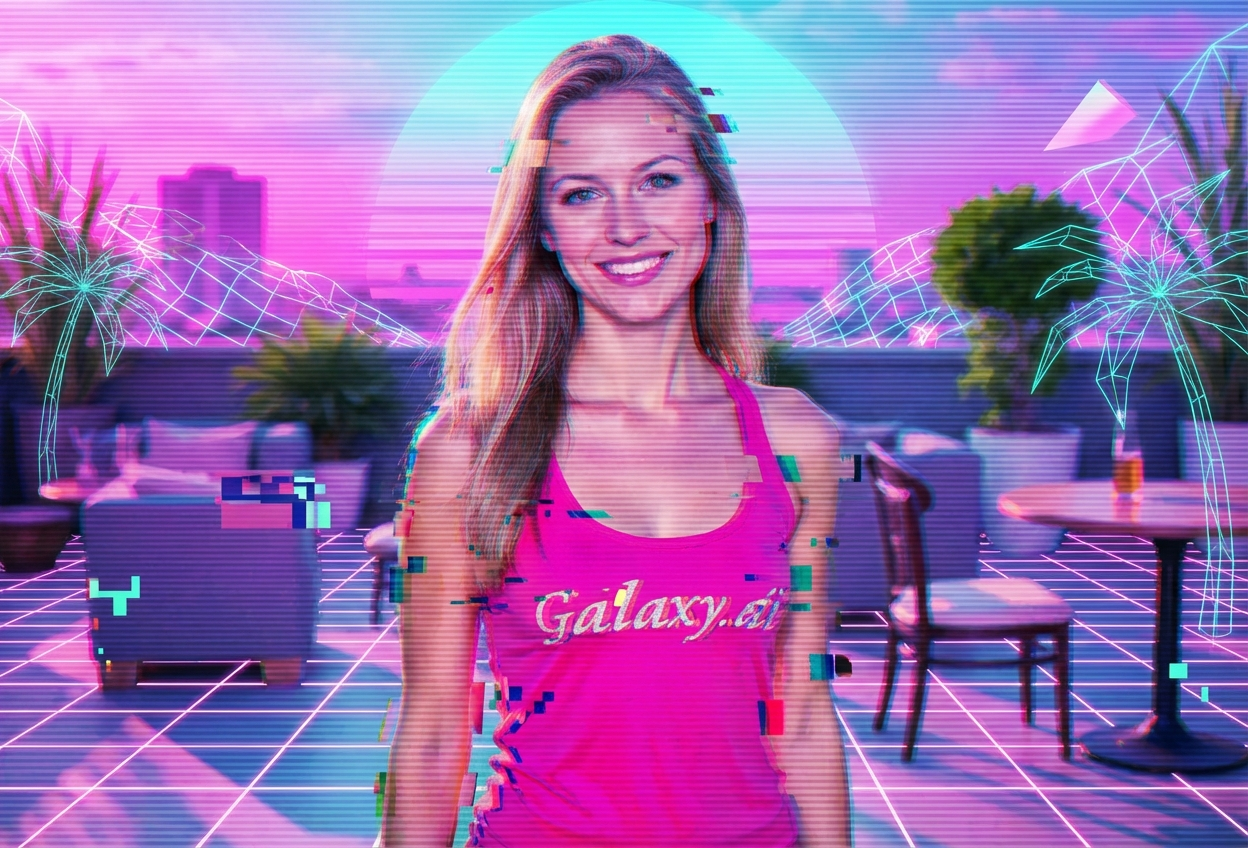
Compare the source image with each finished result.
Source image
Result
What Magica will ask for
The agent gathers these inputs and preferences in the conversation before it starts.
Upload Photos
attach a photo to apply the filter
Why Choose Our AI Vaporwave Filter?
Transform your photos into nostalgic vaporwave art with our advanced AI. Experience the iconic retro-futuristic aesthetic of the 80s and 90s with just one click!
Authentic vaporwave aesthetic with pink and purple gradients
Geometric grid patterns and glitch effects
Retro digital and cyberpunk elements
Maintains original photo quality
Instant transformation powered by AI
No editing skills required
Perfect for social media and creative content
How Our Vaporwave Filter Works
Transform your photos into retro-futuristic vaporwave art with these simple steps:
01
Attach Your Photo
Select any photo you want to transform. Portrait photos work great, but any image can be enhanced with vaporwave aesthetics!
02
Apply the Filter
ask Magica to generate the result and watch as our AI adds pink and purple gradients, grid patterns, and retro digital effects to your photo.
03
Download & Share
Preview your vaporwave transformation and download your nostalgic artwork to share on social media.
Key Features of the AI Vaporwave Filter
Authentic Vaporwave Aesthetics
Creates genuine vaporwave style with characteristic pink and purple gradients, grid patterns, and retro digital elements.
Smart Visual Enhancement
Our AI accurately applies vaporwave effects while maintaining the integrity and recognizability of your original photo.
Glitch & Grid Effects
Automatically adds geometric grid patterns and subtle glitch effects for that authentic retro-futuristic look.
High-Resolution Output
Generates high-quality vaporwave images perfect for social media, album covers, and creative projects.
Who Can Benefit from the Vaporwave Filter?
Our AI Vaporwave Filter is perfect for anyone who loves retro-futuristic aesthetics and wants to create unique nostalgic content.
Social Media Enthusiasts
Create eye-catching vaporwave-themed profile pictures and posts that stand out with retro aesthetics.
Content Creators
Generate unique vaporwave content for YouTube thumbnails, Instagram posts, and TikTok videos.
Artists & Designers
Create vaporwave-inspired artwork and designs for album covers, posters, and digital art projects.
Gaming & Streaming Community
Design retro-futuristic graphics for streams, profiles, and gaming content with nostalgic appeal.
Aesthetic Enthusiasts
Transform photos into the trendy vaporwave aesthetic popular in internet culture and visual arts.
Music Artists & DJs
Create vaporwave-style cover art and promotional materials perfect for electronic and synth music.
Tips for the Best Vaporwave Effect
Tip 1
Use High-Contrast Photos
Photos with good contrast and distinct subjects work best for vaporwave transformations, allowing the filter to add effects while maintaining clarity.
Tip 2
Portrait and Urban Scenes Excel
Portrait photos and urban/cityscape images particularly shine with vaporwave aesthetics, creating that iconic retro-futuristic look.
Tip 3
Higher Resolution Yields Better Details
Use high-quality images to ensure the grid patterns, gradients, and glitch effects are crisp and visually stunning.
Tip 4
Experiment with Different Subjects
Try the filter on various types of images - portraits, landscapes, objects - each creates unique vaporwave art with different visual appeal.
Tip 5
Perfect for Album Art and Graphics
The vaporwave filter creates professional-looking results ideal for music covers, digital art, and creative projects.
Frequently Asked Questions About Our Vaporwave Filter
What is vaporwave aesthetic?
Vaporwave is a retro-futuristic internet aesthetic characterized by pink and purple gradients, geometric grid patterns, 80s-90s digital graphics, and nostalgic references to early internet and computer culture. Our filter captures this iconic style perfectly.
What types of photos work best with the vaporwave filter?
The filter works wonderfully on portraits, urban scenes, and objects. High-contrast photos with clear subjects produce the best results, though you can experiment with any type of image to create unique vaporwave art.
Will my photo still be recognizable?
Yes! Our AI carefully applies vaporwave aesthetics while maintaining the core elements and recognizability of your original photo. The transformation enhances rather than obscures your image.
Can I use this for commercial projects?
The vaporwave images you create are perfect for album covers, social media content, graphic design projects, and creative work. The high-quality output is suitable for both personal and professional use.
How does this compare to manual editing?
Creating authentic vaporwave aesthetics manually requires advanced editing skills and time. Our AI instantly applies pink/purple gradients, grid patterns, and retro effects that would take hours to create by hand.
Is my photo safe to upload?
We prioritize user privacy. Your photos are used only for the transformation process and are not stored long-term or used for other purposes. Your vaporwave artwork is returned in the conversation for you to save.
Can I adjust the vaporwave intensity?
The filter is designed to apply optimal vaporwave aesthetics automatically, balancing retro-futuristic effects with image quality. You can always re-generate or try different photos for varying results.
What makes this different from other filters?
Our AI is specifically trained on authentic vaporwave aesthetics, ensuring your photos get genuine pink/purple gradients, geometric grids, and 80s-90s digital vibes that capture the true essence of vaporwave culture.