
This guide provides a comprehensive overview of setting up an Etsy shop, focusing on key elements such as account verification, shop branding, and organization of product categories to enhance customer engagement and sales.
Setting up an Etsy shop can be an exciting venture for anyone looking to sell handmade or digital products. This guide will walk you through the essential steps to create a shop that is appealing to customers and compliant with Etsy's requirements.
Before diving into the specifics of your shop, it's crucial to establish your Etsy account correctly. If you are new to Etsy, you can open a brand new shop using a special link that offers 40 free listings. This is a great way to start without incurring initial costs.
Etsy has implemented a verification process to prevent spam and misuse of the platform. When setting up your account, ensure that you provide accurate and verifiable information, such as your name and address. Etsy may request verification through documents like your passport or driver's license, so double-check all details before submission.
Once your account is set up, it's time to focus on what customers will see when they visit your shop. Here are the key elements to consider:
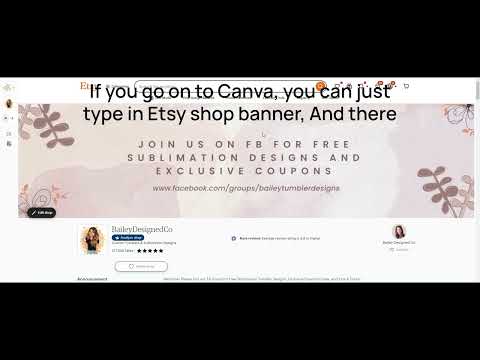
Your shop banner is the first thing customers will notice. It should convey a clear message about your shop. For example, you might include a call to action, such as inviting visitors to join your Facebook group or highlighting a special offer. If you don't have a social media presence, simply state what you sell, such as clip art or sublimation designs. You can create a professional-looking banner using tools like Canva, which offers templates specifically for Etsy shop banners.
When choosing your shop name, keep it simple and memorable. Etsy allows you to edit your shop name in the settings, but remember that it should be one word without spaces. You can use your personal name or your shop name, depending on your branding strategy.
Your shop's profile picture and logo are essential for branding. These can also be edited in the shop settings. Make sure they are visually appealing and represent your shop's identity.
The announcement section of your shop is an opportunity to engage with potential customers. You can include a call to action, such as joining your email list or Facebook group. This section should be updated regularly to reflect any new promotions or changes in your shop.
A well-organized shop is crucial for customer navigation. Etsy allows you to create up to 20 categories for your products. Consider organizing your items by type or style, making it easier for buyers to find what they are looking for. For instance, if you sell various products like PNG designs and Tumblr wraps, categorize them accordingly to avoid confusion.
At the bottom of your shop info page, you can add personal touches that help customers connect with you. This could include a brief bio about yourself and links to your social media accounts. Sharing a bit about your story can make your shop more relatable and inviting.
If you are selling digital downloads, Etsy automatically sets your shop policies to reflect that digital products cannot be refunded or returned. Ensure that your policies are clear and up to date, especially if you have previously sold physical products.
Setting up your Etsy shop involves several important steps, from account verification to shop design and organization. By following these guidelines, you can create a shop that not only attracts customers but also provides them with a seamless shopping experience. Remember to keep your shop updated and engage with your audience to foster a loyal customer base.



















