LiveGood offers an affiliate whitelisting program designed to help affiliates earn more money by posting videos on social media platforms like TikTok and Meta (Facebook and Instagram). This program allows LiveGood to put ad spend behind your videos, driving traffic to your affiliate links and boosting your earnings.
This guide covers everything you need to know about joining and succeeding in the LiveGood affiliate whitelisting program.
What is the LiveGood Affiliate Whitelisting Program?
The program enables affiliates to create videos promoting LiveGood products and post them on their social media pages. LiveGood then reviews these videos, and if they meet the standards, the company uses its own ad budget to promote these videos, directing traffic to the affiliate's unique link. This is a paid advertising method that accelerates earning potential.
- TikTok
- Meta (Facebook and Instagram)
TikTok Affiliate Setup
- If you are based in the US, sign up for the TikTok Affiliate program by searching "TikTok Affiliate US" and completing the application.
- Once approved, create and post videos on TikTok.
- Add your LiveGood Supplement Store affiliate link to your videos.
- If you are not approved or not based in the US, you can still participate by posting videos on TikTok and emailing the video URL along with your affiliate link to TikTok-affiliate@livegood.com.
Important: Always post your video on TikTok first before sharing the link.
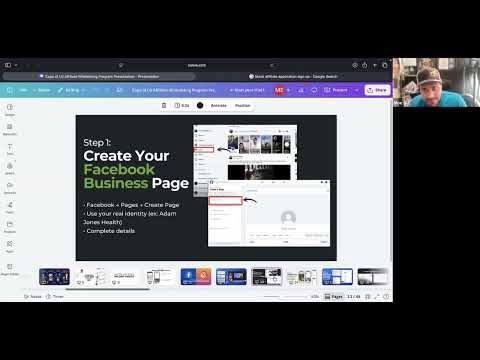
- Create or use an existing Facebook business page. It does not have to be under your name or LiveGood's name.
- Create or use an existing Instagram professional account.
- Create a Meta Business Manager account.
- Add your Facebook page and Instagram account to your Business Manager.
- Grant LiveGood access to your pages via Business Manager so they can run ads on your behalf.
You will need to share a screenshot proving you have granted access along with your video link and affiliate URL.
Creating Effective Videos
Key Rules for Videos
- Videos should be under 90 seconds.
- Focus only on LiveGood products, not the MLM business model.
- You must have the product in hand or use approved B-roll footage.
- Do not promote restricted products like CBD due to advertising restrictions.
Video Content Tips
- Show the product clearly.
- Use good lighting and a clean background.
- Videos should feel natural and organic, not scripted.
- Use "talking head" style or "come with me" style videos.
- Incorporate B-roll shots (additional footage showing the product in use) to make videos more engaging.
Examples of Good Video Styles
- Talking head videos where you discuss the product naturally.
- Comparison videos showing LiveGood products versus others.
- Lifestyle videos demonstrating product use (e.g., drinking mushroom coffee).
Lighting and Location
- Ensure good lighting focused on you and the product.
- Avoid distracting backgrounds.
- Be close enough to the camera so the product is clearly visible.
Video Submission Process
- Create and post your video on your social media page.
- Email the following to LiveGood:
- The video URL.
- Screenshot showing you have granted LiveGood access to your Business Manager.
- Your affiliate website URL.
LiveGood will review the video and, if approved, run ads behind it to boost your reach.
Additional Tips
- If you find the technical setup challenging, LiveGood offers one-on-one support to help you set up your Business Manager and pages.
- You can hire freelancers for video editing if needed.
- Consistency and creativity in video creation are key to success.
Conclusion
The LiveGood affiliate whitelisting program is a powerful way to increase your earnings by leveraging paid ads behind your product videos on TikTok and Meta platforms. By following the setup instructions, focusing on product-centric content, and submitting your videos properly, you can maximize your affiliate success.
For any questions, contact LiveGood via the provided emails:
Stay creative, keep posting, and watch your affiliate business grow!