This blog post explores advanced techniques in Ableton Live for creating unique keyboard sounds by combining instruments and utilizing expression control, focusing on the Electric instrument and its integration with synthesizers.
Ableton Live is often regarded as a sound designer's paradise, offering a plethora of tools for musicians looking to expand their sonic palette. If you're seeking more inspiring sounds for your music, this guide will delve into techniques that can help you unlock endless keyboard sounds using Ableton Live.
One of the standout features of Ableton Live is its ability to process parallel effects through the audio effect rack and stack parallel instruments in the instrument rack. This functionality is particularly beneficial for creating unique keyboard sounds.
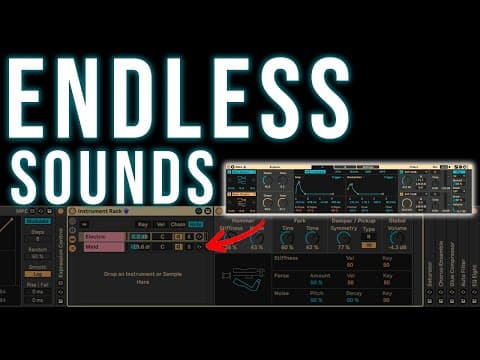
A key instrument that many users may overlook is Electric, which comes standard with Ableton. This module is not just a fantastic emulation of Rhodes and Wurlitzer keyboards; it also provides a warm lower mid-range sound that can serve as a solid foundation for layering synthesizer timbres. By stacking synthesizer sounds onto Electric, you can create entirely new keyboard-style sounds that enhance your music.
Another powerful yet often overlooked module in Ableton is Expression Control. This tool enhances the responsiveness of your keyboard playing to the sound of your synth. To maximize its potential, it’s crucial to understand how to balance its effects, as the default settings may not yield the best results. This video will guide you through the process of effectively utilizing Expression Control to create compelling sounds.
To illustrate the process, let’s look at an example of combining Electric with a new synthesizer called Meld. The key to achieving a rich sound lies in understanding the ADSR (Attack, Decay, Sustain, Release) envelope. The ADSR shape determines how a sound evolves over time, influencing its character.
In the case of Electric, the ADSR settings reveal a fast attack and a decay of about four seconds, with no sustain or release. By combining this with a horn-like synth sound, you can create lush, beautiful textures. The interplay between the ADSR settings of both instruments is crucial for achieving a cohesive sound.
Expression Control allows you to map various parameters in your instrument chain, including effects. For instance, you can link velocity information from your MIDI clips to control aspects like drive, voice spread, and volume. This means that how hard you hit the keys can dramatically alter the sound, creating a more dynamic and expressive performance.
Here are some practical applications of Expression Control:
Another technique involves adjusting the attack speed of your synthesizer. For example, a slower attack can create a ramping effect, where the sound gradually increases in volume after the initial hit. This can produce interesting textures, akin to a reverse effect. By manipulating the curvature of the attack line, you can achieve various sonic results.
Each instrument lane in the rack can have its own series of effects before they are combined. For instance, applying reverb to one lane can add spaciousness, while EQ and saturation can glue the sounds together. This approach allows for independent sound design, resulting in a rich and complex final output.
In conclusion, Ableton Live offers a wealth of possibilities for sound design, particularly when it comes to creating unique keyboard sounds. By understanding the interplay between instruments, ADSR settings, and Expression Control, you can unlock a new realm of creativity in your music production. Experiment with these techniques, and you may discover endless keyboard sounds that inspire your next track.
If you're interested in exploring these sounds further, consider downloading the provided patches and presets to get started on your sound design journey. Happy music-making!