Editorial Team
4 min read

Instagram is rolling out a 15-minute window to edit Story text, music, stickers and drawings while retaining views, likes and replies. Some Stories are ineligible, and edits remove earlier reshares, according to a reported app notice.
Instagram, Meta’s photo-sharing app, is rolling out a way to correct a published Story without deleting it and starting over. The change gives users a brief opportunity to repair text, music, stickers and drawings while keeping the engagement the original post has already received.
Instagram head Adam Mosseri, who became head of Instagram in 2018 after serving as its vice president of product, announced the feature on November 18. He said in his announcement that users can make those changes for up to 15 minutes after sharing, without losing views, likes or replies. He described the feature as something many users had requested.
Stories launched on Instagram in August 2016 as photo and video slideshows that disappear after 24 hours, adopting a format already offered by Snapchat. Inside Instagram, users could share with their existing followers rather than build an audience in another app. Until now, correcting a typo or adding a forgotten song required deleting and reposting the affected Story. The new mechanism matters because replacing a post also means giving up the interactions attached to it.
For creators and social media managers, that makes editing more than a cosmetic convenience. A report on the rollout highlights the difficulty of replacing one slide within an existing sequence: deleting and uploading it again cannot restore its original position between surrounding posts. Editing avoids that disruption as well as the reset in engagement.
For accounts with access, the reported editing process is:
The same hands-on report says edited posts stay in place with their original audience and interactions, and display a label indicating that they were edited. The announced editing options do not establish that users can replace every element of a published Story.
Hunterbrook says IEIT Systems incorporated newer AMD firmware after its U.S. blacklisting, raising questions about software transfers and affiliated server vendors. The reporting does not establish how the code arrived or whether transfers were licensed, and Hunterbrook’s affiliated investment firm disclosed a short position in AMD.
According to that testing in Brazil, Instagram’s notice says the tool does not work for Stories also shared to Facebook or those containing certain stickers, including “Add Yours.” It also says earlier reshares by other users are removed after an edit.
That distinction limits the promise of continuity. The original Story can retain its interactions, while earlier reshares by other people are removed. An account managing a campaign or a collaborative sequence therefore needs to consider both the original post and its reshares before saving an edit.
The same testing found the option on ordinary accounts without verification or a paid subscription, but not on every account tested. That supports treating the feature as a gradual rollout rather than assuming everyone can use it immediately.
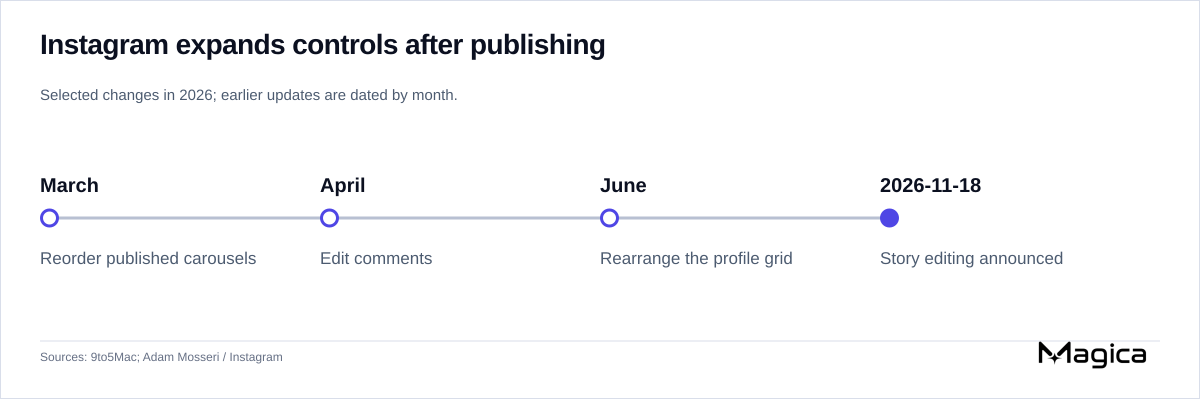
Magica’s timeline traces Instagram’s 2026 changes to carousels, comments, profile-grid ordering and Stories. Source: 9to5Mac.
The new control also extends an existing pattern within Instagram. Regular posts have long been editable. A report tracing this year’s changes notes that Instagram added carousel reordering after publication in March, comment editing with a 15-minute limit in April, and manual profile-grid rearrangement in June. Story editing gives users another way to revise published material without discarding it.
The release also brings changes to composition: Instagram announced new fonts, colors and shapes for stickers, browsable sticker sheets, changes to selecting multiple photos, and blur, color and gradient background options, according to the accompanying feature report.
Instagram has not said when every account will receive Story editing, according to the Brazilian testing report. Users must first check whether the option appears and whether their particular Story qualifies.
The 15-minute correction window is separate from the Story’s 24-hour lifespan. Once that window closes, the reported fallback remains deleting and reposting. Within it, users whose Stories have already circulated need to weigh fixing the original against the loss of earlier reshares.
A tribunal confirmed that the Home Office served Apple with a technical capability notice, clearing the way for much of its legal challenge to be heard publicly. The ruling leaves the notice’s legality and the disclosure of its contents unresolved.
Amazon’s Black Friday discounts take $200 off Apple’s 2026 Studio Display, but leave the height-adjustable version at $1,799 and preserve the configuration premiums.
The free ReactOS-derived operating system targets Windows 11 applications and drivers and can run some Linux programs. Downloadable builds and independent testing show progress, but incomplete compatibility keeps it far from an everyday Windows replacement.
Apple Music’s global creative director says its radio network reaches more than 50 million unique listeners a month. The disclosure puts a number on the free radio network’s reach, but does not establish audience growth, subscription returns or benefits for emerging artists.
Ukrainian specialists say airborne relays guided weapons during the Kerch Strait Bridge attacks without Starshield. The account shows a mission-specific alternative, while satellite restrictions and the network’s wider viability remain unresolved.
Sila says its long-term Panasonic supply relationship could exceed $1 billion, supporting a Washington factory expansion whose qualification, financing and manufacturing economics remain unresolved.
Microsoft will retire every To Do app on June 30, 2027. Work and school accounts get Planner as a destination, but existing lists will not migrate, and personal accounts must find another application—even with a Microsoft 365 subscription.
JEDEC’s DDR6 preview targets faster transfers, a 96-bit data bus and 74mm modules, with server memory density a central goal. The design remains provisional, with no confirmed launch schedule or application benchmarks.
Elon Musk says Ukraine is seeking offensive use of commercial Starlink, while Volodymyr Zelenskyy says restrictions on military Starshield are impairing defensive interceptions. The competing accounts leave the applicable service rules and authority over the limits unresolved.
Apple’s annual shortlist includes AI narration, established Mac productivity tools, spatial games and accessibility software. App Store editors will select the winners in the coming weeks from a finalist pool the same size as last year’s.
Xiaomi’s Smart Band 11 reaches more markets with a slimmer body and revised sensors, starting at €59.99 in Germany. Its 21-day battery headline matches its predecessor, payments require an NFC model and supported cards, and location tracking still needs a phone.
Elon Musk disavowed blind loyalty to Republicans and regretted his midterm spending. His continuing ties to President Trump and the prospect of Democratic investigations leave the practical meaning of that shift unresolved.
Best Buy is reportedly selling 14 4K Blu-ray titles directly, with The Odyssey also reaching stores. The limited return goes beyond marketplace sales, while industry figures show a growing premium format inside a shrinking disc market.
Ice Universe claims Apple is testing two flat-glass and two curved-glass prototypes for its expected 2027 anniversary iPhone. Reduced curvature, uncertain sample parts and rival designs temper claims of a radical all-glass phone.
Apple says HomeView’s first post-launch update fixes two Siri failures and unexpected removal from a home. The touchscreen hub still depends on paired devices for personal-context requests, while some server-based AI features have daily limits and planned fees for expanded access.

Internal presentations described school communities as a route to new Instagram users before Meta expanded its school safety program into student directories and communications. Meta defends the service, while its original education contractor says it had no role in the later development.
US officials say recent technology outages are unrelated and show no evidence of attack. The FAA’s account details a failure in aging equipment, working safety procedures and an investigation still underway; a broader AI connection remains unproven.
Samsung’s software beta lets Galaxy S26 owners lock existing apps and hide their notification content and widgets. It simplifies an established privacy task, but wider device support remains unconfirmed.
A supply-chain report puts iPhone 18 and Air 2 display production in late December and January ahead of an expected March 2027 launch. Leftover Air panels and uncertain order allocations complicate the outlook for suppliers.