Editorial Team
4 min read
Microsoft is investigating printing failures after its November 2026 Windows security updates. The trigger is a document image rendered with zero height or width, including invisible objects used in layouts or inserted by document-generation tools.
Microsoft, the maker of the Windows operating system, is investigating a printing failure after its November 2026 security updates. The company says documents can fail to print when they contain an image rendered with zero height or width at the selected printing resolution—even if the user sees no graphic on the page.
Microsoft described the problem in service alert WI1549472, according to a report whose author saw the alert. The warning applies after the November security update or later updates. It concerns the dimensions at which an image renders for printing, rather than simply whether a document contains visible pictures.
The company says invisible image objects can serve as watermarks or layout anchors. Document-generation tools can also insert them without a visible graphic. That makes the problem relevant to documents assembled through templates or software: users may not know an affected object exists.
According to another account of the notification, affected client versions range from Windows 11 26H2 back to Windows 10 Enterprise LTSC 2016, with Windows Server versions from 2025 back to 2016 also listed. Those version ranges describe compatibility scope, not the frequency of failures. The reports give no affected-device count or proportion of print jobs that fail.
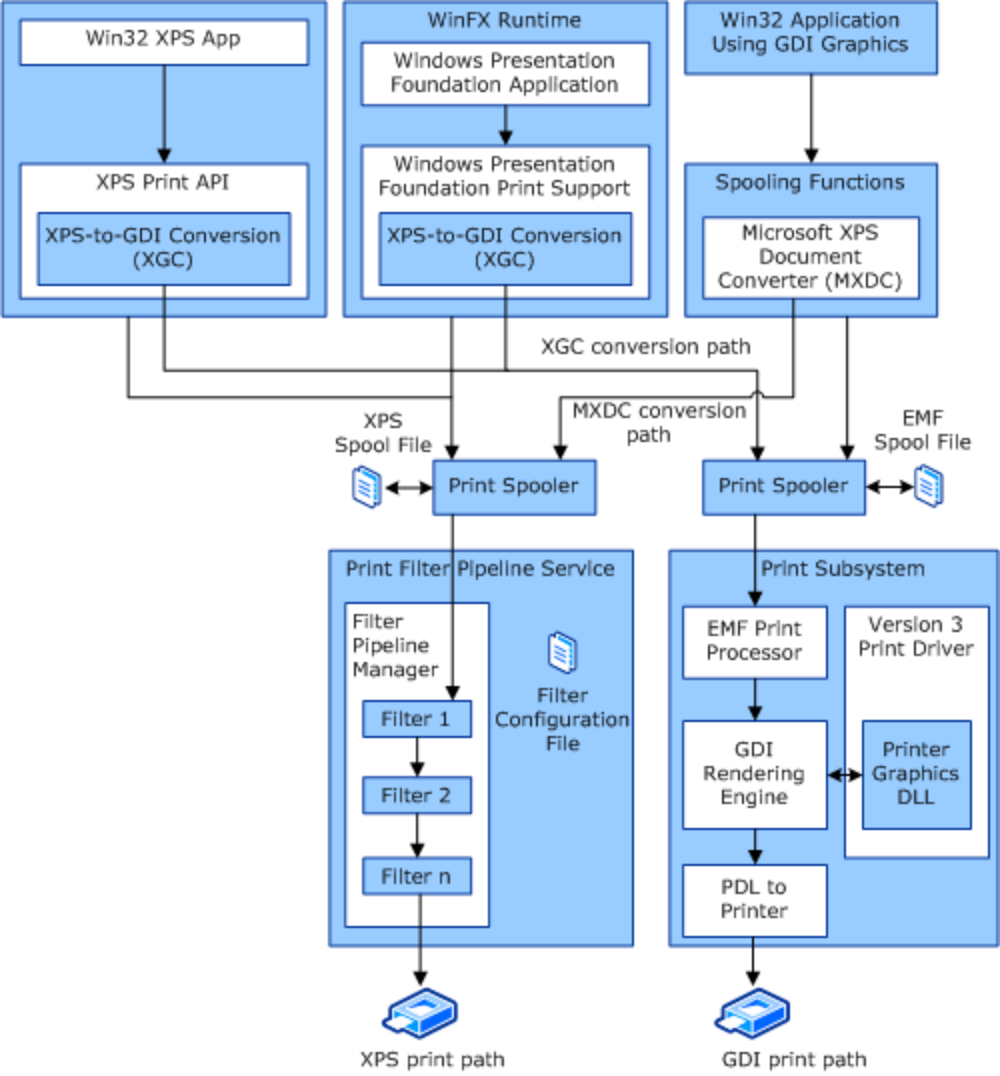
Microsoft’s diagram shows GDI and XPS printing routes. It does not establish either route as a workaround for the November failure. Source: Microsoft Learn.
Apple reportedly has Face ID prototypes for its second foldable iPhone, but integration into the outer display may miss the expected 2027 release. The experience on the unfolded phone remains unresolved.
Microsoft says it observed the failure when printing from Word, its word-processing application, through the Windows Graphics Device Interface, or GDI. It cautions that other applications might also be affected; the evidence does not establish that every Word document or every printer fails.
Microsoft’s printing architecture documentation identifies GDI as the Win32 print path, which starts in a Win32 application using the GDI graphics API and resembles the Windows Server 2003 print path. The observed failure therefore involves an established route from applications into Windows printing infrastructure.
That is not Windows’ only route. The same documentation describes an XPS path originating in Windows Presentation Foundation applications or the XPS Print API, along with conversion between GDI and XPS. It separately recommends the modern print platform, using Microsoft’s IPP inbox class driver and Print Support Apps, for printer development on Windows 10 and 11. None of that documentation establishes an alternative path or driver as a workaround for this particular failure.
A separate report discussing update KB5132061 reproduces two distinct Microsoft statements. Its quoted support guidance says the update fixes an October regression that could prevent adding a printer published in Active Directory through Windows Settings, producing Error 87. That earlier issue generally did not affect existing printers or printing.
The same report reproduces a statement attributed to Microsoft on Reddit describing the zero-dimension image failure and saying it remains under investigation. The printer-setup fix should therefore not be read as a resolution of the newly reported document-printing bug.
There is relevant precedent, but no demonstrated common cause. The report citing Microsoft’s service alert also recounts printing problems addressed in March and July 2025 involving random text from USB printers and Print to PDF, respectively. It says August 2026 .NET Framework cumulative updates subsequently disrupted printing and PDF export in applications using Windows Presentation Foundation. Those are separate regressions, not evidence that the current failure has the same mechanism.
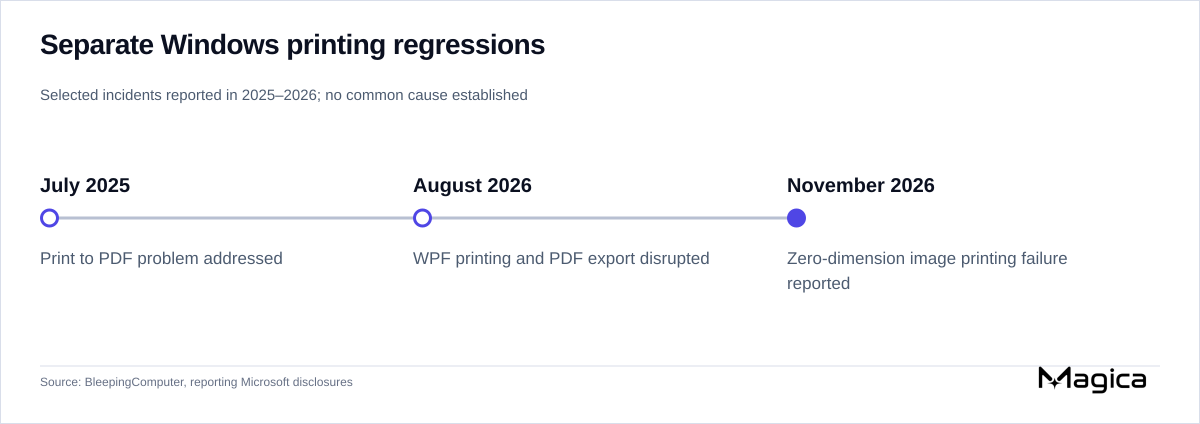
Separate printing regressions reported in 2025–2026; the retained reports establish no common cause. Source: BleepingComputer.
The November 12–13 reports provide neither a confirmed workaround for the document-printing failure nor a release date for its fix. Microsoft’s stated next step is to investigate and provide more information.
Remedies discussed for other November update problems have narrower purposes. The account of Microsoft’s notifications says a fix was expected in the coming days for activation and licensing failures affecting organizations using command-line tools or automation; the interim instruction to contact Microsoft Support for Business concerned that issue. Separately, the KB5132061 report describes Microsoft’s promise of an automatic fix for update-installation failures. Neither announcement establishes a printing remedy.
The unresolved practical questions are how to print affected documents successfully in the meantime, which applications beyond Word are affected, and when a correction will arrive. Microsoft’s next printing guidance needs to answer those questions; the existing evidence supplies a document-level diagnostic clue, not a measured account of the disruption’s scale.
A federal court made protections for Eyes Up and ICE Sightings – Chicagoland permanent, restricting government pressure on Apple and Meta while leaving the platforms’ own decisions unresolved.
Xiaomi says its 18 Pro phones will support Google Maps, Spotify and YouTube Music on their rear displays, alongside AI-generated mini-apps. The software addresses a limitation of the previous generation, but everyday usefulness remains unproven.
Italy’s privacy regulator says Facebook accessed Android users’ photos, videos and metadata without specific consent. Meta plans to appeal, while the order requires gallery suggestions to be switched off by default and separately authorized.
Microsoft’s November 13 Release Preview builds expand Windows Search into a place to change settings and let users customize File Explorer’s right-click menu. The changes target different Windows 11 versions and are rolling out gradually.
Independent Office and web-browsing tests support long battery life for HP’s Intel OmniBook 5 14, without verifying its 42-hour local-video maximum. Memory, display and price vary substantially by configuration.
Nvidia’s GeForce evangelist has rejected speculation that its gaming graphics business is ending. His reply leaves launch schedules, supply and affordability unanswered as data centers dominate the company’s revenue.
Intel regained five percentage points of desktop x86 CPU shipment share in Q3 2026, while AMD advanced in a growing server market. Mercury Research points to supply and channel differences as possible explanations, rather than a demonstrated shift in gaming preference.
SendCutSend’s reported Series B puts a $2.1 billion valuation on a manufacturer born from Jim Belosic’s car projects. Automated ordering makes small jobs practical, but expanding factories must still deliver on speed, quality and cost.
SpaceX’s 15th Starship test reached orbit and began deploying Starlink satellites, but Super Heavy was diverted offshore and exploded. An upper-stage return remained pending, leaving the company’s full-recovery ambition unproven.
Honor’s 700, 700 Pro and 700S will bring built-in rear displays to its midrange line. A November 23 launch will test the price of a package combining selfie previews, electronic pets and company-promoted health checks.
The German drone supplier says its fleet is operating normally after a precautionary Bundeswehr grounding. Reports of malware in the software-update chain leave questions about the intrusion’s reach and responsibility.
Microsoft plans to retire some Word compatibility settings from December 2026. Affected older documents may change pagination or image placement, but the settings list and rollout coverage remain unclear.
Apple has scheduled November 13 preorders for three LG security devices priced from $199.95 to $299.95, with December availability. Buyers also need to account for home-hub requirements and an iCloud+ subscription for event history.
AMD’s rumored Siren Halo APU could pair dedicated GDDR7 graphics memory with LPDDR system memory. The claim suggests a change from earlier Halo designs, but the naming, specifications and possible Xbox connection remain unconfirmed.
Apple’s smart display and fourth-generation streaming box are now available for $299 each, but app gaps, device requirements and Siri access on older hardware complicate the buying decision.
Microsoft halted deployments and configuration changes during a widespread Microsoft 365 outage, saying unexpectedly unavailable servers were overloading the remaining infrastructure. Email, Teams and AI service connectors faced disruption while the cause remained under investigation.
Google is rolling out digital home keys for Android, starting in Google Home Public Preview. The feature supports tap and hands-free unlocking, but requires specific locks and a Google hub, while household access stays managed in Google Home.
Published tests of Humble Bundle’s redesigned storefront found missing two-factor authentication settings and fewer checks on password and email changes. Users face account-control concerns, but neither a breach nor AI involvement has been established.
Microsoft says Windows updates released since October 13 can leave SQL Server linked-server connections to external databases accumulating, degrading performance over time. An out-of-band fix is planned, while temporary cleanup risks interrupting active work.