Editorial Team
5 min read
One Windows 11 user reported lower idle write activity after removing Adobe’s PDF extension and clearing associated background data. The reported 300GB total comes from a counter that includes non-disk transfers, leaving actual SSD writes and the scope of the problem unresolved.
A Windows 11 user says Adobe Acrobat’s official PDF extension for Google Chrome kept generating background storage activity on a largely idle PC. The reported improvement after cleanup gives users a concrete troubleshooting lead, but the headline-grabbing transfer totals are less conclusive than they appear.
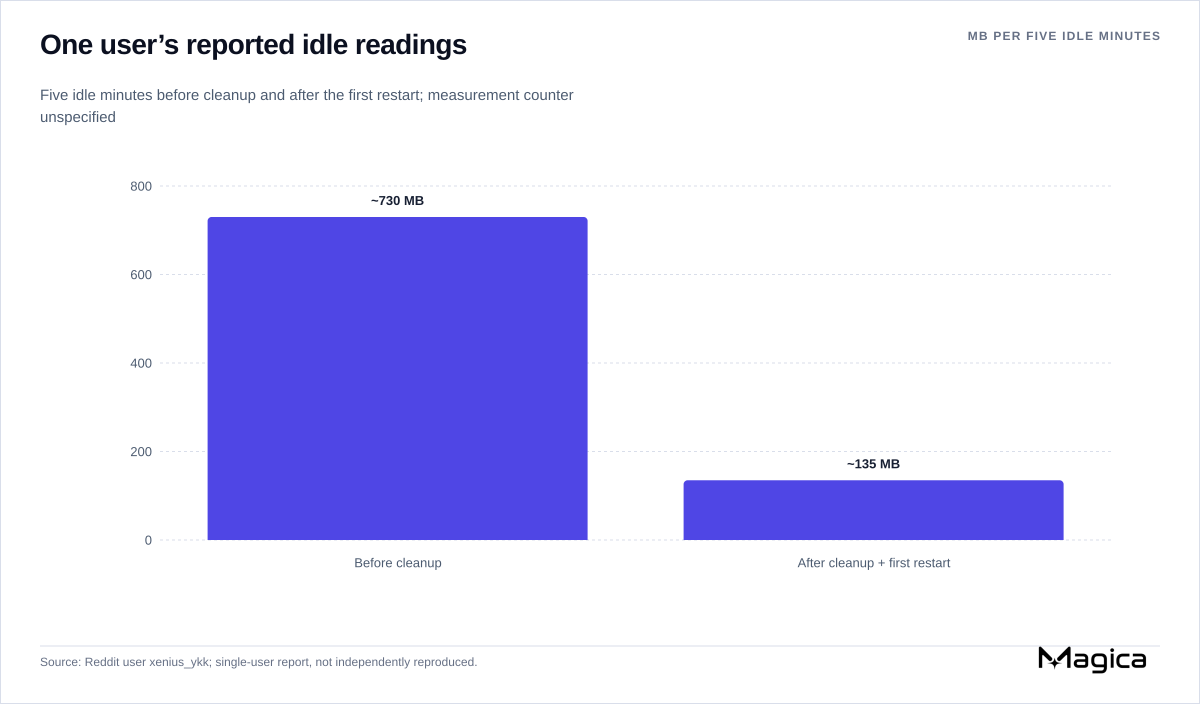
The user reported lower readings after removing the extension, unregistering its worker, clearing site data and restarting Chrome. These readings do not establish physical SSD writes or isolate which action changed the activity. Source: Reddit user report.
The user, posting as xenius_ykk, initially found that Chrome had accumulated more than 300GB of write I/O over roughly three days. Chrome’s cache occupied only about 3.5GB on disk. According to the account of the investigation, the user traced repeated cache filling and deletion to a service worker registered on Adobe’s website and associated with the extension. The activity reportedly continued overnight with no Chrome window open.
Service workers perform background tasks independently of an active webpage, including caching resources. The user described an Adobe-associated cache occupying about 1GB and repeatedly being replenished, according to the report.
The crucial qualification is that the Windows WriteTransferCount counter used in the initial PowerShell check includes non-storage I/O, including network transfers. Dividing that total by three days produces the roughly 100GB-per-day figure, but does not turn it into a measurement of physical SSD writes. Nor does the difference between cumulative transfers and the cache’s current size quantify disk writes. The user illustrated the counter’s limitation with a VPN extension that registered 1.35GB “written” while idle but showed no SSD activity in Windows’ Resource Monitor Disk tab.
Roborock lists the Qrevo 2 Pro at $449.99, about 44% below its displayed reference price. The vacuum-and-mop robot automates mop care, but water-tank upkeep, app settings and mixed review findings limit the hands-off promise.
The user then removed the extension, unregistered the service worker, cleared the associated site data and restarted Chrome. Reported writes over five idle minutes fell from approximately 730MB to 135MB after the first restart, with further improvement afterward, according to the reported results.
The original post does not clearly specify the counter used for those before-and-after readings. Because several cleanup actions happened together, the comparison also does not isolate which action made the difference. Nor does it establish a rate of SSD wear. In the original post, the user acknowledged a possible edge case specific to their setup and disclosed heavy use of AI during diagnosis, while saying the measurements were real and reproducible. They described Windows 11 and Chrome as the newest versions without supplying exact version numbers. The coverage relays this investigation rather than providing separate reproductions.
Adobe’s extension brings Acrobat PDF tools into Google’s browser. In an October 2021 product explanation, Adobe described commenting, highlighting, form filling and signing, alongside additional conversion and document-management features through an Acrobat trial or subscription. Adobe also said people using Acrobat Reader as their computer’s default PDF viewer might already have been prompted to install the extension. Its own comparison acknowledged browsers’ built-in PDF readers: the extension adds a workflow and a route to paid Acrobat features, rather than being a prerequisite for basic browser PDF viewing.
The extension has a reported user base of more than 350 million, a measure of its reach rather than the number affected by this complaint. The current overnight-cache account concerns one reported setup.
There is a separate storage-related precedent. In a May 18, 2026 support thread, a participant using the handle JonathanBuller said multiple computers were filling their disks with repeatedly generated 4MB log files in a folder named for Acrobat’s extension ID. Removing the extension reportedly stopped them returning. A later reply identified Windows 11 Enterprise 24H2, Chrome 148.0.7778.168 and management through AD group policy, but did not supply the extension version. An Adobe employee requested diagnostic files and version information.
That earlier account concerned accumulating logs, while the new complaint describes repeated cache replacement. The available evidence does not establish a shared cause, and Adobe’s request for diagnostics on the earlier issue is not confirmation of the latest allegation.
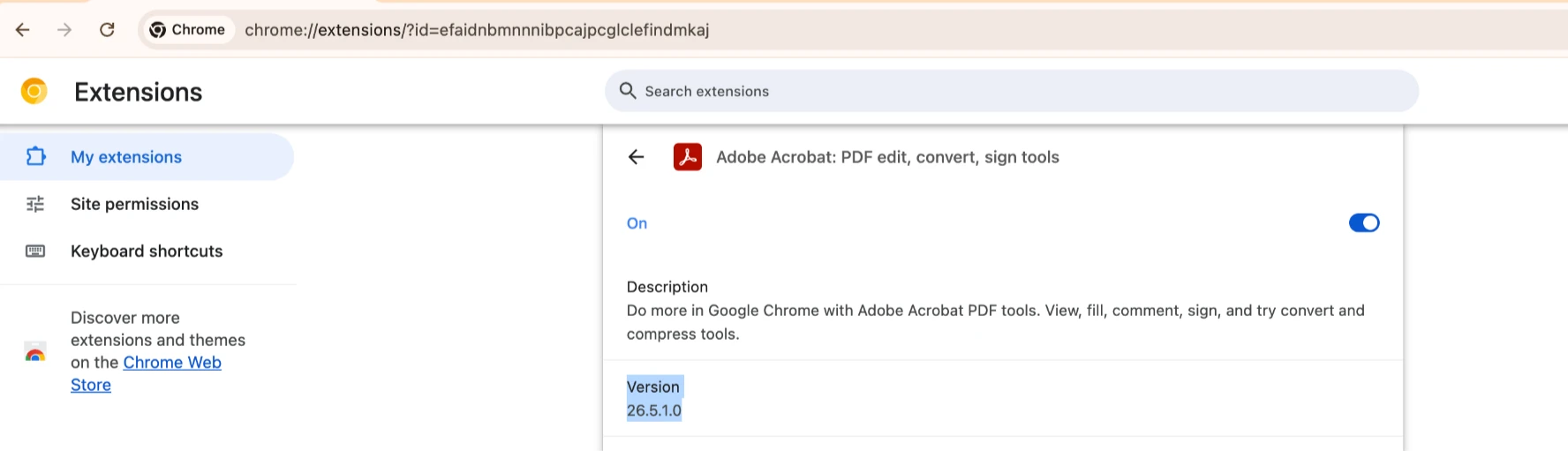
Adobe community manager Anand Sri Bhattacharya supplied this screenshot to show where to find the extension version. The displayed version is an example, not an identified affected version. Source: Adobe Community.
The unresolved question is whether the behavior can be reproduced on other systems with identifiable Chrome and extension versions, disk-specific measurements and one cleanup change tested at a time. The available reports provide neither an affected-user count nor an Adobe-confirmed cause or fix for the overnight cache activity.
For users seeing similar unexplained activity, Windows’ Resource Monitor Disk tab provides a way to check actual disk traffic. Chrome’s chrome://extensions page lists installed add-ons, while chrome://serviceworker-internals/ exposes registered service workers. Comparing idle disk activity before and after a controlled change would be more informative than treating a cumulative process-transfer counter as an SSD endurance reading.
A Weibo leaker claims to have obtained ceramic components for Apple's expected 2027 anniversary iPhone. Reports infer a possible limited edition from low planned capacity, but the component, production approval and retail plan remain unresolved.
Microsoft released KB5138318 to fix a crash triggered by November’s Windows Server 2025 security hotpatch in specific IPv6 configurations. The corrective update takes effect without a restart, but requires an existing baseline and servicing stack.
Edovia’s Screens 5.10.6 puts a remote desktop above a keyboard and trackpad on a half-folded iPhone Duo. The layout makes an existing computer more accessible, with hardware, network and software costs still attached.

Amazon’s 18-core M5 Pro MacBook Pro with 24GB memory and 2TB storage costs $100 more than the 15-core version. The advertised $500 saving uses a reference price; Apple’s launch prices complicate the wider discount claims.

Amazon's Black Friday sale puts the 256GB MacBook Neo at $599.99 and the 512GB model with Touch ID at $699.99 across all four colors. The discounts largely reverse Apple's summer price increase rather than establish a substantially cheaper entry point than at launch.
Finnable raised ₹405 crore to expand lending, technology and partnerships, with Bharat Value Fund supplying ₹150 crore. Its shift toward loans on its own balance sheet has lifted margins, while rising costs make sustained profitability the next test.
The crowdfunded small Android phone promises 12GB of RAM and 256GB of storage at unchanged backer prices. Funding, battery specifications and certification remain unresolved ahead of a May 2027 shipment target.
X’s first parental controls let adults limit teens’ time, recommendations and contacts without reading messages. The optional supervision follows protections already offered by Instagram, while leaving questions about age checks and safety outcomes.
Amazon’s reported $699 Black Friday offer restored the 512GB MacBook Neo’s March launch price and narrowed its premium over the 256GB sale model to $50. Only Blush qualified, and a later update listed $749.
Apple Kukatpally will open at Lake Shore-Y Junction Mall, taking the iPhone maker’s company-owned retail network in India to seven stores across six cities and adding direct retail to its existing Hyderabad operations.
Allstate's outage disrupted customer and agent access for a third day ahead of Thanksgiving. Oklahoma lawmakers sought late-fee waivers and protection against coverage lapses, while local accounts showed payment access varied and the cause remained unexplained.
KaOS 2026.11 removes the Plasma desktop and Qt 5 from its repositories, completing a transition to Niri and Noctalia already under way in September. Existing Plasma installations remain installed but lose maintenance, while the replacement still has authorization problems.

Amazon lists December 31, 2026 as the minimum security-update date for its 2018 Paperwhite and 2019 Kindle. Qualifying purchases can carry a longer guarantee, and the policy announces no store shutdown.

An Amazon drone struck a cable and a neighboring garage after delivering shampoo near Detroit. The FAA is investigating as Prime Air expands, but the cause and broader accident rate remain unresolved.
Leaked materials point to a 7-inch, 120Hz Lenovo handheld for Android games and PC or console streaming. Existing rivals and Lenovo’s own C700 make the missing price, final hardware and service support central to its appeal.
A Chinese distribution-forum report points to lower allocations through January 2027, adding to concerns over GeForce availability. Nvidia has not confirmed the cut, and its model coverage and reach outside China remain unclear.
Some Android beta testers can reportedly turn videos into animated WhatsApp stickers with original audio, sound effects or voice recordings. The feature expands existing sticker tools, while keeping sound muted until recipients choose to play it.
A supply-chain report puts 2027 shipment targets below 2026 goals at Apple, Samsung and most major rivals, including cuts of about 29% at vivo and 25% at Xiaomi. Primary market research shows why memory shortages threaten affordable phones most, but the targets remain unconfirmed.
Mark Gurman says Apple has long had iPads running macOS internally, but is adapting Mac features for iPadOS rather than developing a consumer release. A separate large foldable faces display-production problems, a reported $3,000–$5,000 price range and an unresolved operating-system choice.