Editorial Team
4 min read
Edovia’s Screens 5.10.6 puts a remote desktop above a keyboard and trackpad on a half-folded iPhone Duo. The layout makes an existing computer more accessible, with hardware, network and software costs still attached.
Edovia, the developer of the Screens remote desktop app first released in December 2010, has added Laptop Mode for Apple’s foldable iPhone Duo. Desktop applications still run on the computer being accessed; the phone supplies the display, keyboard and trackpad.
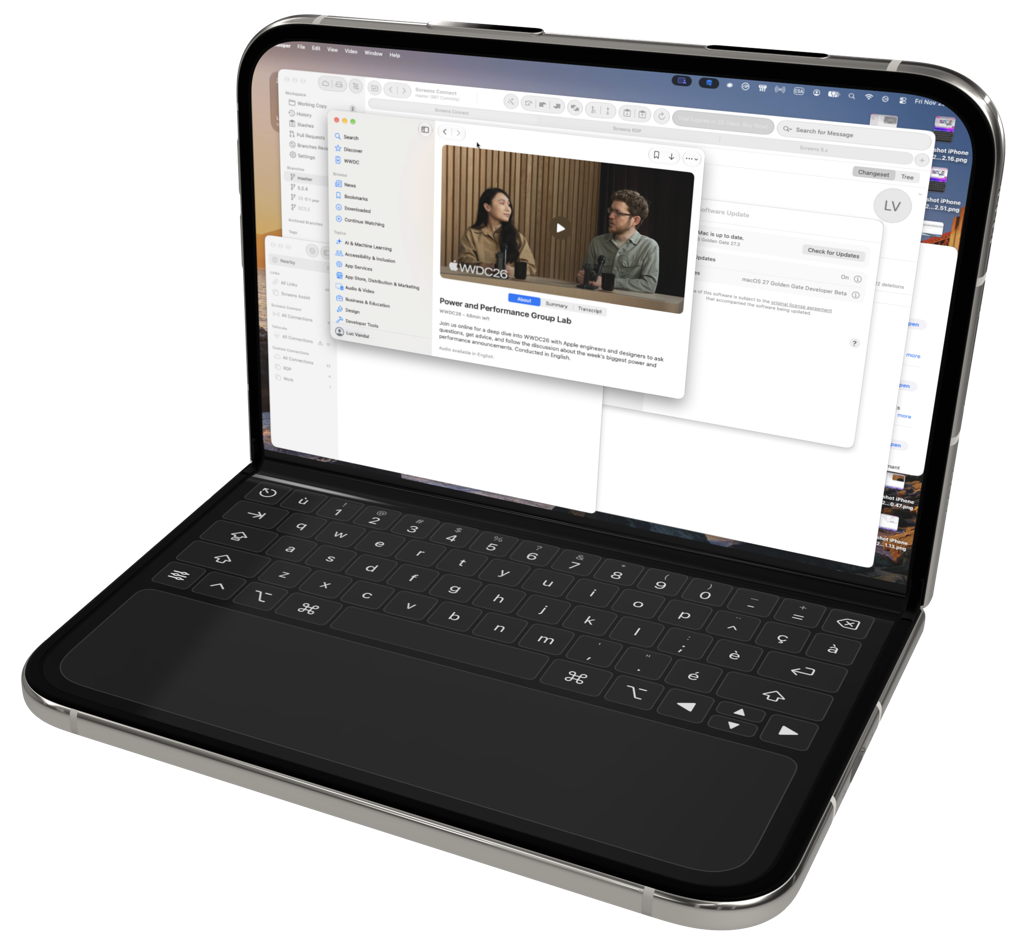
Screens’ Laptop Mode puts the remote desktop above a touch keyboard and trackpad. Applications run on the remote computer. Image: Edovia. Source: Edovia.
Apple introduced Duo in September as its first foldable iPhone, with a 7.6-inch inner display and availability beginning October 23. Screens’ new layout gives that folding screen a specific job: separating the desktop view from its controls.
Edovia’s November 25 announcement says Screens 5.10.6 places the remote desktop on the upper half of a partly folded Duo, with a custom keyboard and trackpad below. The keyboard follows the selected system keyboard language and supports swiping down on keys for secondary characters. The trackpad retains Screens’ existing gestures.
A report on the update explains that iOS 27 lets apps respond to the Duo’s hinge position.
Edovia’s product history dates Screens’ debut to December 2010, following development revived by the iPad’s announcement. The company says building Screens Connect to simplify network configuration for access from outside the local network was part of that initial work.
The current change also follows earlier Duo support. The App Store release history records Duo support in October and High Performance Screen Sharing in version 5.10 earlier in November. Automatic resizing, private virtual desktops and remote audio therefore precede Laptop Mode.
Roborock lists the Qrevo 2 Pro at $449.99, about 44% below its displayed reference price. The vacuum-and-mop robot automates mop care, but water-tank upkeep, app settings and mixed review findings limit the hands-off promise.
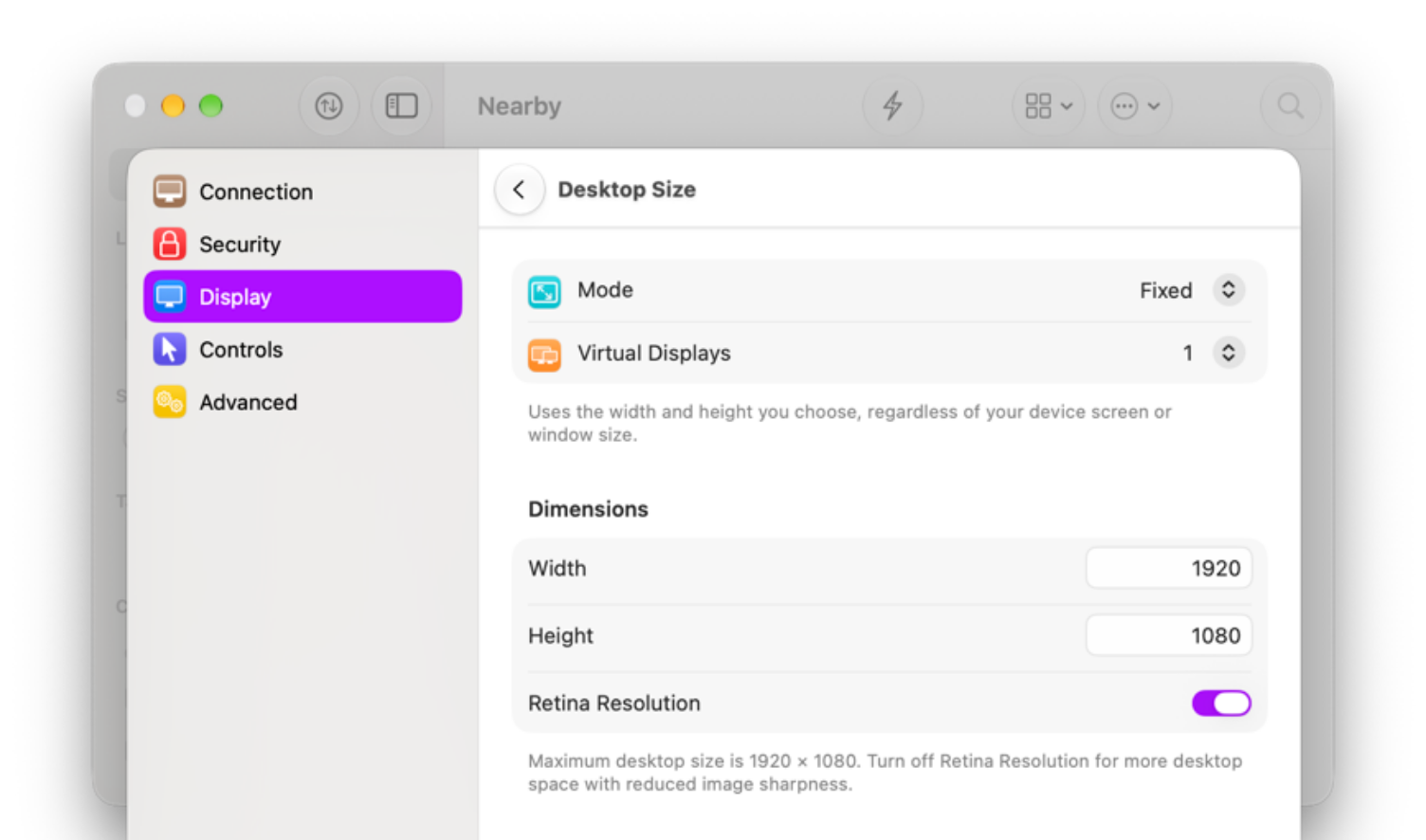
Screens’ desktop-size settings on Mac show fixed-resolution and Retina controls. Image: Edovia. Source: Edovia.
Screens can access Macs, Windows PCs, Linux PCs and Raspberry Pi devices, according to its listing. But Edovia’s preferred pairing for Laptop Mode is narrower: High Performance Screen Sharing automatically resizes a remote Mac’s desktop to fit the upper display and supplies remote audio.
The listing identifies this as Apple’s screen-sharing technology. It requires an Apple silicon Mac running macOS 14 Sonoma or later. Edovia also specifies a fast, stable connection with low latency for smooth video and audio. Its listing says HEVC video and remote audio are unavailable over SSH, while Standard Screen Sharing does not support audio. Buyers should distinguish the app’s broad computer compatibility from the requirements for its richest streaming experience.
Remote access also needs configuration. The listing says Screens Connect is built into Screens for Mac on macOS 14.6 or later; a standalone helper supports older compatible Macs and Windows PCs. Tailscale integration provides another connection route, including for Linux and Raspberry Pi.
The US App Store listing shows a $4.99 monthly subscription, annual subscription entries at $29.99 and $29.49, and a $249.99 lifetime purchase. It does not explain the difference between the annual entries. Those are software access costs on top of the phone and the computer it controls. The app’s free download does not establish that ongoing use is free.
An assessment of the update suggests the touch controls could suffice in a pinch or for people accustomed to on-screen typing, while cautioning that they do not fully replace hardware, particularly for lengthy text. This is an assessment rather than a measured typing comparison. Screens already supports external keyboards, mice and trackpads, giving users another input option if they can carry accessories.
The update also lets users send dictated text by typing it or pasting through the clipboard, optionally followed by Return. Edovia says clipboard pasting preserves paragraph breaks with third-party keyboards such as Typeless, another way to reduce reliance on the small keyboard.
Other changes include portrait resolutions for High Performance connections on iPhone, Apple Pencil actions to show or hide the keyboard, and mouse and trackpad fixes.
Edovia announced version 5.10.6 as available for iOS, iPadOS and visionOS, with the macOS release awaiting App Store approval. The remaining practical question is how comfortably the folded layout handles real work over a user’s own connection. The announcement provides no measured latency or typing-performance results. Its value will turn on whether the desktop area, touch controls and remote session are sufficient for the task someone needs to finish away from their computer.
A Weibo leaker claims to have obtained ceramic components for Apple's expected 2027 anniversary iPhone. Reports infer a possible limited edition from low planned capacity, but the component, production approval and retail plan remain unresolved.
Microsoft released KB5138318 to fix a crash triggered by November’s Windows Server 2025 security hotpatch in specific IPv6 configurations. The corrective update takes effect without a restart, but requires an existing baseline and servicing stack.

Amazon’s 18-core M5 Pro MacBook Pro with 24GB memory and 2TB storage costs $100 more than the 15-core version. The advertised $500 saving uses a reference price; Apple’s launch prices complicate the wider discount claims.

Amazon's Black Friday sale puts the 256GB MacBook Neo at $599.99 and the 512GB model with Touch ID at $699.99 across all four colors. The discounts largely reverse Apple's summer price increase rather than establish a substantially cheaper entry point than at launch.
Finnable raised ₹405 crore to expand lending, technology and partnerships, with Bharat Value Fund supplying ₹150 crore. Its shift toward loans on its own balance sheet has lifted margins, while rising costs make sustained profitability the next test.
The crowdfunded small Android phone promises 12GB of RAM and 256GB of storage at unchanged backer prices. Funding, battery specifications and certification remain unresolved ahead of a May 2027 shipment target.
X’s first parental controls let adults limit teens’ time, recommendations and contacts without reading messages. The optional supervision follows protections already offered by Instagram, while leaving questions about age checks and safety outcomes.
Amazon’s reported $699 Black Friday offer restored the 512GB MacBook Neo’s March launch price and narrowed its premium over the 256GB sale model to $50. Only Blush qualified, and a later update listed $749.
Apple Kukatpally will open at Lake Shore-Y Junction Mall, taking the iPhone maker’s company-owned retail network in India to seven stores across six cities and adding direct retail to its existing Hyderabad operations.
Allstate's outage disrupted customer and agent access for a third day ahead of Thanksgiving. Oklahoma lawmakers sought late-fee waivers and protection against coverage lapses, while local accounts showed payment access varied and the cause remained unexplained.
KaOS 2026.11 removes the Plasma desktop and Qt 5 from its repositories, completing a transition to Niri and Noctalia already under way in September. Existing Plasma installations remain installed but lose maintenance, while the replacement still has authorization problems.

Amazon lists December 31, 2026 as the minimum security-update date for its 2018 Paperwhite and 2019 Kindle. Qualifying purchases can carry a longer guarantee, and the policy announces no store shutdown.

An Amazon drone struck a cable and a neighboring garage after delivering shampoo near Detroit. The FAA is investigating as Prime Air expands, but the cause and broader accident rate remain unresolved.
Leaked materials point to a 7-inch, 120Hz Lenovo handheld for Android games and PC or console streaming. Existing rivals and Lenovo’s own C700 make the missing price, final hardware and service support central to its appeal.
A Chinese distribution-forum report points to lower allocations through January 2027, adding to concerns over GeForce availability. Nvidia has not confirmed the cut, and its model coverage and reach outside China remain unclear.
Some Android beta testers can reportedly turn videos into animated WhatsApp stickers with original audio, sound effects or voice recordings. The feature expands existing sticker tools, while keeping sound muted until recipients choose to play it.
A supply-chain report puts 2027 shipment targets below 2026 goals at Apple, Samsung and most major rivals, including cuts of about 29% at vivo and 25% at Xiaomi. Primary market research shows why memory shortages threaten affordable phones most, but the targets remain unconfirmed.
Mark Gurman says Apple has long had iPads running macOS internally, but is adapting Mac features for iPadOS rather than developing a consumer release. A separate large foldable faces display-production problems, a reported $3,000–$5,000 price range and an unresolved operating-system choice.
One Windows 11 user reported lower idle write activity after removing Adobe’s PDF extension and clearing associated background data. The reported 300GB total comes from a counter that includes non-disk transfers, leaving actual SSD writes and the scope of the problem unresolved.