Editorial Team
5 min read
Apple is adding app-by-app and folder-specific permissions, repeat approval requests and clearer warnings in macOS 27.3 beta 2. Existing permissions remain intact, limiting the immediate reach of the privacy changes.
Apple, the maker of the Mac and its operating system, is giving users more precise ways to limit what software can read and control in macOS 27.3 beta 2, released to developers on November 16. The developer release follows Apple's October warning about increasingly capable AI agents. It leaves existing grants intact.
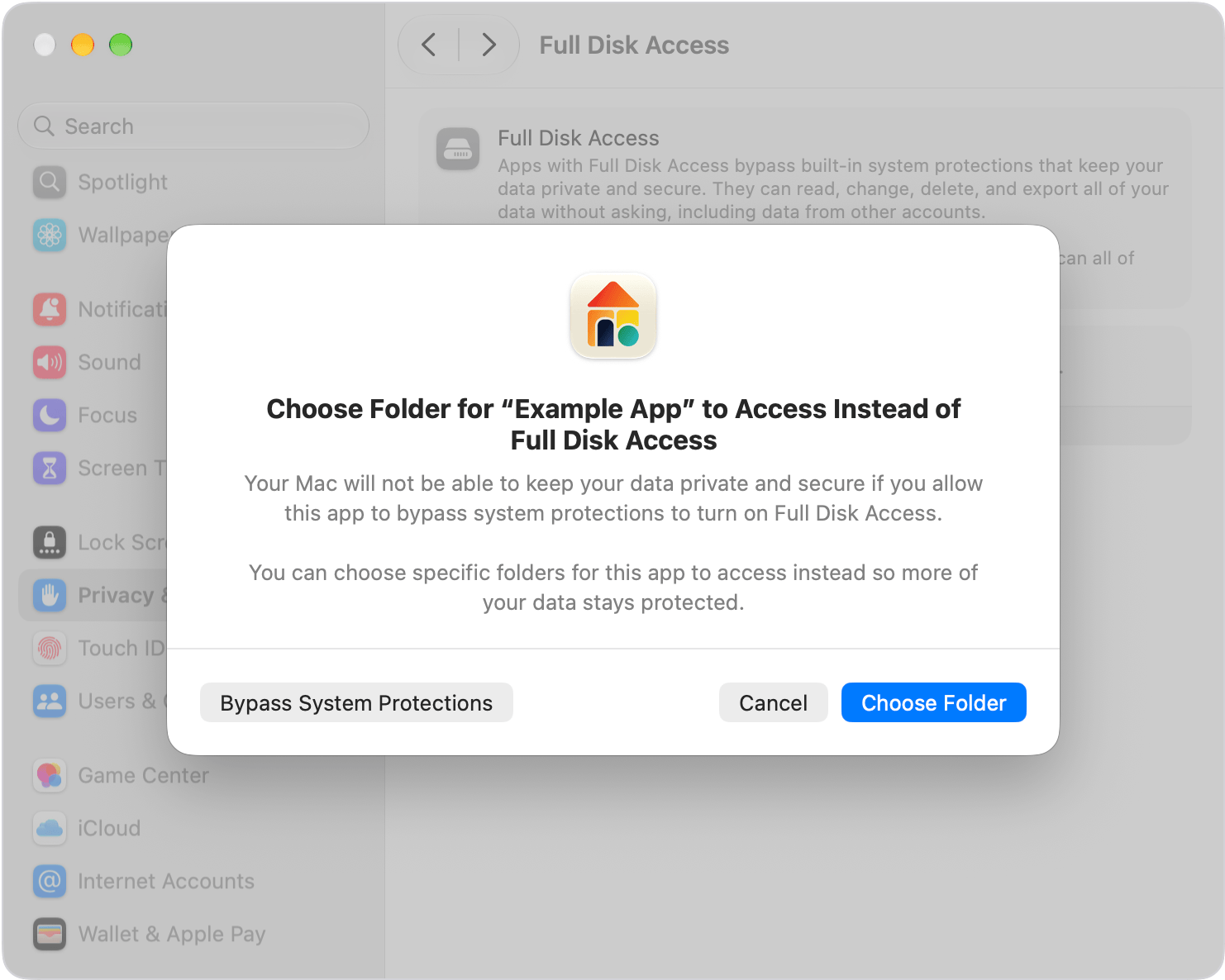
Apple's permission dialog offers folder-specific access as an alternative to Full Disk Access. Image: Apple. Source: 9to5Mac.
The most consequential change is the ability to approve a narrower workflow. An automation tool can receive permission to work with Mail without gaining control of Messages, while an app that needs files in one folder can be restricted to that folder, as described in the detailed account of the changes.
Apple's warning concerned AI agents: software that can act on a user's behalf across files and applications, rather than simply answer questions. Their usefulness depends partly on access to those resources; the same permissions can expose personal information. Apple warned in October that some developers were using Full Disk Access in ways that could expose everything on a user's system, the report says, citing Apple's developer statement.
In macOS 27.2, Device Control and Data Access is a unified setting covering extensive capabilities, including monitoring keystrokes and controlling other apps. Apple says the beta splits it into Accessibility, intended for assistive technologies such as software for people with disabilities, and System & App Protection Override, for software that bypasses protections to control apps or automate tasks.
Users can choose to make an app ask for access each time. A new menu bar indicator shows when one app is controlling another through System & App Protection Override. A separate account of Apple's announcement says Apple is introducing a single permission-granting method in which users select the requesting app from a list.
Records detail Chinese data-center investments linked to Hexi founder Kang Wei, husband of former Megaspeed chief Alice Huang. Filings document financing and Huawei business, but do not establish a route for restricted Nvidia chips.
These are changes to powerful app permissions generally. Although AI agents prompted Apple's warning, ordinary automation software is also affected.
Full Disk Access was originally intended for backup programs, according to an account of the rollout. It can expose sensitive information including emails, messages and browsing history. Its roots in backup software help explain why some apps still need to work across a user's files.
Full Disk Access is not being removed. Users can still grant it, but the approval process will explain more clearly which protections are being bypassed and which personal information could be exposed. Folder-specific permission offers an alternative to that broad grant.
The rollout report says a permission called “Private Folders” appeared in the first beta's code. It also describes a separate, currently disabled feature to prevent apps from automatically being added to the Full Disk Access list. That code finding is distinct from the active controls now announced.
The distinction between new and existing approvals is critical. Apple says in its developer notice that users will encounter the changes when approving new requests, and all previously granted permissions will remain in effect. Installing the update therefore does not itself narrow an app's existing access.
Apple's position also involves a commercial tension. An account of the security announcement notes that the company has benefited from purchases of Mac mini and Mac Studio desktop computers by early adopters running local AI models. The report provides no measure of how much revenue those purchases represent.
Apple is also expanding its own software that acts across applications. The beta release report describes expanded capabilities for Apple's Siri AI assistant in its own apps and tools for third-party developers to build multistep Siri integrations. Permission design is becoming more consequential as the operating system itself supports more complex actions.

The November beta follows Apple's October warning about broad access. Graphic: Magica. Source: Apfelpatient.
Apple says the underlying programming interfaces remain unchanged, according to the detailed announcement report. Developers nevertheless need to revise onboarding and ensure their apps can function when users approve only selected folders or applications. Limited access must become a usable state for software that previously expected a broad grant.
Apple is preserving a path for software whose function depends on extensive access. Developers of disk-backup apps using Full Disk Access, and assistive technologies using the new Accessibility settings, can request entitlements—permissions from Apple—to maintain the previous experience for new installations. Apple says known apps currently retain that experience without an entitlement.
Apple has promised further entitlement details. Those rules will clarify how developers obtain the exceptions, while testing during the beta will show how apps handle partial access. A clearer approval screen alone does not establish that an app will work well with those limits. For users who have already approved broad permissions, those grants remain a separate decision: the update leaves them in place.
ElevenLabs plans to acquire Kotoba, the startup behind Japanese speech technology used in Salesforce’s Agentforce Voice. The deal adds a 15-person team and deployed products to its existing Japanese operation, but financial terms and integration plans remain undisclosed.
Tesla plans €3 billion of expansion at its profitable Grünheide factory to build Cybercabs from 2029, eventually targeting up to one million annually. The driverless taxi still lacks German and EU approval, and its capacity target differs from an older plan for the whole site.
Our World in Data’s comparison finds negative views of AI exceed positive ones across five probability-based surveys. The primary results also reveal substantial mixed views, acceptance of some applications and a sharper divide over who controls development and bears its local costs.
NVIDIA's Nemotron for Science pairs an existing open model with nearly 50,000 chemistry questions and scientific post-training recipes. Partner results suggest scope for specialized agents, but the reported accuracy and inference savings do not establish the full cost of adapting them.
AMD says the Lux AI supercomputer is open to scientific users at Oak Ridge. Half its annual capacity supports the Genesis Mission and half is reserved for paid access, including AMD development, while workload limits and undisclosed rates shape its practical value.
OpenAI reportedly discussed buying Goodfire for more than $5 billion, over four times its February financing valuation. No deal resulted. A disclosed paid assessment agreement offers cooperation without ownership, while the technology’s safety benefits remain to be demonstrated.
Gemini’s regional voice rollout includes more than ten UK options and applies to live conversations and spoken chat responses. Earlier accent consistency problems remain untested in the new release, while pricing and rollout eligibility are unspecified.
Hugging Face is moving language-model requests to OpenRouter’s provider router, adding automatic failover while ending custom provider keys on that route. Provider rates carry no Hugging Face markup, but the selected service—and the resulting bill—can change.
Nasiko’s OpenRuntime combines agent spending reports, model routing and gateway budget limits. Earlier releases and company benchmarks show what it can do, but metering disputes, workload trade-offs and runtime charges complicate the savings case.
A report citing business records identifies Anthropic cybersecurity researcher Paul Crowley as a manager of Red Means No. The disclosure adds to scrutiny of consent safeguards and professional networking at the Bay Area sex parties.
Reported internal Microsoft data puts Claude for Microsoft 365 usage below one-tenth of Copilot’s. Undisclosed measurement details and Claude’s availability inside Copilot limit what the gap says about Anthropic’s workplace business.
South Korea is strengthening device checks and considering public Wi-Fi shutdowns before its November 19 college entrance exam, after a tax-accountant exam top scorer admitted using AI to cheat. The response still depends heavily on human screening, with no electronic device detectors planned for this year's test.
Russia’s objections to observer participation stalled the opening of a Geneva weapons conference, where governments must decide whether to authorize negotiations on autonomous weapons and whether any resulting rules should be binding.
Apple’s iOS 27.3 beta ties higher allowances for server-based AI to existing iCloud+ plans. Basic Siri commands remain free, but undisclosed daily limits leave the value of paid access uncertain.
The partners plan to combine IBM quantum processors, NVIDIA computing and Fermilab physics expertise to study modular quantum systems. A separate decoder release promises faster error-correction research, with important limits on its performance comparisons.
Federal Reserve Chairman Kevin Warsh outlined AI scenarios spanning shared prosperity, job displacement and an investment downturn. The exercise offers no forecast or rate guidance as colleagues worry that the infrastructure buildout is adding to inflation.
OpenAI is offering approved organizations a free classifier for suspected child sexual abuse images, including AI-generated material. Early results suggest less review work, but existing detection alternatives and the need for human review qualify the launch.
Nvidia plans scientific computing racks for early 2027, extending Vera beyond its initial AI deployments. Its 2.4× performance-per-watt claim comes from one airflow simulation against AMD Turin; performance against newer rivals and delivered costs remain unresolved.
OpenAI’s CEO expressed empathy for Nvidia founder Jensen Huang but withheld judgment on reinstatement. His confidence in continued AI financing comes with a direct commercial stake and unresolved deployment risks.