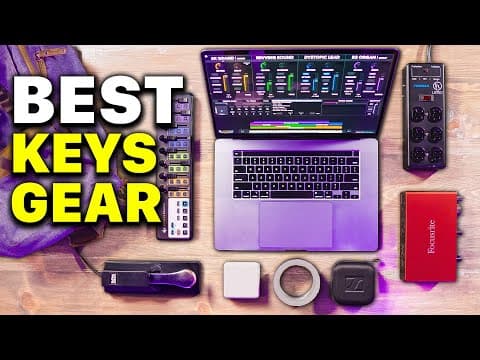
This blog post outlines the essential gear and setup strategies for worship piano players, emphasizing the importance of a reliable MIDI-based rig, proper cabling, power management, audio interfaces, in-ear monitors, and effective organization during setup and teardown.
When it comes to playing worship music, having the right gear can make all the difference. A MIDI-based keyboard rig allows for flexibility and portability, enabling musicians to practice and perform in various environments. However, frequent setup and teardown can introduce potential points of failure. In this guide, we will explore the essential gear that every worship piano player should consider, along with tips for successful setup and teardown.
At the heart of any worship piano rig is a reliable laptop. For many musicians, a MacBook is the preferred choice due to its compatibility with key software. Always remember to bring your Mac charger. The ability to run sounds directly from your computer means you can plug into any MIDI controller and maintain consistency in your sound.
Having the right cables is crucial for a seamless setup. I recommend using color-coded cables from the brand Cable Matters, which can be easily purchased online. Here are the key cables to include:
Using cable wraps can help keep your setup organized and prevent accidental disconnections. Wrapping cables around the legs of your keyboard stand not only looks neat but also minimizes the risk of unplugging during a performance.
A reliable power source is essential. I recommend bringing a power strip, such as the Furman power strip, which is sturdy and has multiple outlets. This ensures you have enough power for all your devices, especially in unfamiliar venues.
For many worship settings, a full-sized MIDI keyboard may not be necessary. Instead, I prefer the Korg Nano Control 2. This compact controller allows for easy mapping of controls in software like MainStage or Ableton Live. It’s lightweight, inexpensive, and can be placed on top of any keyboard at the venue, making it a versatile choice.
Always bring your own sustain pedal, even if the venue has one. Sustain pedals can fail unexpectedly, and having a backup ensures you won’t be left without this essential tool during a performance.
An audio interface is a valuable addition to your gear, even if the church has one. I recommend the Focusrite 4x4 for its multiple audio outputs and MIDI capabilities. This allows for greater flexibility and control over your sound. While the headphone jack on your laptop can suffice for beginners, investing in an audio interface will enhance your audio quality and reduce latency.
For monitoring, I use the Sennheiser IE400 Pro in-ear monitors. They provide excellent sound quality and come with a protective case for travel. Additionally, always carry an eighth to quarter-inch adapter, as some in-ear monitoring systems may require it.
One of the most underrated tools in a musician's kit is gaff tape. Unlike duct tape, gaff tape won’t leave a sticky residue and can be used to secure cables and equipment, preventing tripping hazards on stage.
Investing in a dedicated laptop stand is crucial. Avoid using a music stand for your MacBook, as it may not provide the stability needed. A robust laptop stand with adjustable height and tilt will keep your device secure during performances.
The Sunday Keys software is an essential part of my rig. It allows for preparation at home, enabling the creation of great-sounding patches and smooth transitions during performances. This software ensures that everything translates seamlessly when you arrive at the venue.
Developing a consistent order for setting up and tearing down your gear is vital. This muscle memory reduces the likelihood of forgetting important connections, especially during early morning gigs. Create a checklist or a specific order that works for you and stick to it.
The gear you choose to take with you for worship performances can significantly impact your experience and success. By investing in quality equipment and developing a systematic approach to setup and teardown, you can ensure a smooth performance every time. Share your must-have gear in the comments, and let’s help each other improve our worship music experiences!