Editorial Team
4 min read
Spotify Premium listeners in existing DJ markets are getting nine new voices and an option to turn off commentary between songs. Brief spoken acknowledgements remain, and the new Spanish voices replace Livi.
Spotify, the music-streaming service, is adding nine voices and a commentary switch to DJ, its personalized music selector for paying Premium subscribers. The update lets listeners keep DJ’s recommendations while turning off its talk between songs.
The change gives listeners more control over a feature that has combined music selection with a synthetic host since its 2023 launch. Spotify says the quieter setting is intended for occasions such as dinner parties, when listeners might otherwise choose a playlist. It changes DJ’s presentation; the announcement does not describe an upgrade to the underlying recommendation system.

Spotify DJ’s playback interface in May 2026 promotional imagery, before the November voice and commentary controls. Image: Spotify. Source: Spotify Newsroom — May DJ Expansion.
Spotify says in its announcement that switching off commentary leaves brief acknowledgements when listeners start DJ or press the DJ button to change the music. It is therefore a control over interruptions between songs, rather than a fully silent mode.
DJ already builds a listening session from a user’s listening history, mixing favorites, older tracks and new releases. It had also expanded to accept requests and support additional languages before this update, as an account of its development notes. Turning off commentary does not require giving up that personalized selection.
The rollout is for Premium subscribers in existing DJ markets. To find the controls, listeners search for DJ in Spotify’s mobile app and open its three-dot menu, which contains the voice and commentary settings. The DJ button lets them move to another genre, artist, mood or set of recommendations.
Employee equity at Anthropic’s IPO price is reportedly worth $232 billion, while book rightsholders await a first settlement installment estimated at $2,203.56 per work. Vesting, shared copyrights and founder voting rights complicate the comparison.
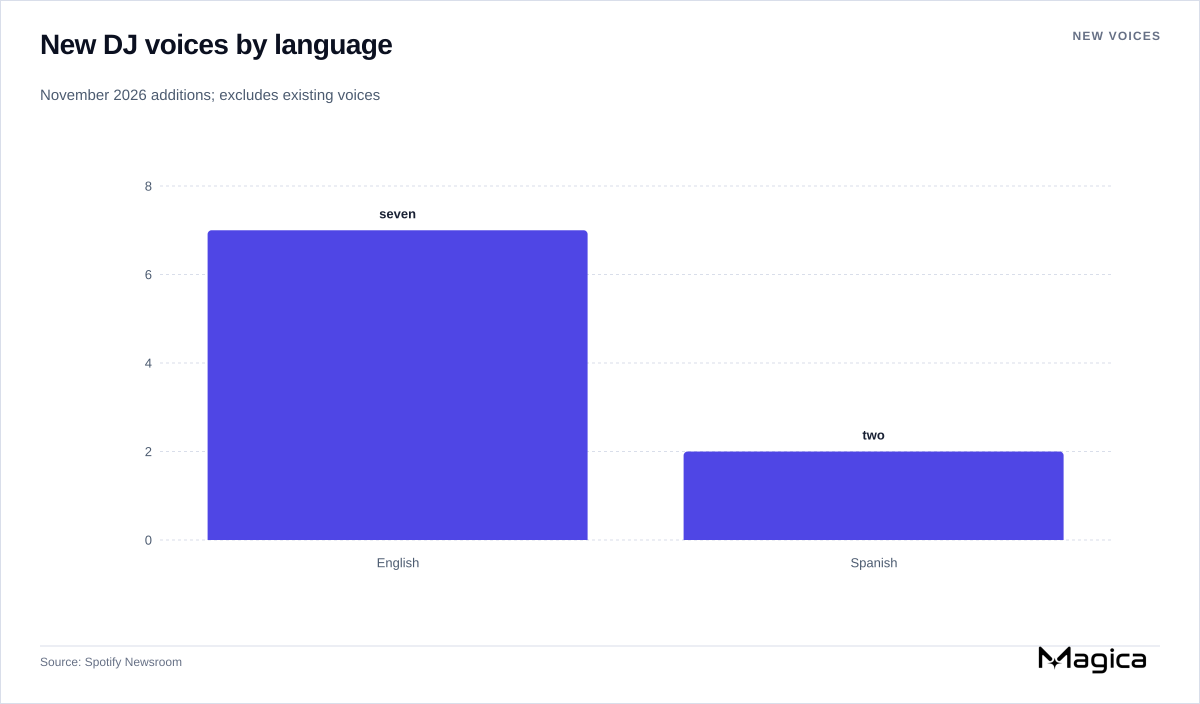
Company-reported additions: seven English DJ voices and two Spanish voices. Counts exclude existing voices. Chart: Magica; source: Spotify. Source: Spotify Newsroom.
The seven new English voices are American personas Casey, Tess and Lane, Australian Sam, British Nell, Irish Declan and Indian Nisha. Spotify describes differing presentation styles: Casey is relaxed and warm, Tess more direct, and Lane has a Southern accent and youthful energy. These are the company’s character descriptions, rather than evidence of different music-selection capabilities.
The two new Spanish voices are Mexican personas Nico and Fabi, described respectively as down-to-earth and witty. Spotify’s Spanish-language announcement details the same voice choices and commentary controls.
The lineups change differently. The original English voice, DJ X, remains available. Nico and Fabi become the only Spanish choices, replacing Livi, according to the report on the launch. Spanish listeners gain a choice between two new voices but lose the previous one.
That report puts DJ’s current availability at more than 95 markets, with support for English, Spanish, French, German, Italian and Brazilian Portuguese. The new voice options cover English and Spanish, rather than all six languages.
Voice selection is also a familiar customization option in other AI assistants, as the report notes. Within Spotify, DJ sits alongside other ways to influence listening, including AI playlist creation and prompts to adjust recommendations. This release adds control over DJ’s host rather than introducing personalized music discovery to the service.
Spotify had already reported broad use before this release. In its May 7 expansion announcement, the company said DJ, then described as a beta feature, had served 94 million Premium users since launching in 2023. That is a historical reach figure, not a count of current weekly users.
In November, Spotify says 80% of DJ listeners return week after week. It does not specify the measurement period or define the listener cohort, so that percentage cannot establish how many people currently use DJ or whether these new settings improve repeat use.
The next useful evidence would be how many listeners adopt the commentary switch and new voices, and whether they use DJ more often afterward. Spotify’s announcement supplies no such results. It establishes a narrower, immediate benefit: listeners can keep the personalized music flow while choosing when they hear from its host.
Moore Threads is preparing a December 29 reveal for Lushan, a desktop GPU pitched at gaming and local AI inference. Its claimed memory record remains unquantified, and capacity alone will not establish performance or value.

Amazon is in advanced talks to buy Decart, whose software helps AI models run efficiently across chips. The reported deal could strengthen AWS’s Trainium business, with conditional payments and five-year founder commitments making execution central to its value.
The University of California is expanding ChatGPT and Codex access across 10 campuses, with extra charges for advanced models and an unresolved dispute over faculty authority.
Ray-Ban’s US store cuts the Gen 2 Wayfarer by 25% to $284.25. Buyers still face separate prescription-lens prices, a cheaper Gen 1 option and newer glasses outside Meta’s frame sale.
Ubisoft has made the team behind its Teammates experiment a dedicated subsidiary targeting AI characters with memory and outside game creators. Earlier playtests show both progress and limitations, while commercial plans remain undisclosed amid group cost cuts and refinancing.
Neuralink has shown a trial participant controlling GTA VI through intended movements. Earlier gaming use and company-reported trial results put the demonstration in context, while its reliability across users remains unmeasured in the reports.
SoftBank founder Masayoshi Son reportedly explored financing a $1 trillion acquisition of memory-chip maker SK hynix, but the company says the deal is no longer under active consideration. The target brings surging earnings, existing shareholders and customer commitments that complicate any simple equation between ownership and access to AI-memory supply.
Nvidia reported $115.8 billion in quarterly revenue, but its shares fell 14% Friday amid a wider technology selloff, a leadership transition and a reported accounting investigation. Strong cash generation offers a counterweight to concerns about the durability of AI spending.
The Nasdaq 100 fell 5.6% on November 20 and closed 19.8% below its record after an intraday bear-market breach. Nvidia’s revenue surge and Anthropic’s huge IPO did not halt the rout; infrastructure bills and resilience elsewhere in the market complicate the picture.
UN-backed talks agreed on two more years of work toward an autonomous-weapons instrument, without committing to a treaty. Consensus kept major military powers involved while allowing opponents to weaken the mandate.
Tesla is sending FSD v15 to its first customers, adding a visualization of planned driving and changes to navigation and hazard detection. The software remains supervised, and its claimed 25-fold intervention improvement lacks a disclosed baseline.
OpenAI reports sharply lower reasoning-extraction rates in internal GPT-6.2 tests and backs sanctions against illicit foreign distillation. Its own research and rival Anthropic’s experience show why protecting hidden reasoning leaves capability transfer and customer costs unresolved.
Alberta proposes 600-metre setbacks for large data centres and expanded utility oversight, but exemptions and rules still to be written will determine how much protection communities receive.
President Donald Trump backed Commerce Secretary Howard Lutnick as lawmakers scrutinize alleged delays in restricting a suspected route for AI chips to China. A new congressional inquiry also questions Nvidia’s influence on an existing investigation.

Amazon’s month-old Echo Time is $50 off for Black Friday. Its touchscreen, home hub and optional sleep-aware alarm cost $90 more than the reported Echo Spot price, while Alexa+ access and evidence of better waking remain key buying questions.
Merck will pair its experimental data with Isomorphic Labs’ AI to seek small-molecule cancer drug candidates. The deal follows Isomorphic’s $5 billion financing, but its payments, target and development timetable remain undisclosed.
Thinking Machines Lab released a roughly 20GB open-weights model that reuses its middle layers for reasoning. It brings the Inkling family to local hardware, with competitive coding results but workload-dependent costs and preliminary evidence on oversight.
Apple’s first HomePod mini update since 2020 adds Mac audio and four-speaker surround, but Siri AI remains unavailable, core home-hub features carry over, and reviews disagree on playback reliability.
Treasury Secretary Scott Bessent says an unnamed Anthropic founder will announce a large gift to children's investment accounts within weeks, but the amount, recipients and connection to existing philanthropic pledges remain undisclosed.