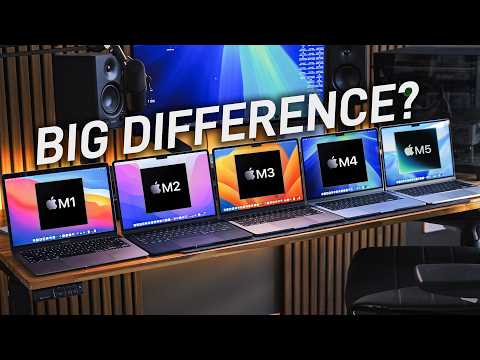
Apple's MacBook Air lineup has evolved significantly since the introduction of the M1 chip. This comprehensive comparison covers every Apple Silicon MacBook Air model from M1 through the latest M5, highlighting their differences in design, performance, features, and value to help you decide which model suits your needs best.
Physical Design and Display
Since the M1 MacBook Air overhaul in 2022, the physical design has remained largely unchanged through the M2, M3, M4, and M5 models. The 2022 redesign brought a brighter screen, improved webcam, better speakers, enhanced keys, a refined trackpad, and updated port selection.
Webcam Improvements
- The M4 and later models feature Center Stage technology and slightly better image quality compared to earlier versions.
External Monitor Support
- M4 and M5 models come with Thunderbolt 4 ports, offering faster speeds and more bandwidth than Thunderbolt 3.
- These models support two external displays in addition to the built-in screen.
- The M3 supports two external displays only when the MacBook screen is closed.
- M1 and M2 models support only a single external monitor regardless of the MacBook screen status.
Storage and Memory Upgrades
The M5 MacBook Air base model now starts with a 512 GB SSD, doubling the previous 256 GB base storage found in earlier models. Additionally, the base RAM has increased from 8 GB to 16 GB in recent years, significantly enhancing overall performance.
Pricing Considerations
- The M5 Air is priced at $1,199, which is higher than the M4's $999 launch price.
- However, considering the doubled SSD capacity and increased RAM, the M5 offers substantial value, especially given rising component costs.
- The M1 and M2 chips lack several media engine features present in M3 and later models, including hardware-accelerated ray tracing beneficial for gaming and 3D workflows.
- Memory bandwidth has improved significantly in the M5 compared to the M4, allowing faster access to unified memory.
Everyday Use and Multitasking
- For basic tasks such as web browsing, email, and light multitasking (10-20 browser tabs), all models perform similarly with snappy responsiveness.
- Faster single-core speeds in M4 and M5 models result in marginally quicker website loading times, noticeable only when devices are compared side by side.
Intensive Multitasking and Professional Use
- Models with 16 GB RAM (M4 and M5 base models) handle heavy multitasking better, with less frequent browser tab hibernation.
- More demanding tasks like basic Photoshop editing benefit from increased memory bandwidth in newer models.
- Differences between M2 and M3 are minor when RAM is equal.
- The 512 GB SSD in the M5 offers significantly faster read and write speeds than the 256 GB SSDs in previous models.
- Faster SSD speeds improve small file transfers and enhance multitasking performance by speeding up swap memory operations.
Charging and Power
Included Chargers
- All MacBook Air models include a charger, but these typically output only 30-35 watts, insufficient for fast charging.
Fast Charging Requirements
- From the M2 Air onwards, fast charging requires a charger capable of at least 70 watts.
- Standard chargers have a single port, limiting charging to one device at a time.
Recommended Charger Upgrade
- The Anker Prime 160W multiport charger is recommended for fast, simultaneous charging of multiple Apple devices.
- Features include GAN Prime 2.0 technology for compact size and heat management, Power IQ 5.0 for smart power distribution, and Active Shield 4.0 for temperature control and safety.
Advanced Workflows and Creative Applications
- Each generation shows improvements in single-core and multi-core CPU performance.
- Short burst tasks like coding in Xcode are faster on newer models, while longer tasks like compiling large codebases see less pronounced gains.
Neural Processing Unit (NPU)
- The neural engine powers AI and machine learning tasks.
- M1 and M2 lag behind newer models, but differences between M4 and M5 are minimal.
- Real-world impact is limited currently due to the nascent state of Apple Intelligence features.
- Photoshop, After Effects, Final Cut, Resolve, and Premiere show minor generational improvements.
- Basic video editing performance is comparable across models.
- M1 struggles with ProRes footage due to lack of dedicated hardware encoders/decoders.
3D Applications and Ray Tracing
- M3, M4, and M5 support hardware-accelerated ray tracing, enhancing 3D rendering in apps like Blender and Cinema 4D.
- M5 offers significantly more power than M4 in these tasks.
- GPU improvements across generations lead to marginally better gaming performance.
- M5 performs well even during extended gaming sessions, maintaining performance without significant thermal throttling.
Thermals and Heat Management
- MacBook Air models rely on passive cooling with no internal fans.
- During everyday use, devices remain cool to the touch.
- Intensive tasks cause the chassis to warm up, with temperatures reaching 44-45°C at the back, which can be uncomfortable on bare skin.
- Thermal behavior is similar across all five models.
Battery Life
- Apple's official claims suggest similar battery life across all models.
- Real-world testing shows the M5 lasting approximately 1 to 1.5 hours longer than M1, M2, and M3 models under similar workloads.
- Battery health and age significantly affect performance; older MacBooks may have degraded battery capacity.
Which MacBook Air Should You Choose?
- If you already own a MacBook Air that meets your needs, upgrading is not necessary.
- For users with an original M1 base model (8 GB RAM, 256 GB SSD) used for several years, upgrading to the M5 is justifiable and offers meaningful improvements.
- New buyers should consider a new or lightly used M4 if available at a significant discount.
- Otherwise, the M5 is recommended for its superior RAM, SSD, performance, battery life, and warranty.
Conclusion
The MacBook Air lineup has matured into a powerful and efficient series of laptops suitable for a wide range of users. While differences between models may be subtle for everyday tasks, professionals and power users will appreciate the advancements in RAM, SSD speed, media engines, and GPU capabilities in the latest M5 model. Choosing the right MacBook Air depends on your specific needs, budget, and whether you value the latest features and performance enhancements.
For a broader comparison including other MacBook models, additional resources are available to help guide your decision.