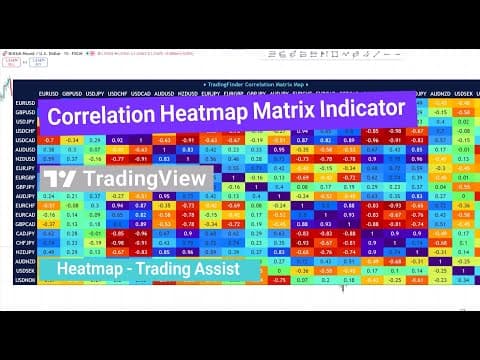
The Correlation Heatmap Matrix Indicator is a powerful tool available on the Trading Finder website and accessible through TradingView. It offers traders a comprehensive way to visualize and analyze the correlation between different trading pairs and assets in real time.
Accessing the Indicator on TradingView
To use the Correlation Heatmap Matrix Indicator, follow these steps:
- Navigate to the indicator section on the TradingView website.
- Search for the indicator by name.
- Select the indicator and apply it to your chart.
- For quicker access in the future, add the indicator to your favorites by enabling the "add to favorites" option.
Once applied, the indicator displays a heatmap that shows the correlation status between various pairs on your chart.
What is the Correlation Heatmap Matrix Indicator?
This indicator is one of the most important statistical metrics in trading, illustrating how two assets move in relation to each other—whether in the same direction or opposite directions. It visualizes these relationships through a color-coded map, making it easier to analyze positive and negative correlations across the market.
Key Features:
- Supports multiple markets including Forex, stocks, and cryptocurrencies.
- Offers a customizable mode to tailor the analysis to your needs.
- Helps traders analyze intermarket patterns, manage risk, diversify portfolios, and identify pairs trading opportunities.
- Operates in real time, providing a broad view of market flows and divergences.
How to Interpret the Heatmap
The heatmap matrix displays symbols in both rows and columns, allowing you to analyze the correlation between each pair relative to others. For example:
- The Indosty symbol might show a 91% negative correlation with the USDCAT symbol.
- The GBPUSD pair could have a 75% positive correlation with the EURUSD pair.
Values fluctuate between +1 (perfect positive correlation) and -1 (perfect negative correlation), updating continuously to reflect current market conditions.
Configuring the Indicator Settings
The indicator offers several customizable settings to enhance your analysis:
- Correlation Period: Defines the number of candles used to calculate the correlation. This is preset by default but can be adjusted.
Display Settings
- Correlation Table Display: You can enable or disable the correlation table on the chart. Enabling it moves the table from the oscillator section directly onto the chart for easier viewing.
- Table Size: Choose from options such as small, medium, or large to adjust the table size.
- Table Position: Select the table's position on the chart (e.g., top right, bottom left) to suit your preference.
Market and Symbol Selection
- Market Type: Choose the market you want to analyze correlations for, including Forex, stocks, cryptocurrencies, or a custom selection. Forex is the default.
- Trading Symbols: Customize up to 20 symbols to analyze. For example, the first symbol might be gold, with others listed accordingly.
- Custom Mode: Activating this mode allows you to modify and select your desired symbols, providing flexibility to focus on assets relevant to your trading strategy.
Status Line Display
- You can enable or disable the display of input values in the status line. This helps keep your chart clean or provides additional information as needed.
Practical Benefits for Traders
Using the Correlation Heatmap Matrix Indicator can significantly enhance your trading by:
- Allowing you to quickly identify which assets move together or inversely.
- Helping manage risk by understanding intermarket relationships.
- Supporting portfolio diversification by selecting assets with low or negative correlations.
- Spotting pairs trading opportunities where correlated assets can be traded simultaneously.
Conclusion
The Correlation Heatmap Matrix Indicator is a versatile and essential tool for traders looking to deepen their market analysis. By providing real-time, visual correlation data across multiple markets and customizable settings, it empowers traders to make informed decisions and optimize their trading strategies.
Feel free to explore the indicator on TradingView, customize it to your needs, and share your experiences or suggestions to help improve this valuable tool.