
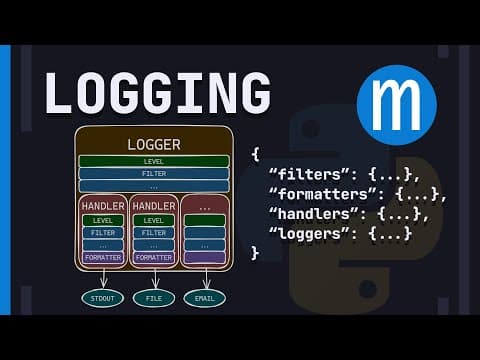
This blog post explores modern logging practices in Python, emphasizing the use of the built-in logging package, the advantages of dictConfig for configuration, and the importance of structured logging. It covers setting up loggers, handlers, formatters, and the use of JSON for log storage, along with performance considerations and best practices for library authors.
Welcome back, aspiring professional Python developers! In this post, we will delve into how to set up logging in your Python application the modern way. We will explore best practices, the built-in logging package, and how to configure logging effectively using dictConfig.
Logging is a crucial aspect of any application, providing insights into its operation and helping diagnose issues. While some may question the necessity of logging, it is generally advisable to implement it, especially for production applications. Logging can help track errors, monitor application behavior, and provide context for debugging.
The built-in logging package in Python is the de-facto standard for logging. Despite its age and some quirks, it is widely used across various applications, whether in the cloud or locally. However, it is essential to note that many tutorials and documentation may be outdated or not follow best practices.
Many developers start logging by simply importing the logging module, creating a logger, and using a basic configuration. While this approach works for simple cases, it is not recommended for more complex applications. Instead, you should consider logging to multiple destinations (e.g., stdout and files) and handling different log levels appropriately.
To set up logging effectively, we recommend using dictConfig, which allows you to configure logging via a dictionary. This method provides clarity and flexibility, especially for more complex logging setups.
Loggers are organized in a hierarchy. For example, a logger named A.X is a child of logger A, which is a child of the root logger. This hierarchy allows for easy management of logging across different components of an application.
For most applications, it is advisable to keep logging configurations simple. Here are some recommendations:
logging.getLogger().A simple configuration that logs everything to stdout can be set up as follows:
import logging
from logging.config import dictConfig

logging_config = {
    'version': 1,
    'disable_existing_loggers': False,
    'formatters': {
        'simple': {
            'format': '%(levelname)s: %(message)s'
        }
    },
    'handlers': {
        'stdout': {
            'class': 'logging.StreamHandler',
            'formatter': 'simple',
            'stream': 'ext://sys.stdout'
        }
    },
    'loggers': {
        '': {
            'handlers': ['stdout'],
            'level': 'DEBUG'
        }
    }
}

dictConfig(logging_config)
For applications that require logging to a file, you can modify the configuration to include a file handler:
import logging
from logging.handlers import RotatingFileHandler

logging_config = {
    'version': 1,
    'disable_existing_loggers': False,
    'formatters': {
        'detailed': {
            'format': '%(asctime)s - %(name)s - %(levelname)s - %(message)s',
            'datefmt': '%Y-%m-%d %H:%M:%S'
        }
    },
    'handlers': {
        'file': {
            'class': 'logging.handlers.RotatingFileHandler',
            'filename': 'my_app.log',
            'maxBytes': 10 * 1024,
            'backupCount': 3,
            'formatter': 'detailed'
        }
    },
    'loggers': {
        '': {
            'handlers': ['file'],
            'level': 'DEBUG'
        }
    }
}

dictConfig(logging_config)
For better parsing and analysis, consider storing logs in JSON format. This can be achieved by creating a custom JSON formatter:
import json
import logging

class JSONFormatter(logging.Formatter):
    def format(self, record):
        log_record = {
            'levelname': record.levelname,
            'message': record.getMessage(),
            'timestamp': self.formatTime(record, self.datefmt),
        }
        return json.dumps(log_record)
Logging can introduce performance overhead, especially in high-throughput applications. To mitigate this, consider using a QueueHandler to log asynchronously. This allows log records to be queued without blocking the main thread, improving application responsiveness.
To implement a QueueHandler, modify your logging configuration:
from logging.handlers import QueueHandler

logging_config = {
    'version': 1,
    'disable_existing_loggers': False,
    'handlers': {
        'queue': {
            'class': 'logging.handlers.QueueHandler',
            'queue': 'your_queue',
        }
    },
    'loggers': {
        '': {
            'handlers': ['queue'],
            'level': 'DEBUG'
        }
    }
}
When developing libraries, avoid configuring logging directly. Instead, allow application developers to configure logging according to their needs. This approach ensures that your library does not interfere with the logging preferences of its users.
In conclusion, effective logging is essential for any Python application. By utilizing the built-in logging package and configuring it with dictConfig, you can create a robust logging setup that meets your application's needs. Remember to keep your configurations simple, consider performance implications, and allow flexibility for library users. Happy coding!



















