
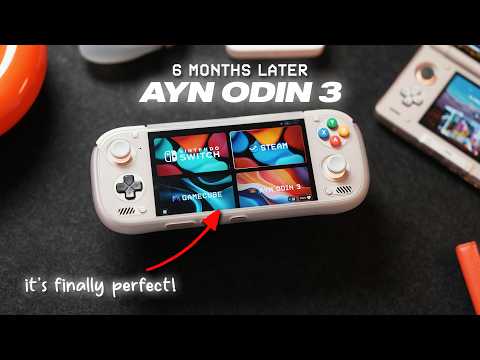
The AYN Odin 3 is a powerful, compact handheld gaming device featuring a Snapdragon 8 Elite chip, 6-inch AMOLED 1080p 120Hz display, and excellent performance for PC and Switch emulation. Despite some thermal and fan noise concerns, custom GPU drivers and underclocking apps improve usability, making it a strong competitor to the Steam Deck OLED for portable gaming.
The AYN Odin 3 has quickly become a standout in the world of handheld gaming devices. Combining powerful hardware with a compact form factor reminiscent of the PS Vita, it offers an impressive alternative to larger devices like the Steam Deck OLED and Legion Go 2. This article explores why the Odin 3 is gaining popularity and what makes it a compelling choice for gamers on the go.
The Odin 3 is notably smaller and lighter than many competitors. Weighing approximately 390 grams (less than a pound), it is comfortable for extended gaming sessions without causing fatigue. Compared to the bulky Legion Go 2, the Odin 3’s size makes it highly portable.
The model discussed here is the Max version, equipped with the Snapdragon 8 Elite chip. This processor delivers 30 to 40% better CPU and GPU performance than the AYN Thor, making it a beast in terms of raw power. The Max version also includes 16GB of RAM and 512GB of storage, though the Ultra version offers even more with 24GB RAM and 1TB storage.
The Odin 3 features a 6-inch 1080p AMOLED touchscreen display with a 120Hz refresh rate. This results in vibrant, crisp visuals on a small screen, enhancing the gaming experience. Connectivity options include Wi-Fi 7 and Bluetooth 5.4, ensuring fast and reliable wireless connections.
Battery life is supported by an 8,000 mAh battery capable of fast charging up to 60W, allowing for longer playtime and quick recharges.
The build quality of the Odin 3 is impressive, especially considering its size and weight. While the device is comfortable to hold as is, users can enhance ergonomics with an optional TPU grip case. The reviewer uses a TPU shell that adds slight depth and improves grip without compromising portability.
Additionally, the reviewer customized their Odin 3 with silicon face button covers originally designed for the Nintendo Switch. These covers provide a less slippery, slightly raised Xbox-style button layout, improving gameplay comfort. The analog sticks were also swapped from dark gray to a lighter off-white color, adding a subtle aesthetic upgrade.
For the front-end launcher, the Retroid app is the preferred choice. Retroid is highly customizable and user-friendly, making it easy to import games and emulators. Setting up is straightforward, though customizing the interface to personal preferences can take some time.
When the Odin 3 first launched, it faced challenges with emulating games due to limited driver support for the Snapdragon 8 Elite chip. However, after 6 to 7 months, custom GPU drivers and emulator updates have significantly improved performance.
Currently, about 85 to 90% of games run at a consistent 60 FPS with minimal stutters or graphical glitches. Popular Switch games like "Mario Kart 8 Deluxe" run smoothly, comparable to playing on a Switch Lite but with more powerful hardware.
"The Legend of Zelda: Breath of the Wild" with the 60 FPS mod runs exceptionally well, offering an experience close to what the upcoming Switch 2 might deliver. Some games, like "Lego Horizon," may still experience occasional graphical glitches, but this is also true for other handhelds like the AYN Thor.
The Odin 3 excels at running PC games on the go. Titles like "Sleeping Dogs" run flawlessly at 720p on normal settings, maintaining 60 FPS without frame drops or stutters. This game is highly recommended for those seeking engaging single-player experiences while waiting for new releases like GTA 6.
"Final Fantasy 7 Remake" also performs well at 720p low settings, mostly maintaining 60 FPS with occasional dips to 45-50 FPS. Older games such as "BioShock 2 Remastered" run smoothly at 1080p medium settings, though finding the optimal GPU driver is essential for the best experience.
Newer games like "Forza Horizon 6" are currently unplayable on the Odin 3 due to their demanding requirements and lack of support, a limitation shared even by the Steam Deck OLED.
One of the main concerns with the Odin 3 is its thermal performance and fan noise. The device can get quite loud during intensive gaming sessions, which may detract from the experience.
To address this, users can install an app called Cluster Tune from GitHub. This app offers three custom underclocking profiles (small, medium, and large) for the Snapdragon 8 Elite chip. These profiles reduce CPU and GPU clock speeds without significantly impacting frame rates.
Using Cluster Tune helps lower device temperatures, reduce fan noise, and extend battery life by 30 to 45 minutes during gameplay. This solution works well for both Switch emulation and older AAA PC titles.
The AYN Odin 3 is an incredible handheld gaming device that rivals the Steam Deck OLED in many respects. While the Steam Deck still holds an advantage in game compatibility and overall polish, the Odin 3 offers comparable power in a much smaller and lighter package.
With ongoing GPU driver updates expected over the next few months, the Odin 3’s performance and stability will only improve, potentially making it the perfect on-the-go gaming handheld for a wide audience.
However, potential buyers should be cautious about inflated prices from scalpers and resellers. Purchasing directly from AYN at retail prices is recommended to avoid paying exorbitant amounts.
For gamers seeking a compact, powerful device capable of running PC and Switch games smoothly, the Odin 3 is a highly recommended option. For those primarily interested in emulating older consoles like PS1, PS2, or Switch games, more affordable alternatives like the Retroid Pocket 6 may be better suited.
Overall, the AYN Odin 3 is poised to become a popular choice among handheld gaming enthusiasts by the end of the year.



















